Setting and Getting JSON Objects using JSON Path
2015-03-30 - 20:28:11 by PeterThoeny in Development

-
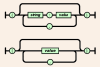
{ "key1": "value1", "key2": "value2", ... }- a hash with key/value pairs; the value can be another JSON object. -
[ "va1", "val2", "val3", ... ]- an array with values; the value can be another JSON object. -
"String"- a text string enclosed in double quotes.
%SET{ name = object }% or %SET{ name.path = object }%.
-
name- variable name, such as:menu- supported characters: alphanumeric, dash and underscore
-
.path- JSON path, such as:.File.Open[1]inmenu.File.Open[1]- JSON path fragment for a hash object is
.hashName, such as:.File- supported characters for hash object name: alphanumeric, dash, underscore and dollar sign
- JSON path fragment for an array object is
[n], such as:[1]- supported characters for array index: non-negative integers
- JSON path fragment for a hash object is
-
object- JSON object, simple (hash, array, string) or nested, such as:-
{ "Breakfast": "cereal", "Lunch": "salad", "Dinner": "Sushi" }- hash with key/value pairs; the value can be another JSON object -
[ "Monday", "Tuesday", "Wednesday", "Thursday", "Friday", "Saturday", "Sunday" ]- array with values; the value can be another JSON object -
"Sushi"- text string enclosed in double quotes
-
ERROR:
An optional remember="1" parameter can be added. If set, the JSON object will be stored persistently so that it can be used later in any TWiki topic.
How to GET a JSON Object: The syntax to get a JSON object is %GET{ name }% to get the full object, or %GET{ name.path }% to get a sub-part of the object using a JSON path.
-
name- variable name, such as:menu- supported characters: alphanumeric, dash and underscore
-
.path- JSON path, such as:.File.Open[1]inmenu.File.Open[1]- JSON path fragment for a hash object is
.hashName, such as:.File- supported characters for hash object name: alphanumeric, dash, underscore and dollar sign
- JSON path fragment for an array object is
[n], such as:[1]- supported characters for array index: non-negative integers
- JSON path fragment for a hash object is
- hash object:
{"key1":"value1","key2":"value2"}- hash with key/value pairs; space trimmed; nondeterministic sequence; the value can be another JSON object - array object:
["va1","val2","val3"]- array with values; space trimmed; the value can be another JSON object - string object:
String- text string, without enclosing double quotes
-
%SET{ menu = { "File": { "New": [ "new", "F" ], "Open": [ "open", "F" ] }, "Edit": { "Copy": [ "cpy", "F" ], "Paste": [ "pst", "F" ] } } }%- set a JSON object -
%GET{ menu }%- get the JSON object, returns:{"File":{"New":["new","F"],"Open":["open","F"]},"Edit":{"Copy":["cpy","F"],"Paste":["pst","F"]}} -
%GET{ menu.File.Open }%- get a JSON object using JSON path, returns:["open","F"] -
%SET{ menu.File.Open[1] = "T" }%- modify a JSON object -
%GET{ menu }%- get the JSON object, returns:{"File":{"New":["new","F"],"Open":["open","T"]},"Edit":{"Copy":["cpy","F"],"Paste":["pst","F"]}} -
%SET{ menu.Edit.Cut = [ "cut", "T" ] }%- add to a JSON object -
%GET{ menu }%- get the JSON object, returns:{"File":{"New":["new","F"],"Open":["open","T"]},"Edit":{"Copy":["cpy","F"],"Paste":["pst","F"],"Cut":["cut","T"]}}
 dependency on your TWiki server.
-- Peter Thoeny - Founder TWiki.org
dependency on your TWiki server.
-- Peter Thoeny - Founder TWiki.org
Comments
The latest plugin now supports a wildcard for JSON array objects. For example you can get the list of names of all projects using%GET{ projects[*].name }%. See example at SetGetPlugin.
--  Peter Thoeny - 2015-07-10
The latest SetGetPlugin now supports queries using JSON path with [*] wildcard. For example, you can query a JSON array of hashes object to get an array of names:
Peter Thoeny - 2015-07-10
The latest SetGetPlugin now supports queries using JSON path with [*] wildcard. For example, you can query a JSON array of hashes object to get an array of names:
%GET{ projects[*].name }% - use wildcard to get all project names; example return: ["Prj A","Prj B","Prj C"]
-- Peter Thoeny - 2015-07-15
 Edit | Attach |
 Topic revision: r2 - 2015-03-31 - PeterThoeny


 Site map
 Blog web

 Write New Post
 Blog Feed (ATOM)
 Changes
 Search
 Notifications
 Index
Index Statistics
 Preferences


 Account

 |
 |
|
|
|


 Ideas, requests, problems regarding TWiki? Send feedback. Ask community in the support forum.
Copyright © 1999-2026 by the contributing authors. All material on this collaboration platform is the property of the contributing authors.