It seems that sometime last week the formatting for tables on twiki.org changed. Prior to that time, tables were shown with outlines around the table and each cell. Now they are shown with colored backgrounds (for the heading) and alternate lines shaded.
While this generally looks better, there are two cases where it is not better (IMHO):
There are some known issues with the new table look, which is an opportunity to improve things:
 And don't forget this corporate rule:
when creating mystery meat navigation
And don't forget this corporate rule:
when creating mystery meat navigation ,
use only newest, fanciest technology to show off.
Blue on dark-blue just does not count
,
use only newest, fanciest technology to show off.
Blue on dark-blue just does not count 
Seriously: I prefer shading over a grid, which looks really oldfashioned mosaicish (to me). But until the TablePlugin fixes this problem (probably using CSS classes in a span or such), the table background colours must stick to the same rules as %WEBBGCOLOR%. Actually, WEBBGCOLOR is a nice choice: it reinforces the web identity and is in line with search headers and similar. Ad form table: I'll post a simple patch to RenderFormAsRegularTable. -- PeterKlausner - 23 Apr 2003
Finally posted the promised patch...
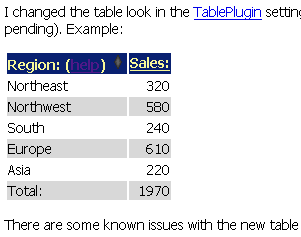
BTW: the right hand side screenshot shows the table from above
as seen in NS7 on Win NT w/o any colour tweakings.
It looks good, yes.
Minor detail: can anybody read the link?
I don't think this appeals to corporate users!
This should be really, really fast
- For people who use a browser like IE with the
Internet Options -> Accessibility -> Ignore colors specified on Web pagesoption set. (I have the same problem in Mozilla, but I'm not at my Linux box so I can't tell you the option I specified.) - For printing -- in general the heading text is lighter (less legible) and the lack of outlines around the table and each cell makes data more difficult to "associate" (which data is on the same row??)
- Was this an intentional or an accidental change?
- Can it be set on a web by web basis (<Webname>WebPreferences??)
- Can the print template be set up to use the outlines?
Region: (help)  |
Sales: |
|---|---|
| Northeast | 320 |
| Northwest | 580 |
| South | 240 |
| Europe | 610 |
| Asia | 220 |
| Total: | 1970 |
- Printing: Some browsers like IE do not print background colors by default (although you can change that in the browser settings). This is not an issue at TWiki.org, content does not gets printed often.
- Accessability: As Randy points out, if you set the browser to ignore colors it is difficult to see the borders between cells.
- Links: Links in table headings are difficult to see on the blue background. This should be fixed so that links are visible in all cases.
- Arrows: The table sorting arrows are difficult to see for the same reasons.
- Attached forms do not get rendered according to the TablePlugin settings.
Internet Options -> Accessibility -> Ignore colors specified on Web pages option is set?)
Two other things re printing: - Not everyone has a color printer
- Even those who do have a color printer may not like "wasting" colored ink for a table background
And don't forget this corporate rule:
when creating mystery meat navigation,
use only newest, fanciest technology to show off.
Blue on dark-blue just does not count
Seriously: I prefer shading over a grid, which looks really oldfashioned mosaicish (to me). But until the TablePlugin fixes this problem (probably using CSS classes in a span or such), the table background colours must stick to the same rules as %WEBBGCOLOR%. Actually, WEBBGCOLOR is a nice choice: it reinforces the web identity and is in line with search headers and similar. Ad form table: I'll post a simple patch to RenderFormAsRegularTable. -- PeterKlausner - 23 Apr 2003
 Figure: screenshot of table on stock Windoze NS7 |
This should be really, really fast
- fixed in the plugin, or
- changed [temporarily] to sth. like %WEBBGCOLOR... (I favor the second, because however cool the new table colour scheme is for itself, it just doesn't match the other elements of the default skin. So rather than enhance the overall appearance, this just looks more random/inconsistent.)
%WEBBGCOLOR% but it does not work, the execution order of the variables is in a way that %WEBBGCOLOR% does not get expanded. This should be fixed as well.
Tom is right, the link color in table headings needs to be fixed. The correct way is to add a new parameter for that to the TablePlugin.
-- PeterThoeny - 13 May 2003
This is now fixed in the latest TablePlugin.
-- PeterThoeny - 25 May 2003 

| I | Attachment | History | Action | Size | Date | Who | Comment |
|---|---|---|---|---|---|---|---|
 gif gif |
TableFormatOnTwikiOrg.gif | r1 | manage | 4.0 K | 2003-05-12 - 19:05 | UnknownUser | screenshot of table format on stock Windoze NS7 |

Topic revision: r10 - 2003-05-25 - PeterThoeny


 Site map
 Blog web

 Create New Topic
 Index
Index Search
 Advanced search
 My topics of interest
 Changes
 Major changes only
 All tags
 Notifications
 RSS Feed
 Statistics
 Preferences
 Community
  Readme first
 Developers News
 How you can help
 Community roles
 #twiki IRC
 Lima Release
 Feature Proposals
 Bugs Changes
 Categories


 Account




 Ideas, requests, problems regarding TWiki? Send feedback. Ask community in the support forum.
Copyright © 1999-2026 by the contributing authors. All material on this collaboration platform is the property of the contributing authors.