TWiki As A Bookmark Manager
I do quite a bit of Internet-based research, and many times I found myself wishing there was a magic button that if I pressed it while looking at an arbitrary web page, would- create a bookmark
- allow me to annotate the bookmark
- allow me to access my bookmarks from anywhere
- allow me to share the bookmark with others
- allow me to search my (and others') bookmarks
- Each bookmark is its own TWiki page.
- Each of these TWiki pages has a BookmarkForm attached
- The BookmarkForm has fields for Title, URL and annotation
- A short JavaScript script in the form of a javascript: URL that I attach to a 'link button' in IE. It doesn't work yet in Netscape, but it's on my todo list.
javascript:
   var d=new Date();
   var dateTime=d.getTime();
   this.open(
      'http://web/twiki/bin/edit/Main/BookmarkID'+
      dateTime+
      '?formtemplate=Main.BookmarkForm&Main.TopicOwner=Main.FrankSmith&Main.TopicURL='+
      document.URL+
      '&Main.TopicTitle='+
      document.title,
      'bookmark'+dateTime,
      '');
   this.URL=this.URL;
Anybody else doing anything like this?
-- FrankSmith - 21 Nov 2002
This is a really good idea. I'd like to also see the BookmarkForm and the BrowseBookmarks page for showing all the book marks. It would be nice of all this supported TWiki's topic parents for making heirarchies of bookmarks
-- DougAlcorn - 21 Nov 2002
I figured that someone must have implemented the magic button before. So I did a
Google search on "web based bookmark management", and the top hit is http://www.bookmarktracker.com/ .
I registered at this site, and it looks like it will be a good source of
ideas. They have javascript magic buttons, and their implementation is very
similar to the one I outlined above.
When you hit their magic button, a window pops up:
.
I registered at this site, and it looks like it will be a good source of
ideas. They have javascript magic buttons, and their implementation is very
similar to the one I outlined above.
When you hit their magic button, a window pops up: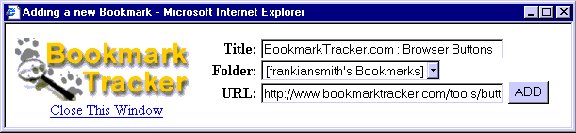 -- FrankSmith - 21 Nov 2002
Frank,
The thing I was thinking of was Backflip -- see AddToTopicLikeBackflip.
-- RandyKramer - 22 Nov 2002
Nice and smart idea. But I do not like creating this many pages, with little contents and no meaningfull name. Who is going to link them together? How you'll find on which page bookmark is?
I can imagine little different approach: Your Javascript might ask also for a page name, and add bookmark as a bullet item somewhere on the end of the page - or in %BOOKMARKS% area. Default page name might be ie. Main.UserNameBookmarks or like.
So you can "gather" bookmarks in some pages, and link these pages in a meaningfull way - URL without context saved in a Twiki is better than a bookmark in browser (at least is web-based), but not much. How many bookmarks do you have in your PC? Mine have hundreds, in hierarchical folders.
To make this happen, you need to solve page locking issues (somebody might be editing the page where bookmark wants to go). But the same known bug is also in Plugins.CommentPlugin, with proposed solution. You can fix it in both places
-- FrankSmith - 21 Nov 2002
Frank,
The thing I was thinking of was Backflip -- see AddToTopicLikeBackflip.
-- RandyKramer - 22 Nov 2002
Nice and smart idea. But I do not like creating this many pages, with little contents and no meaningfull name. Who is going to link them together? How you'll find on which page bookmark is?
I can imagine little different approach: Your Javascript might ask also for a page name, and add bookmark as a bullet item somewhere on the end of the page - or in %BOOKMARKS% area. Default page name might be ie. Main.UserNameBookmarks or like.
So you can "gather" bookmarks in some pages, and link these pages in a meaningfull way - URL without context saved in a Twiki is better than a bookmark in browser (at least is web-based), but not much. How many bookmarks do you have in your PC? Mine have hundreds, in hierarchical folders.
To make this happen, you need to solve page locking issues (somebody might be editing the page where bookmark wants to go). But the same known bug is also in Plugins.CommentPlugin, with proposed solution. You can fix it in both places  Maybe even better will be to enhance Plugins.CommentPlugin. COMMENT in
 view mode is rendered as a submittable form. Your new BookmarkPlugin may add fields URL, Title. Then, in order to add the bookmark, user needs to: - copy URL from browser to clipboard,
- open (in another window) twiki with bookmarks, and find the proper page,
- fill Title and Note, paste URL
- submit the page.
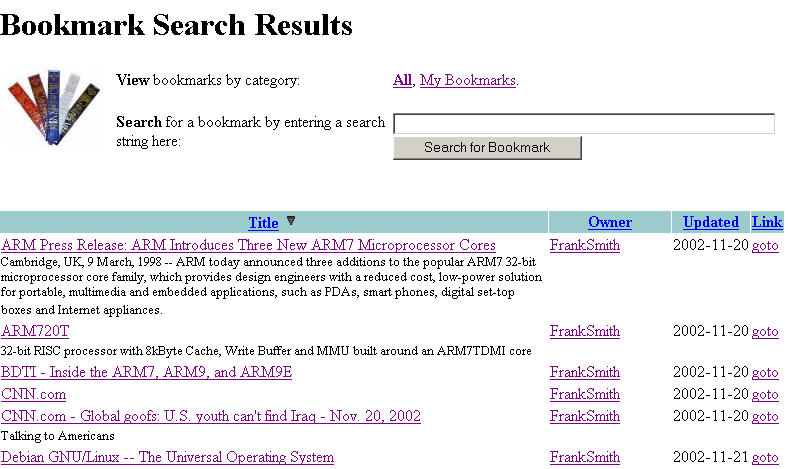 Note the much friendlier use of free-form titles instead of WikiWord topic
names. Also note the descriptive text below each title.
Although each bookmark is in an individual TWiki page with little content and
a nasty looking name, you can see how these facts are hidden from the user.
I don't want to start a philisophical war here. I'm just outlining what I've
found works in practice in my own particular situation.
Note that what I've described here can be implemented with stock TWiki,
although I could forsee some TBD features requiring changes to TWiki or
implementation as a plugin.
-- FrankSmith - 25 Nov 2002
...just a few ideas to add:
Note the much friendlier use of free-form titles instead of WikiWord topic
names. Also note the descriptive text below each title.
Although each bookmark is in an individual TWiki page with little content and
a nasty looking name, you can see how these facts are hidden from the user.
I don't want to start a philisophical war here. I'm just outlining what I've
found works in practice in my own particular situation.
Note that what I've described here can be implemented with stock TWiki,
although I could forsee some TBD features requiring changes to TWiki or
implementation as a plugin.
-- FrankSmith - 25 Nov 2002
...just a few ideas to add: - consult with TikiWiki http://tikiwiki.sourceforge.net/ documentation as thay have really interesting inplementation which uses optional caching of external links (great for research based work...when you do not lose work if external servers are down)
- consult with previous work done on DmozCatalogPlugin for using TWiki bookmark managment as base for DMOZ-like or compatible directory.
. However I thought of using TWiki on my own for free form bookmark and annotation functions. With research (and the sharing aspects) this area might just be a killer app of sorts.
-- GrantBow - 03 Jan 2003
I also just ran across TWikiBookmarklets. Very nice!
-- GrantBow - 15 Jan 2003
Regarding the comment above suggesting a facility to cache external links for research based wikis, I've uploaded a plugin for this purpose, have a look at URLCachePlugin
-- ArildBergh - 11 Jun 2005
I created something similar in BookmarkSharingWithTWiki.
The examples there piggyback on CommentPlugin,
although, like the poster of this page, I would like to create a BookMarkPlugin.
-- AndyGlew - 22 Aug 2006 
Topic revision: r15 - 2006-08-23 - FranzJosefSilli


 Site map
 Blog web

 Create New Topic
 Index
Index Search
 Advanced search
 My topics of interest
 Changes
 Major changes only
 All tags
 Notifications
 RSS Feed
 Statistics
 Preferences
 Community
  Readme first
 Developers News
 How you can help
 Community roles
 #twiki IRC
 Lima Release
 Feature Proposals
 Bugs Changes
 Categories


 Account


 Ideas, requests, problems regarding TWiki? Send feedback. Ask community in the support forum.
Copyright © 1999-2026 by the contributing authors. All material on this collaboration platform is the property of the contributing authors.