This is one of the presentations for the panel Blogs and Wikis: Emergent Collaboration in the Enterprise at the Collaborative Technology Conference in New York, 20 Jun 2005
 in New York, 20 Jun 2005
-- Peter@ThoenyPLEASENOSPAM.com



at the Collaborative Technology Conference in New York, 20 Jun 2005
Slide 1: Structured Wikis in the Enterprise
Writable webs empower employees to share knowledge effectively and to be more productive- Wiki, a writable web: Communities can organize and share content in an organic and free manner
- If extended with the right set of functionality, a Wiki can be applied to corporate groups to schedule, manage, document, and support their daily activities
- A Structured Wiki combines the benefits of a Wiki and a database application
- This talk explains what a Structured Wiki is, and shows some sample applications using the open source TWiki platform
in New York, 20 Jun 2005-- Peter@ThoenyPLEASENOSPAM.com
Slide 2: Blogs vs. Wikis
- Blog: (Weblog)
- Key: Easy to publish opinions of individual, in sequential posts
- Media to express individual voice
- "Post media" (like e-mail), many times with feedback and talkback
- Wiki: (WikiWikiWeb)
- Key: Easy to create and refactor content owned by group
- Media to express group voice, deemphasizing identity of individuals
- "Refactor media", content may change at any time
- Some Blogs have Wiki-like features, some Wikis have Blog capabilities
Slide 3: Wiki Offerings
- Open Source Wiki engines: Download and install
- MoinMoin: Used by internet communities (Python)
- UseModWiki: Used by internet communities (Perl)
- PhpWiki: Popular Wiki (PHP)
- FlexWiki: .NET based (C#)
- SnipSnap: Wiki + Blog (Java)
- MoinMoin
- Hosted Wiki services: Wiki farms
- Socialtext Workspace: Open source Wiki (Kwiki) with Blog extensions; for corporate use
- EditMe: Simple Wiki and Blog
- Teamflux: Simple Wiki
- Socialtext Workspace
- Wiki appliance: Wiki in a preconfigured box
- Socialtext Appliance: Based on Kwiki with some proprietary extensions
- Socialtext Appliance
Slide 4: Wikipedia
- Wikipedia: Wiki + Encyclopedia
- A free encyclopedia that is being written collaboratively by its readers
- Project started in January 2001
- The most active public Wiki: There are over 420,000 articles in English; more in 150 other languages; 150,000 registered users
- Anyone in the world can edit any page.
- Doesn't that lead to chaos?
- Content can be freely distributed and reproduced under the terms of the GNU Free Documentation License (GFDL)
Slide 5: Wiki in the Enterprise
- Issues with conventional Wikis in the corporate world:
- Perceived as chaotic
- No security
- No audit trail
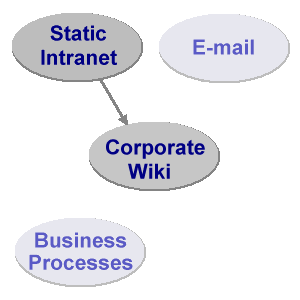
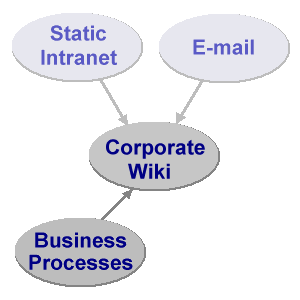
- A Wiki system with the right extensions can be used in a corporate environment
- It can address some internal challenges:
- Maintenance of static Intranets
- Internal E-mail flood
- Implementation of business processes
Slide 6: Challenges of Static Intranets
- Some content is outdated
- Incomplete content
- When was the page last updated?
- Difficult to find content
- Inconsistency across departments
- Special tools, knowledge and permission required to maintain
- Content is static, it has a "webmaster syndrome":
If an employee discovers a page with incorrect or insufficient information, the employee will often ignore it because it takes too much time to find out who the webmaster is and to write an e-mail requesting an update
Slide 7: Challenges of E-mail
- E-mail and mailing lists are great, but:
- Post and reply vs. post and refine/refactor
- Great for discussion, but ... hard to find "final consensus" on a thread
- E-mail is not hyper-linked and is not structured, content can't be grouped easily into related topics
- E-mail and attachments are not version controlled and it is difficult to determine the history of a document
- Not all interested people / too many people in the loop
Slide 8: Challenges of Business Processes
- Business processes are implemented in large scale by IT department (Sarbanes-Oxley compliance etc.)
- Rigid structure by design
- Teams follow formal/informal workflow to accomplish tasks, which is often a paper-based process:
- Roll out laptops to employees
- Status board of call-center
- Sign-off for export compliance of a software release
- No resources allocated to implement applications to automate those processes
- IT department has no bandwidth to implement light weight applications for a variety of teams
- IT department has no bandwidth to implement light weight applications for a variety of teams
Slide 9: Wikis and Static Intranets
- Move some/all Intranet content into a Wiki
- No difference for readers to browse and search content
- Employees are empowered to fix content on the spot
- Ease of maintenance
- No need to install client side software
- Paradigm shift
- from: webmasters maintain content
- to: domain experts and casual users maintain content
Slide 10: Wikis and E-mail
- Move some E-mail traffic into a Wiki or Blog
- Ease of reference (cross-linking)
- Flexible notification (favorites only, daily digest, RSS feed)
- Pockets of knowledge made available to interested parties
- Audit trail / domain experts
- Paradigm shift
- from: post & reply
- to: post & refine & cross-link
- Send e-mail with link to content instead of content itself
Slide 11: Wikis and Business Processes
- A Wiki is a flexible tool to support evolving processes
- in the free-form Wiki way -- linked pages, collaboratively maintained
- or with a structured Wiki application -- forms, queries, reports
- Content contributors with moderate skill sets can build web applications
- Paradigm shift
- from: programmers create applications
- to: content contributors build light weight applications
- Similar shift happened with the introduction of spreadsheet programs
Slide 12: Requirements for a Corporate Wiki
- What to look for:
- Version control -- audit trail
- Access control -- security
- File attachments -- document management
- Ease of use -- productivity
- Feature set -- create web applications
- API -- integration with existing enterprise applications
- Support -- get help when needed
Slide 13: Open Source Wikis for the Enterprise
- PHPWiki: A feature-rich implementation with support for various databases (PHP)
- Tiki: A CMS with Wiki, Slashdot-style forums, blogs, image galleries, chat, etc. (PHP)
- TWiki: Heavily featured Wiki variant and application platform for the enterprise, many Plugins (Perl)
- XWiki: Feature rich Wiki implementation, compatible with some TWiki Plugins (Java)
- ZWiki: A Wiki implementation that runs on the Zope application platform (Python)
- We will look at some TWiki applications to see how a Wiki can be applied in an enterprise
Slide 14: Structured Wiki
- Goal of a Structured Wiki:
- Combine the benefits of a Wiki and a database application
- Wiki:
- Organic content: The structure and text content of the site is open to editing and evolution
- Open content: Readers can refactor incomplete or poorly organized content on the spot
- Hyper-linked: Many links to related content due to WikiWord nature
- Trust: Open for anyone to edit, "soft security" with audit trail
- Database application:
- Highly structured data
- Easy reporting
- Workflow (e.g. purchase requsition)
- Access control
Slide 15: Usage Pattern in a Structured Wiki
- Users typically start with unstructured Wiki content
- Example: Call-center status board
- User discovers patterns in content
- Example: Call-center status board has fixed list of users and fixed list of time slots
- User or administrator builds an application, typically in iterations
- Goal: Automate tasks based on discovered patterns
Slide 16: Example: Call-Center Status Board, v1
- Requirement for status board:
- Easily see who is on call at what time
- Easily change the status board
- Start simple with status board v1:
- 07:00am - 11:00am: Richard
- 11:00am - 03:00pm: Peter
- 03:00pm - 07:00pm: Sam
- See CallCenterStatusBoard example on TWiki.org
Slide 17: Example: Call-Center Status Board, v2
- Status board v1 does the job, but lets make it more presentable and useful:
- Convert the bullets into a table
- Use WikiWord links to team member's home pages for easy reference
- Add Backup person
- Improved status board v2:
Start End Primary Backup 07:00am 11:00am RichardDonkin 11:00am 03:00pm PeterThoeny 03:00pm 07:00pm SamHasler
- See CallCenterStatusBoardV2 example on TWiki.org
Slide 18: Example: Call-Center Status Board, v3
- Status board v2 is presentable, now lets make it more user friendly:
- Use the TWiki:Plugins.EditTablePlugin to select the times and names from a list
- Use the TWiki:Plugins.EditTablePlugin
- Improved status board v3, view and edit:

- See CallCenterStatusBoardV3 example on TWiki.org
Slide 19: How is a Structured Wiki used?
- Shared notebook for projects: Repository, scheduling, meetings
- Departmental collaboration tool: Processes, project reviews, QA tracking
- Intranet publishing tool: IT, HR, ISO standards
- CMS with focus on free-form collaboration: Requirements capture
- Knowledge base: Problem/solution pairs with attached patches
- TWiki started its life as a KB for support
- TWiki started its life as a KB for support
- Specific application: News portals, inventory systems, bug tracking systems
Slide 20: Example Application: Feature Tracking
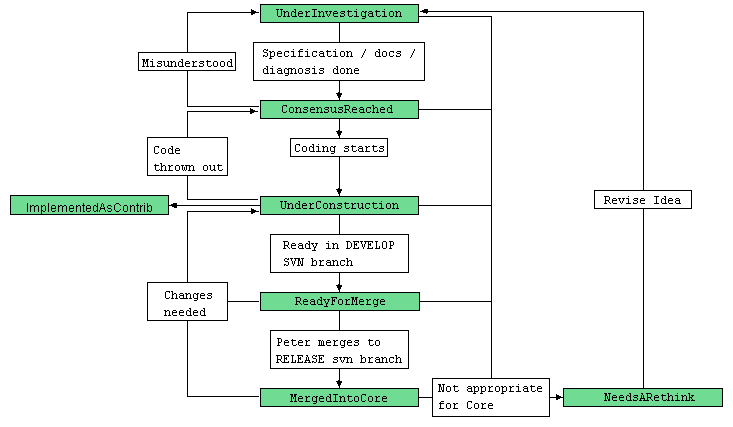
- TWiki.org tracks new features with a Wiki application
- Workflow:
- Sample feature: ShowRevisionsAroundVersion
- Sample status report: DakarRelease
Slide 21: Example Application: Employee News Portal
|
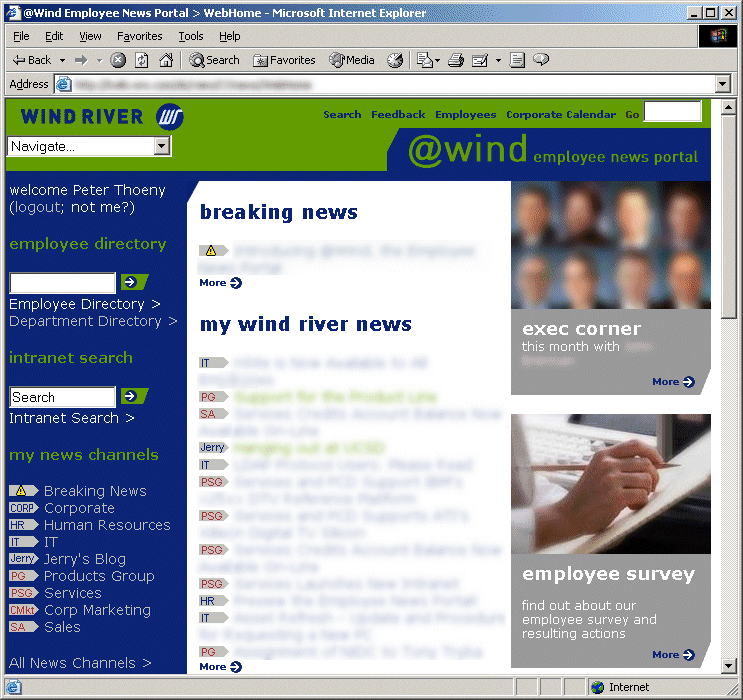 Portal, "above the fold" view 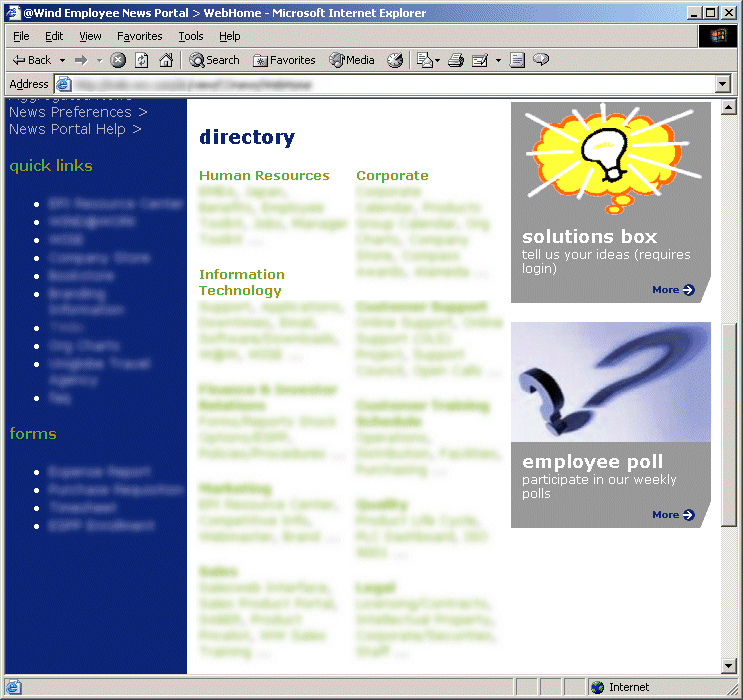 Portal, "below the fold" view |
Slide 22: What is TWiki?
- TWiki started as a Wiki engine, evolved into a Structured Wiki, and is now a platform for web applications
- Mission:
TWiki is a leading-edge, web-based collaboration platform targeting the corporate intranet world. TWiki- fosters information flow within an organization
- lets distributed teams work together seamlessly and productively
- eliminates the webmaster syndrome of outdated intranet content
- Open Source software (GPL), hosted at http://TWiki.org/
- Many corporations use TWiki: 3Com, AMD, Alcatel, AT&T, Boeing, ... Xerox
- BT, Disney Corp, Motorola, SAP, Wind River and others have submitted success stories
- BT, Disney Corp, Motorola, SAP, Wind River and others have submitted success stories
- Over 1000 installation
- Browse the TWikiInstallation directory to see who is using TWiki for what purpose
Slide 23: TWiki Plugins
- TWikiPlugins enhance the functionality of TWiki
- Growing Plugins repository at TWiki.org - over 150 Plugins available for download
- A great resource for administrators and web developers to tailor TWiki to their needs, like for example with:
- ActionTrackerPlugin: Keep track of action items in meeting minutes and notify assignees by e-mail
- CalendarPlugin: Monthly calendars with events
- ChartPlugin: Create charts visualizing TWiki tables
- DatabasePlugin: Access a relational database
- HeadlinesPlugin: Show news based on RSS feeds
- TWikiDrawPlugin: Use the TWikiDraw Java Applet to create editable drawings embedded in topics
- SlideShowPlugin: Turn a TWiki page into a web-based presentations
- ActionTrackerPlugin
Slide 24: Questions & Answers
Slide 25: References
- This presentation: http://TWiki.org/cgi-bin/view/Codev/StructuredWikiPresentation20Jun2005
- WikiWikiWeb: http://www.c2.com/cgi/wiki?WikiWikiWeb
- Wiki Engines: http://www.c2.com/cgi/wiki?WikiEngines
- Wikipedia: http://www.wikipedia.org/
- TWiki Home: http://TWiki.org/
Slide 26: References, cont.
- Extreme Blogging, Forbes.com: http://www.forbes.com/best/2004/1213/bow001.html
- Is Wiki under your radar? InfoWorld: http://www.infoworld.com/article /04/11/05/45OPconnection_1.html
- Do-It-Yourself Software for All? BusinessWeek: http://www.businessweek.com/technology /content/oct2004/tc2004106_2351.htm
- 'Wiki' May Alter How Employees Work Together, Wall Street Journal: http://online.wsj.com/article /0,,SB109105974578777189,00.html
- Something Wiki This Way Comes, Business Week: http://www.businessweek.com/magazine/content/04_23/b3886138.htm
- Tool of the month, Unix Review: http://www.unixreview.com /documents/s=1820/uni1011715271489/
- Wiki Time, LINUX MAGAZINE: http://www.linux-mag.com/2002-12/lamp_01.html
Slide 27: About Peter
- Peter Thoeny - Peter@ThoenyPLEASENOSPAM.com
- Software developer with over 15 years experience, with interests in corporate collaboration, web technology and UI design
- Author of the open source collaboration software TWiki, managed the project over the last six years
- Graduate of the Swiss Federal Institute of Technology in Zurich
- Lived in Japan for 8 years working as an engineering manager for Denso Create, developing case tools
- Now in the Silicon Valley for 7 years, managing the Knowledge Engineering group at Wind River
Notes
- Copyright © 2005 by Peter Thoeny. This presentation may be reproduced as long as you retain the copyright notice and provide a link back to the URL of this presentation on TWiki.org
- This presentation is based on the SlideShowPlugin and uses the TWiki:Main/PeterThoenySlideShowTemplate
- Please do not edit this topic, provide TWiki:Codev/StructuredWikiPresentation20Jun2005Feedback
- Only TWikiAdminGroup can change this topic; view topic in raw format
- Set ALLOWTOPICCHANGE = TWikiAdminGroup
| BasicForm | |
|---|---|
| TopicClassification | TWikiAdvocacy |
| TopicSummary | Presentation for panel on Blogs and Wikis: Emergent Collaboration in the Enterprise (at CTC) |
| InterestedParties | |
| RelatedTopics | CollaborativeTechnologiesConference2005 |

Topic revision: r3 - 2005-06-21 - PeterThoeny


 Site map
 Blog web

 Create New Topic
 Index
Index Search
 Advanced search
 My topics of interest
 Changes
 Major changes only
 All tags
 Notifications
 RSS Feed
 Statistics
 Preferences
 Community
  Readme first
 Developers News
 How you can help
 Community roles
 #twiki IRC
 Lima Release
 Feature Proposals
 Bugs Changes
 Categories


 Account





 Ideas, requests, problems regarding TWiki? Send feedback. Ask community in the support forum.
Copyright © 1999-2026 by the contributing authors. All material on this collaboration platform is the property of the contributing authors.