Introduction
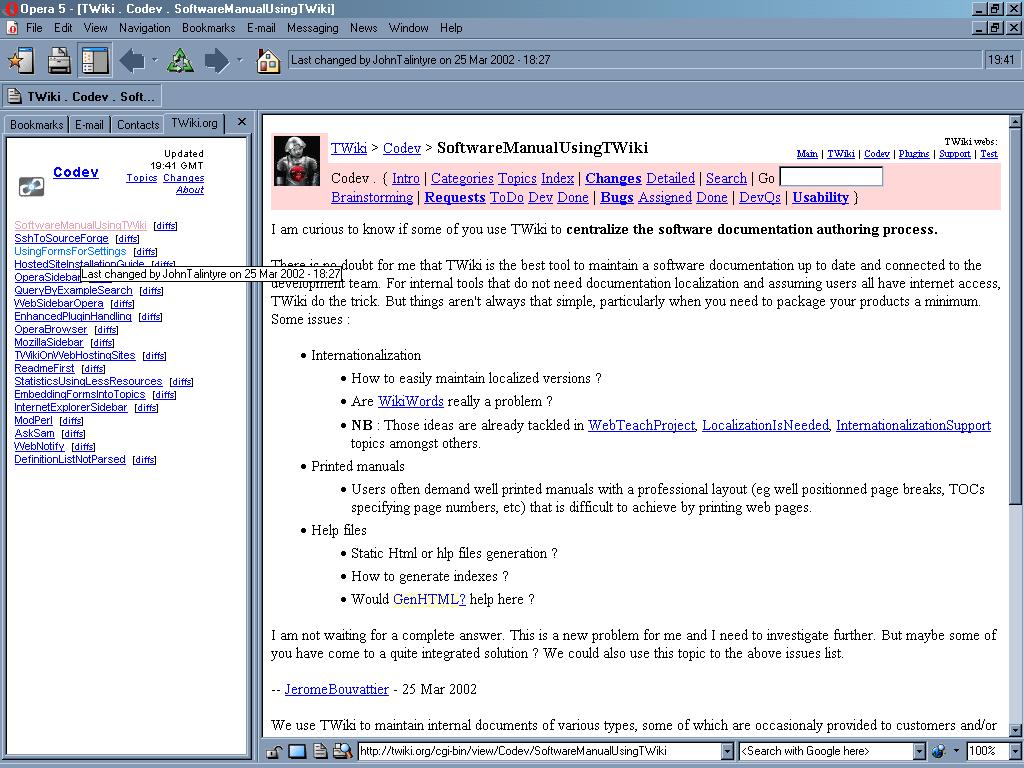
Sidebars let you track WebChanges in a small frame (also known as a 'custom panel') that sits at the left of the screen - see this screenshot of a TWiki sidebar for Opera, and have a look at MozillaSidebar and InternetExplorerSidebar for some background.Why does this matter?
See MozillaSidebar for the rationale behind sidebars, but they make using TWiki from Opera a more pleasant experience.Background
TWiki sidebars are now working with Opera - they've been tested in Opera 5.12 and Opera 6.01, both on Windows. Opera 6.01 is recommended for use with sidebars, because it enables the sidebar to be refreshed without having to clear out the browser cache and re-open the hotlist window. The OperaBrowser supports sidebars (known as 'custom panels') in Opera 5.12 or higher, with significant improvements in Opera 6. See this page on Opera 5.12 support - this links to a page on Opera 6 sidebars and covers Opera search bars (like SherlockAndMozillaSearching).
Get Opera sidebars now!
To preview the TWiki.org Codev sidebar, see http://twiki.org/cgi-bin/view/Codev/WebSidebarOpera?skin=plain.
Opera 6
With Opera 6, adding a sidebar is very easy - just click on this link: Add Codev sidebar. This is done by embedding the following HTML into a TWiki page - therel makes Opera 6 add the sidebar, and the title is the sidebar title:
<a title="Codev"
  href="http://twiki.org/cgi-bin/view/Codev/WebSidebarOpera?skin=plain"
  rel="sidebar">Add Codev sidebar</a>
The manual steps are (if you don't have such a link):
- Click on http://twiki.org/cgi-bin/view/Codev/WebSidebarOpera?skin=plain
- Open the Hotlist
- Right-click on the Bookmarks tab
- Select Add Panel
- Set the title of the panel to something shorter (e.g. the web name)
- Hit OK
Opera 5.x
You can try sidebars out on Opera 5.12 or higher, but there's no auto-refresh - upgrading to Opera 6.01 is recommended.- Shut down Opera
- Edit the
opera.inifile to add the following as a new section:
[brand]
title 1=Codev
url 1=http://twiki.org/cgi-bin/view/Codev/WebSidebarOpera?skin=plain
partner=twiki
Now restart Opera, and you should have a sidebar! You even have working tooltips, like InternetExplorerSidebars.
Limitations
Limitations at present are:- (Opera 5 and 6) Can't easily do a manual refresh of the sidebar
- You need to close the hotlist, do File | Delete Private Data, then open the hotlist
- Auto refresh (every N minutes) requires JavaScript or TWiki skin
- Opera 6 - auto-refresh is done by the sidebar using JavaScript, and working well (set to 20 minutes at present)
- Opera 5 - auto-refresh would require new skin for the sidebar that does
meta refreshin theheadelement of the page - Note the problems of auto-refresh as discussed in InternetExplorerSidebar, particularly for autodial users!
- Search feature doesn't work, so it has been removed
- If you find the Opera buttons for Back/Forward or other features don't work, just try clicking in the right-hand pane (i.e. outside the sidebar)
Browser issues
See OperaBrowser and BrowserIssues for other things to be aware of. In particular, you are recommended to implement RefreshEditPage to avoid losing text on the second edit of a session.How sidebars work
The sidebar requires JavaScript to work (at least if you want auto-refresh). Opera 6.01 is recommended since Opera 5.12 doesn't support JavaScript in the sidebar. TWiki's neat FormattedSearch made it very easy to support this with no code changes - you can add this to your own TWiki site just by creating a few pages, and make TWiki much more attractive to Opera users. I've added a single page to Codev, Codev.WebSidebar - not yet added to other webs since this is not finished yet, but see MozillaSidebar for how this is done.Things to do
- Get search from sidebar working - if possible
- Manual refresh - if possible (probably not)
- Get a cross-web sidebar, as with InternetExplorerSidebar
- Create a TWiki variable to make it easier to create an 'add sidebar' link, e.g.
%ADDSIDEBAR{'Codev'}%- or just use InterwikiPlugin
Resources
- The Opera users group at h2g2 has a list of Opera custom panels - most seem to use
metatags to refresh the sidebar.
Comments, questions
Any comments are most welcome, particularly from Opera users -- RichardDonkin - 26 Mar 2002

| I | Attachment | History | Action | Size | Date | Who | Comment |
|---|---|---|---|---|---|---|---|
 jpg jpg |
TWiki-sidebar-for-Opera.jpg | r1 | manage | 166.6 K | 2002-03-25 - 19:45 | UnknownUser | Screenshot of Opera sidebar |

Topic revision: r6 - 2002-03-26 - RichardDonkin


 Site map
 Blog web

 Create New Topic
 Index
Index Search
 Advanced search
 My topics of interest
 Changes
 Major changes only
 All tags
 Notifications
 RSS Feed
 Statistics
 Preferences
 Community
  Readme first
 Developers News
 How you can help
 Community roles
 #twiki IRC
 Lima Release
 Feature Proposals
 Bugs Changes
 Categories


 Account






 Ideas, requests, problems regarding TWiki? Send feedback. Ask community in the support forum.
Copyright © 1999-2026 by the contributing authors. All material on this collaboration platform is the property of the contributing authors.