Some of the ideas here have been rolled into the server side TWiki:Plugins/OpenOffice2TWikiAddOn including the XSLT stylesheet attached below. The stylesheets in the add-on package are probably more complete and can be used from within OpenOffice.org as described below, although I always find it produces superfluous attributes in element tags.
-- WadeTurland - 06 Aug 2005
including the XSLT stylesheet attached below. The stylesheets in the add-on package are probably more complete and can be used from within OpenOffice.org as described below, although I always find it produces superfluous attributes in element tags.
-- WadeTurland - 06 Aug 2005
I started hacking away at an XSLT to generate WikiSyntax from an OpenOffice.org text document. It mostly works but I am having difficulty with extra newlines creeping into the WikiSyntax output where I don't expect them. Any advice on how to fix this up would be helpful. I intend to integrate this into my local TWiki installation as a feature to insert the contents of OpenOffice.org attachments into the topic text. The problems with the current document when used with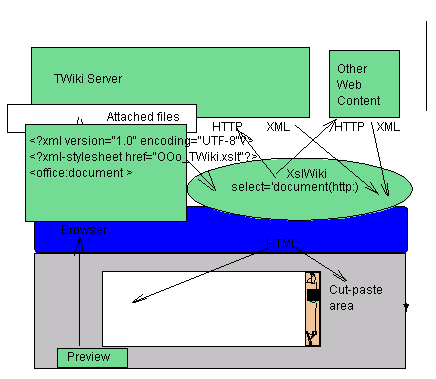
 (by dfrench from Wellington, New Zealand) I'm converting swx files from one directory to twiki formated txt files.
In case the links gets broken, the code is:
(by dfrench from Wellington, New Zealand) I'm converting swx files from one directory to twiki formated txt files.
In case the links gets broken, the code is:
including the XSLT stylesheet attached below. The stylesheets in the add-on package are probably more complete and can be used from within OpenOffice.org as described below, although I always find it produces superfluous attributes in element tags.
-- WadeTurland - 06 Aug 2005
I started hacking away at an XSLT to generate WikiSyntax from an OpenOffice.org text document. It mostly works but I am having difficulty with extra newlines creeping into the WikiSyntax output where I don't expect them. Any advice on how to fix this up would be helpful. I intend to integrate this into my local TWiki installation as a feature to insert the contents of OpenOffice.org attachments into the topic text. The problems with the current document when used with
xsltproc are:
- Many extra newlines in the output.
- Each text:p template outputs extra newlines. This messes up table output:
|
*
Row A*|
*
Row B*|
*
Row C*|
*
Row D*|
*
Row E*|
It should look like this:
|*Row A*|*Row B*|*Row C*|*Row D*|*Row E*|Any advice that can be offered would be appreciated. -- BradDixon - 13 Oct 2003
- Import Open Office document: Sample content.xml file now has processing instruction to apply XSL automatically. It also uses XslWiki library to create a edit frame. I fixed some of the formatting, will correct more next week.
- I tried to edit this drawing to reflect the processing path but the changes did not save!
- OOConvertFrame.htm: If you use this frame, login will work correctly
- basic formatting
- tables
- ordered and unordered lists... but only two levels deep.
- headings
- "span" formatting like this.
- Tools -> XML Filter Settings
- New...
- Filter name - Twiki
- Application - OpenOffice Writer
- Name of file type - Twiki
- File extension - txt (or similar)
- Go to the "Transformation" tab
- Set "XSLT for export" to where you saved the OOo_TWiki.xslt file
- OK button
- You should now be able to use File -> Export in OO Writer to export the 'Twiki' type, and use the resulting .txt file contents in Twiki.
This is a test.

   1 Numbered *list* with _italics_.
   1 Another numbered
   * Bulleted listing
      * inset bullet.
   * Outset bullet.

End it all.
-- BradDixon - 30 Mar 2004
This demo locks a destination TWiki page for write, so currently only one user can try the demo at any given time.
- teststyles.xml: Sample content.xml file from an OpenOffice.org doc
- OOConvertFrame.htm: If you use this frame, login will work correctly
(by dfrench from Wellington, New Zealand) I'm converting swx files from one directory to twiki formated txt files.
In case the links gets broken, the code is:
sub ToTiki
rem takes all .sxw files from chosen directory and writes .txt files with twiki format
rem to another chosen directory
rem ----------------------------------------------------------------------
rem define variables
dim document   as object
dim dispatcher as object
dim sInDir as string
dim sOutDir as string
dim sFile as string
dim sUrl as string
dim spdf as string
dim doct as object
Dim args(0) as new com.sun.star.beans.PropertyValue
dim args1(2) as new com.sun.star.beans.PropertyValue
dim mNoArgs() ' supplies empty arg list
' get the input and output directories for the document source and pdf output
sInDir = InputBox("Input Directory","Macro Dialog","file:///home/rpacheco/twiki/ORIG/")
sOutDir = InputBox("Output Directory","Macro Dialog","file:///home/rpacheco/twiki/FINAL")
' DIR basic runtime sets directory and returns first filename
sFile = Dir(sInDir+"*.sxw")  ' can be any valid selection for file namesnnnn
' set up interfaces required
dispatcher = createUnoService("com.sun.star.frame.DispatchHelper")
oDesktop = createUnoService("com.sun.star.frame.Desktop")
' property for silent ie no visible document operation
args(0).Name = "ReadOnly"
args(0).Value = True
While sFile <> ""  ' loop while there are files to process in input directory
   sUrl = sIndir+sfile
   ' load doc by name

   doct=oDesktop.loadComponentFromURL(sURL,"_blank",0,Args())

   rem ----------------------------------------------------------------------
   rem get access to the document so can send commands to it
   document   = doct.CurrentController.Frame
   ' output file name  replace the .xxx with .txt
   spdf =sOutDir+ left(sfile,len(sfile)-4)+".txt"
   rem ----------------------------------------------------------------------
    'set properties
   args1(0).Name = "URL"
   args1(0).Value = spdf
   args1(1).Name = "FilterName"
   args1(1).Value = "Twiki"

   ' ask document controller to create the pdf
   dispatcher.executeDispatch(document, ".uno:ExportDirectToPDF", "", 0, args1())
   ' unload the document object
   doct.dispose()
   ' get next filename  null when none left
   sfile = dir
wend
end sub
-- RicardoPacheco - 18 Oct 2004 | WebForm | |
|---|---|
| TopicClassification | FeatureEnhancementRequest |
| TopicSummary | |
| InterestedParties | |
| AssignedTo | |
| AssignedToCore | |
| ScheduledFor | |
| RelatedTopics | |
| SpecProgress | |
| ImplProgress | |
| DocProgress | |


| I | Attachment | History | Action | Size | Date | Who | Comment |
|---|---|---|---|---|---|---|---|
 png png |
Example2.png | r1 | manage | 30.4 K | 2004-03-30 - 21:38 | UnknownUser | pic |
 htm htm |
OOConvertFrame.htm | r2 r1 | manage | 1.0 K | 2004-03-31 - 20:08 | UnknownUser | If you use this frame, login will work correctly |
 xslt xslt |
OO_TWiki_Import.xslt | r1 | manage | 15.6 K | 2004-03-31 - 06:18 | UnknownUser | convert and import, will rewrite to seperate import from convert |
| xslt |
OOo_TWiki.xslt | r4 r3 r2 r1 | manage | 11.5 K | 2004-03-30 - 21:32 | UnknownUser | basic XSLT for OOo -> WikiSyntax |
| draw |
RESTfulXslWiki.draw | r4 r3 r2 r1 | manage | 6.4 K | 2004-03-28 - 17:01 | UnknownUser | |
 gif gif |
RESTfulXslWiki.gif | r4 r3 r2 r1 | manage | 6.2 K | 2004-03-28 - 17:01 | UnknownUser | |
 xml xml |
somekeys.xml | r2 r1 | manage | 0.4 K | 2004-03-31 - 19:43 | UnknownUser | config file for XslWiki interface |
| xml |
teststyles.xml | r3 r2 r1 | manage | 42.2 K | 2004-03-31 - 05:20 | UnknownUser | Sample content.xml file from an OpenOffice.org doc |

Topic revision: r14 - 2005-08-06 - WadeTurland


 Site map
 Blog web

 Create New Topic
 Index
Index Search
 Advanced search
 My topics of interest
 Changes
 Major changes only
 All tags
 Notifications
 RSS Feed
 Statistics
 Preferences
 Community
  Readme first
 Developers News
 How you can help
 Community roles
 #twiki IRC
 Lima Release
 Feature Proposals
 Bugs Changes
 Categories


 Account


 Ideas, requests, problems regarding TWiki? Send feedback. Ask community in the support forum.
Copyright © 1999-2026 by the contributing authors. All material on this collaboration platform is the property of the contributing authors.