A New Navigation Model For TWiki.Org
Summary of past discussions...
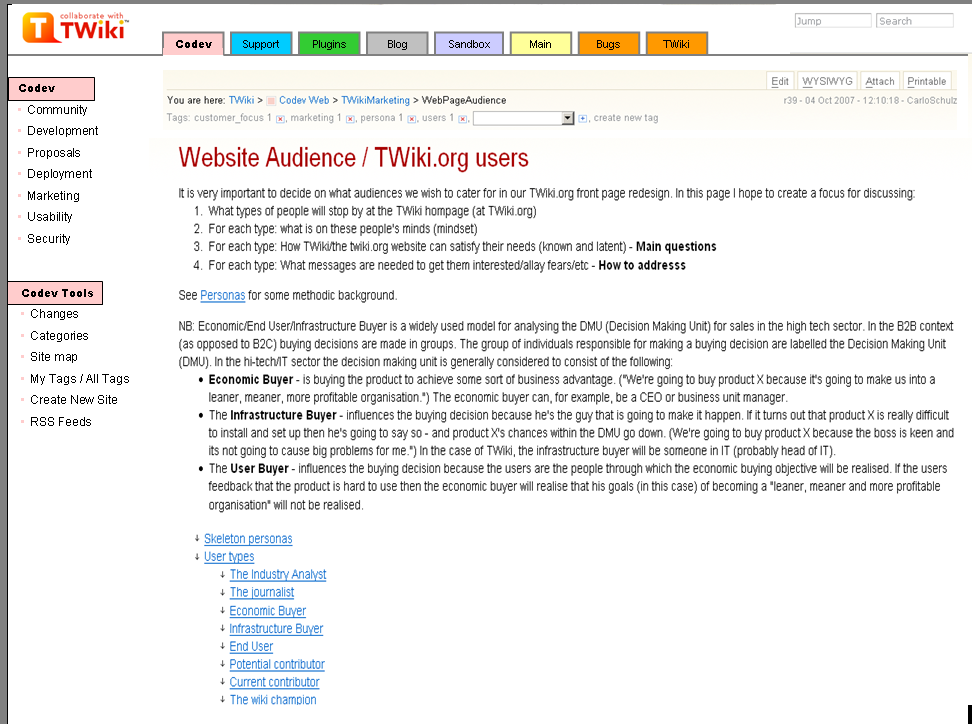
- Use tabs or buttons on the top for our main topics of interest - see WebPageAudienceSiteStructure
- Don't use Webs for tabs
- Don't use side bar for navigation - have just site tools like WebChanges in it
- Consider using color codes for different sections
- Use trigger words for links like "contribute" or "get involved"
- Use images instead of just plain text - maybe show some faces as well
- Renaming "web" to "section" is a difficult. We already have two different use cases for "section" in wikis: (1) sectional editing and (2) start-end section in transclusions. "Web space" or "work space" meets the typical use of webs more closely.
Navigation examples
- http://plone.org/

- http://digg.com/
- TWikiOrgHomepageRedesign2007
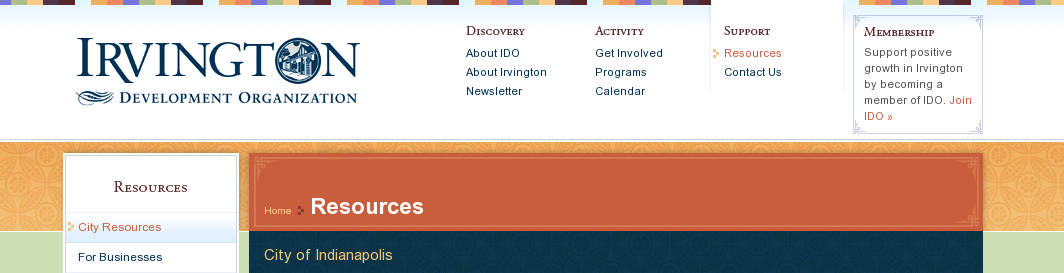
- http://www.irvingtondevelopment.org
- WebTopBarTest
First Round of Design Proposals
About
There's a general agreement, that Arthurs design proposals lead into the rigth direction. Still some concerns about the right colors, how to style the top bar, use tabs or not...Design decisions
- There are 5 main sections. The menu blocks are images so we can use the Avenir font.
- Main web is not one of the main sections; it is offered as secondary link at the top: "User pages"
- Also Sandbox is a secondary link
- The left bar shows a number of links of the current section. It would be good to have some kind of hierarchical navigation if you are one level deeper in the site. But without having a costly dynamic search. Possibly a fixed menu for a number of main sections could work.
- There is a white content area. The page has a fixed width. That gives visual 'rest', less complexity. Occasionally an image or large table will stick out (not such a problem on developer pages), but we should try to stick to the content width.
Tabs or no tabs?
Actually we have no tabs at all in these drafts, they are just large buttons. If we wanna have tabs we need to visually connect the body with the tab. This works best using one of the following apporaches:- put a second bar underneath the tab bar which has the same color as the active tab
- like amazon does it
- like amazon
- use the same color for both, highlighted tab and background
- as wikipedia does it (same as in my color coding examples)
- as wikipedia
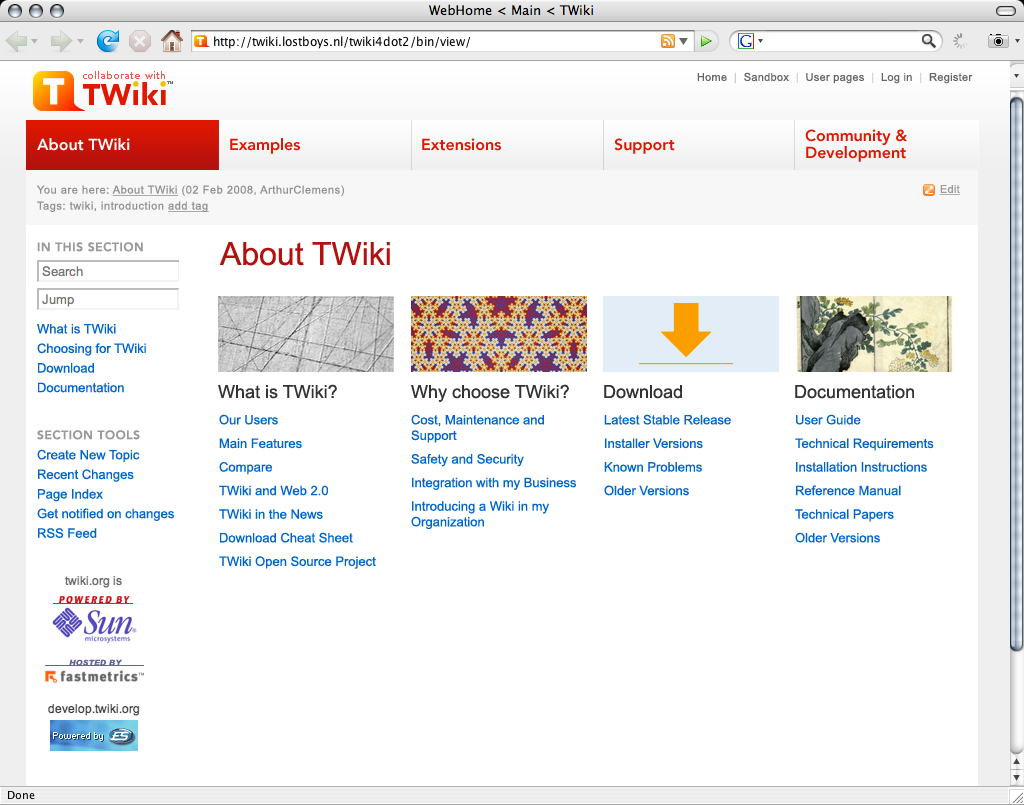
First Draft
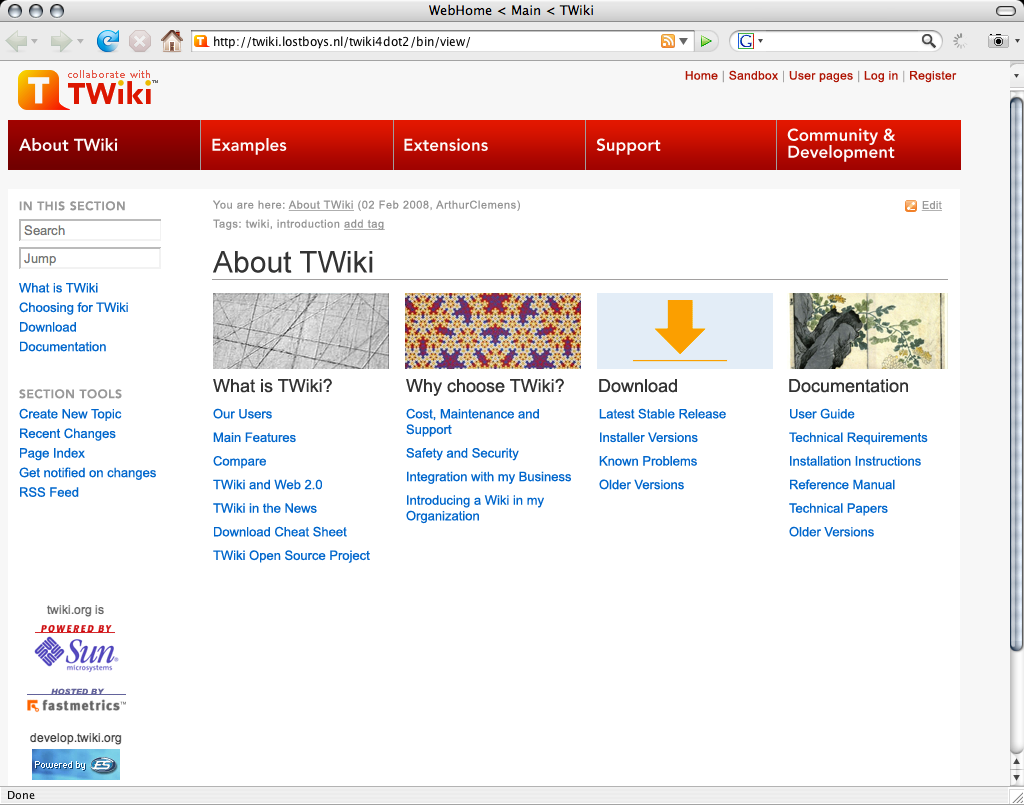
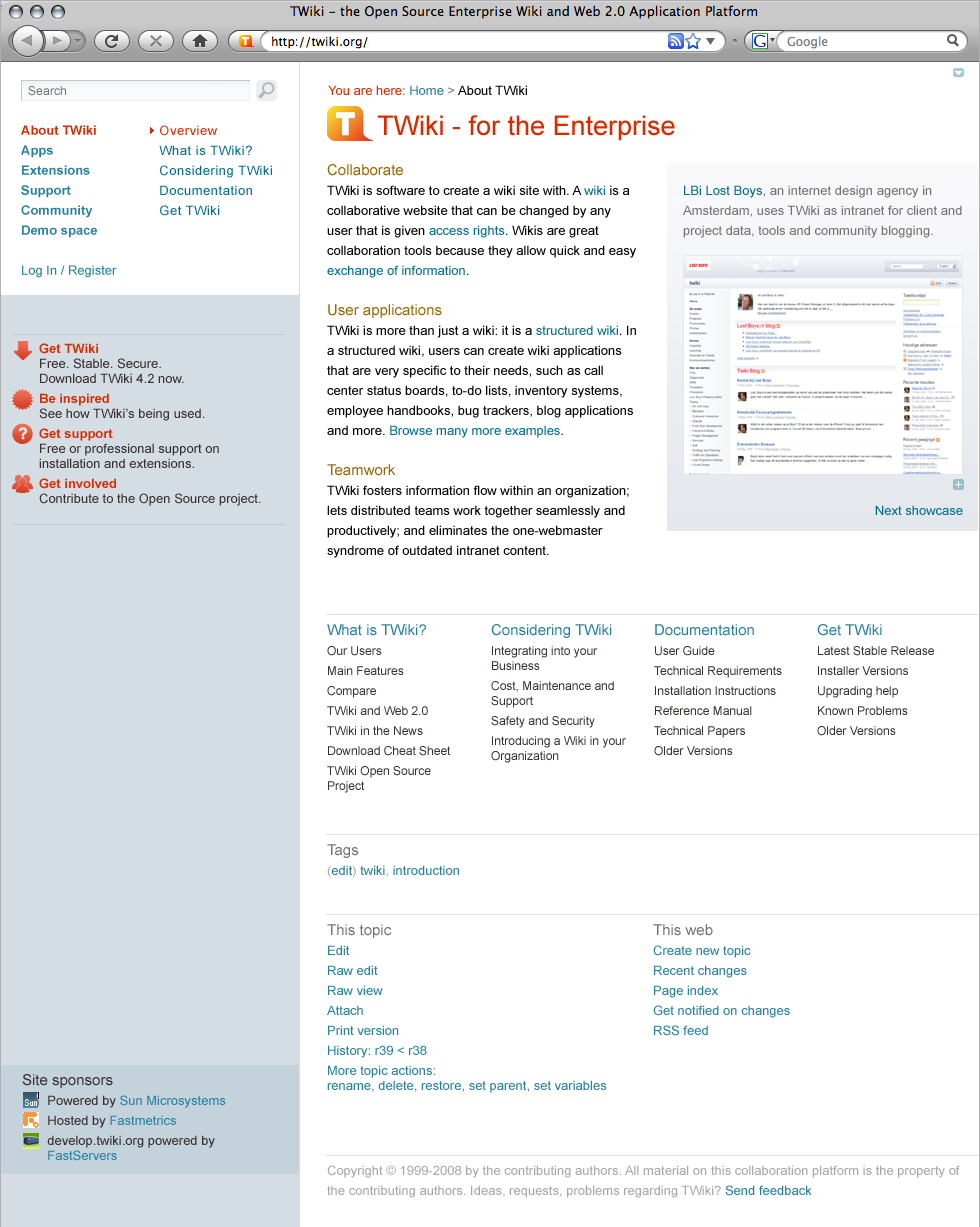
This is a design proposal for a modified pattern skin, demonstrating an overview page as defined in WebPageAudienceSiteStructure. first draft -- ArthurClemens - 03 Feb 2008 Reactions:- Too red, too angry
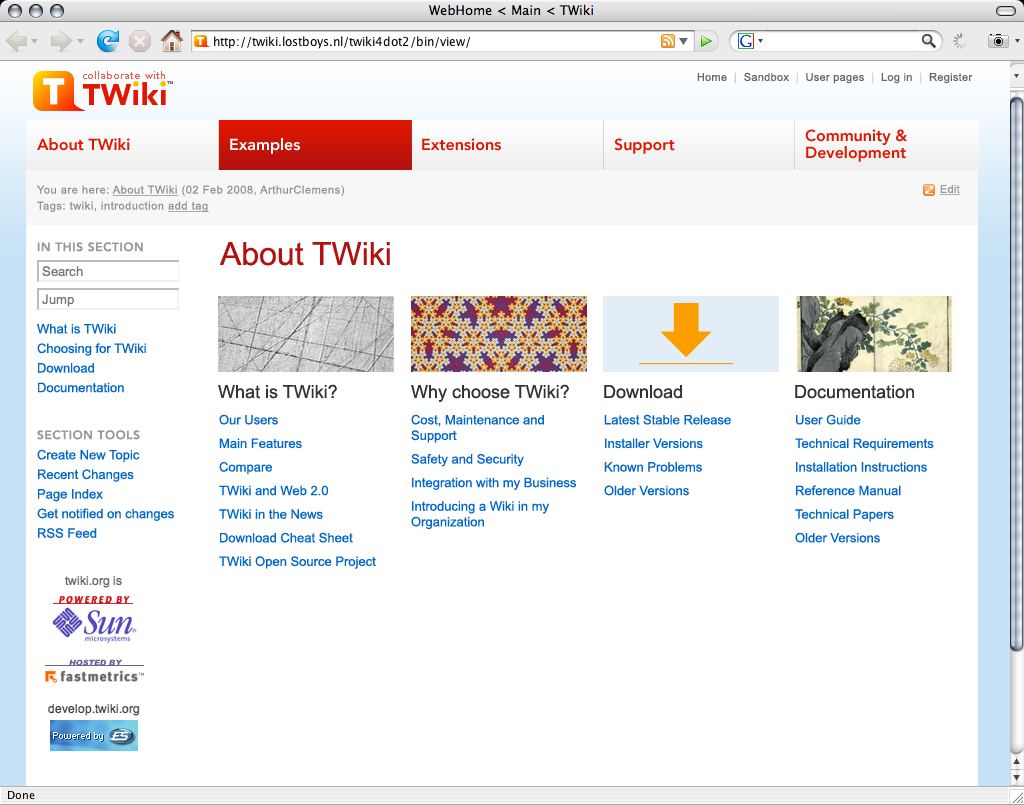
Second Draft
Less red, and less link underlines: Second draft -- ArthurClemens - 03 Feb 2008 Reactions:- lost a bit of "edge" by removing the red menu bar and leaving the text in red.
- "Choosing for TWiki" is not good English. "Why TWiki?" or "Why choose TWiki?".
Third Draft
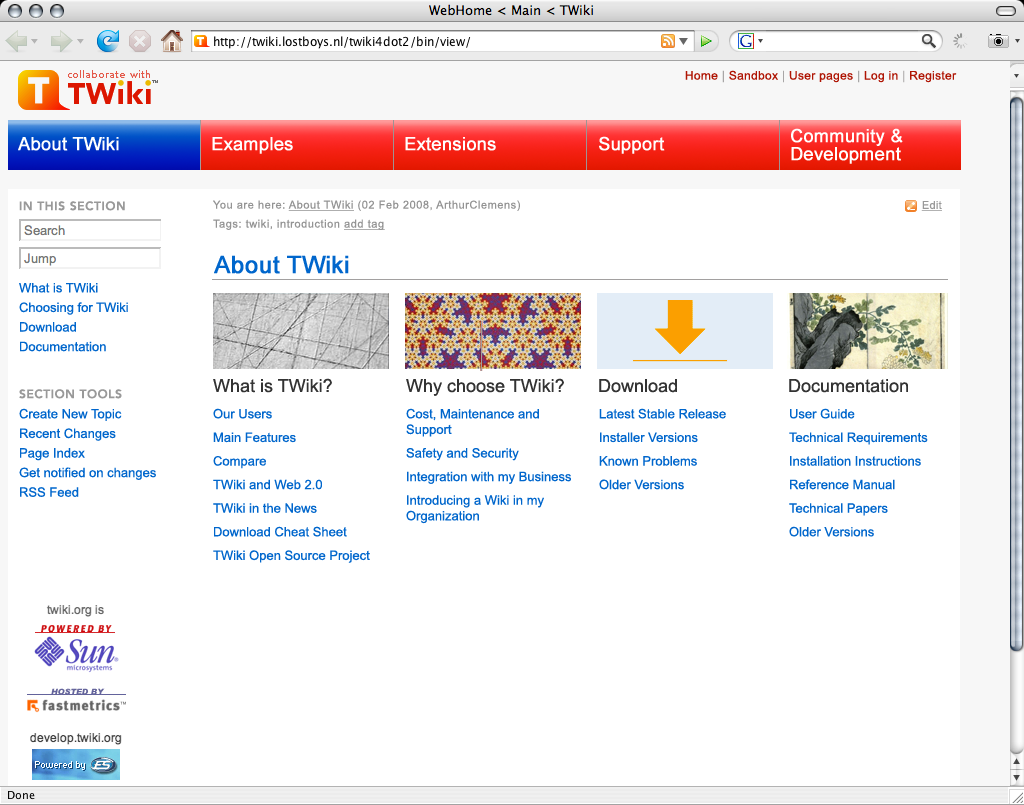
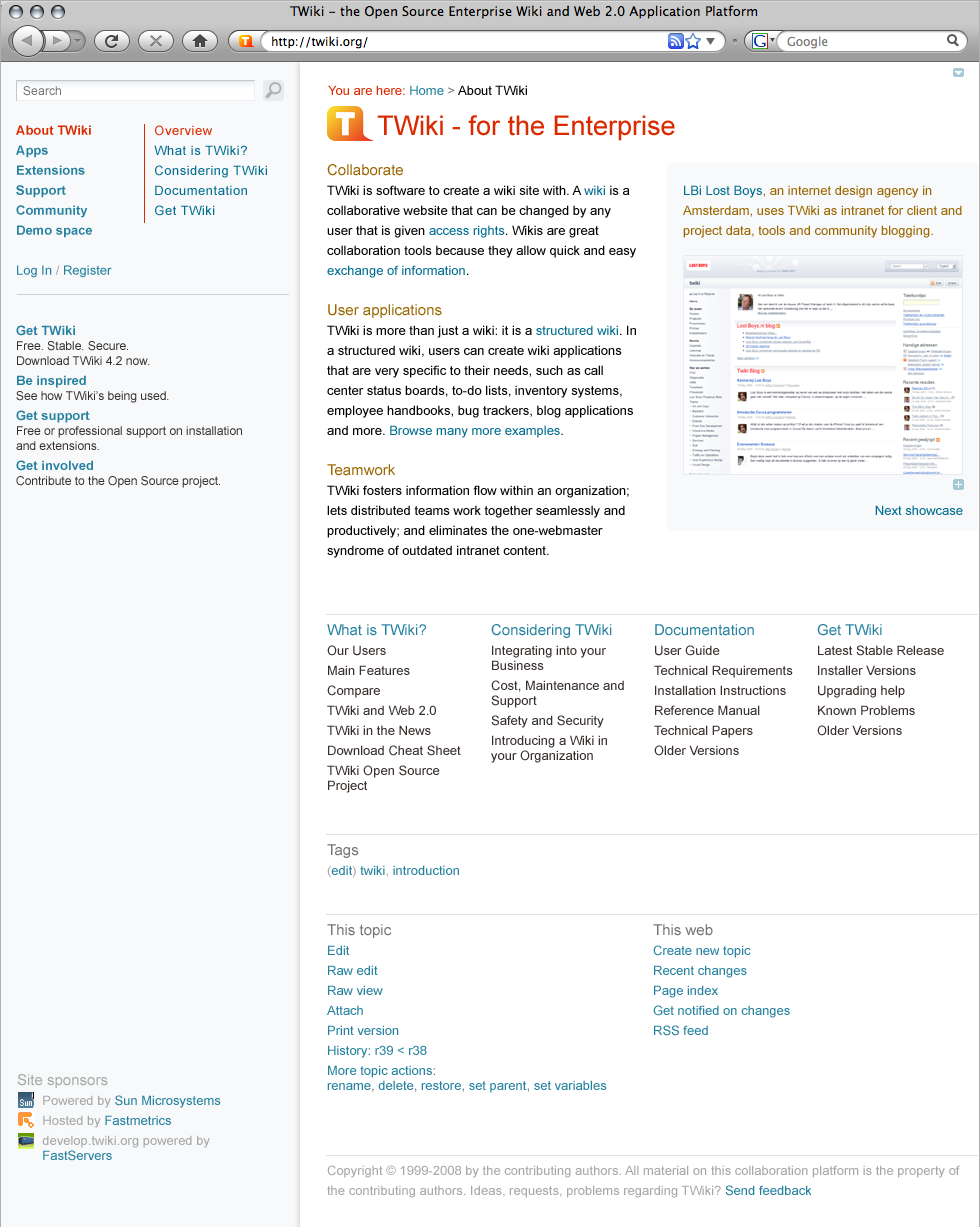
Design alternative: red menu bar, blue links: Third draft -- ArthurClemens - 03 Feb 2008 Reactions:- visual appearance
- lost a bit of "edge" by removing the red menu bar and leaving the text in red.
- problem with the sponsor links in the sidebar. Either they are too far down the sidebar and the white space above should be fixed. Or put the sponsor links in a horizontal bottom bar.
- What about the bottom of the page anyway? Are there any special links besides copyright? How about a repeated navigation?
- more contrast between the highlighted and non-highlighted sections like in draft 2. Just from the colors you can't easily tell in which section you are.
- wording
- "Choosing for TWiki" is not good English. "Why TWiki?" or "Why choose TWiki?".
- The new terminology introduced (sections) is interesting and I'm all for it ("hey, it's just namespace ..")
- renaming "About TWiki" in the tab navi with "Home" and add a "Recent blog postings" section under the "About TWiki" section on the home page?
- navigation
- have a combined search & jump box as their different purposes is not clear for new users.
- use notifications, they are very much longed for.
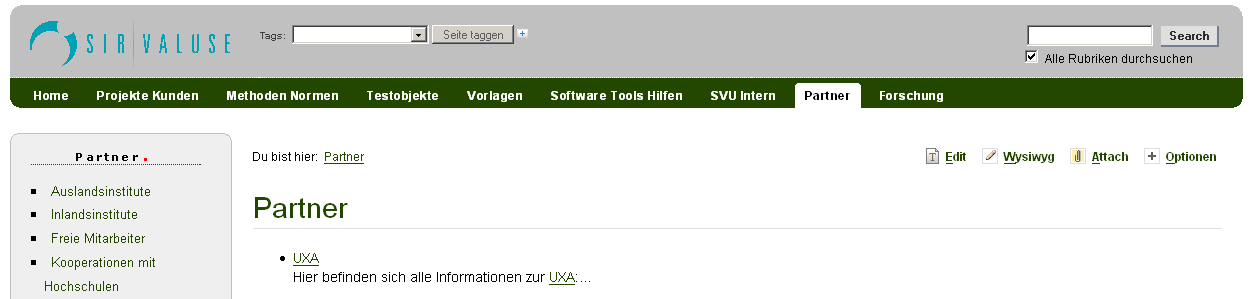
- Consider color coding - it is much easier to orientate your self in a color coded environment and your pages/sections appear more dynamic.
-
-

-

- More color codin examples
- Illustrator
- After Effects.
- Museum, Activities
- Service pages.
- Illustrator
-
- missing content
- A link to "Extensions" is missing in the "Download" column
- In the "What is TWiki", is "Our users" about "People using TWiki" or linking to the registered users on twiki.org?
- What about personas that want to migrate from other wiki engines to TWiki? Where do they click?
- A link to screenshots and movies somewhere would be great.
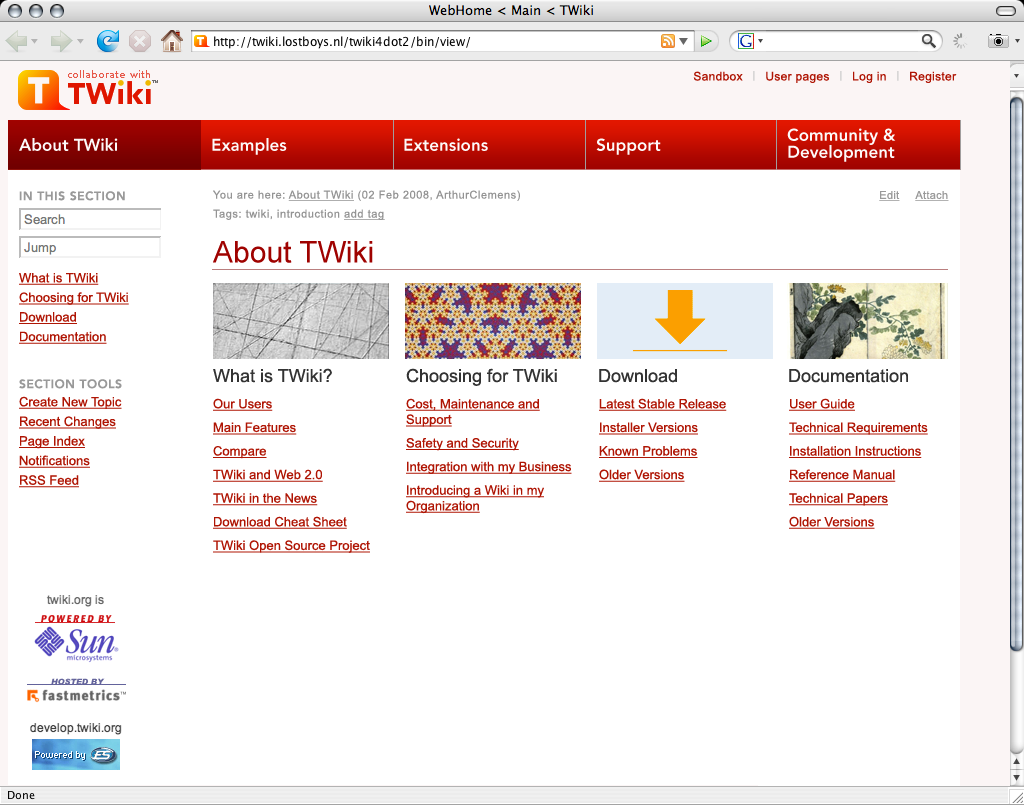
Fourth Draft
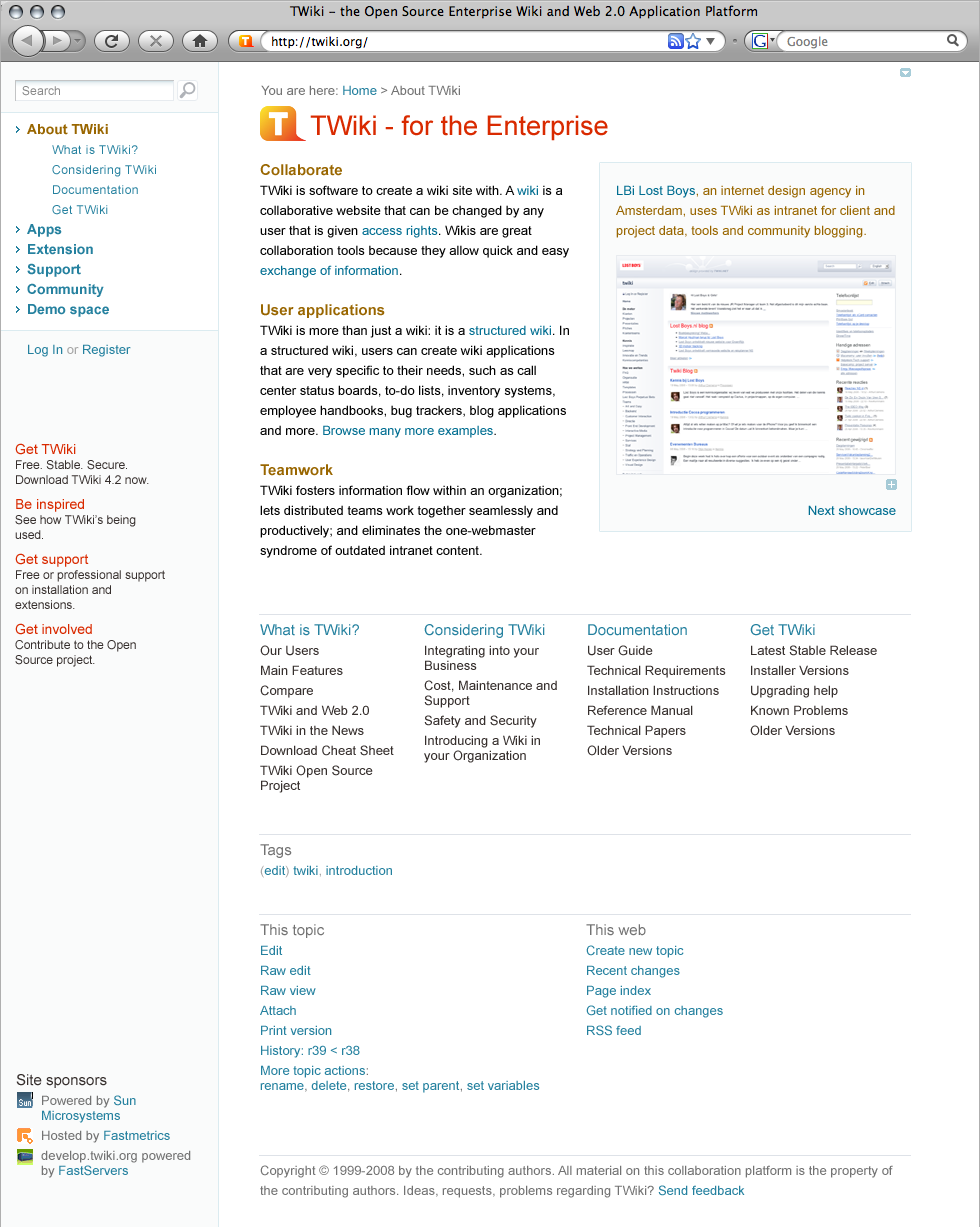
Another variation with a less distracting top bar: Fourth Draft See a test with a color coded background: Fourth Draft 2 -- ArthurClemens - 09 Feb 2008 Reactions:- red version with the blue links is better.
- Too washed out. The pages lost its balance.
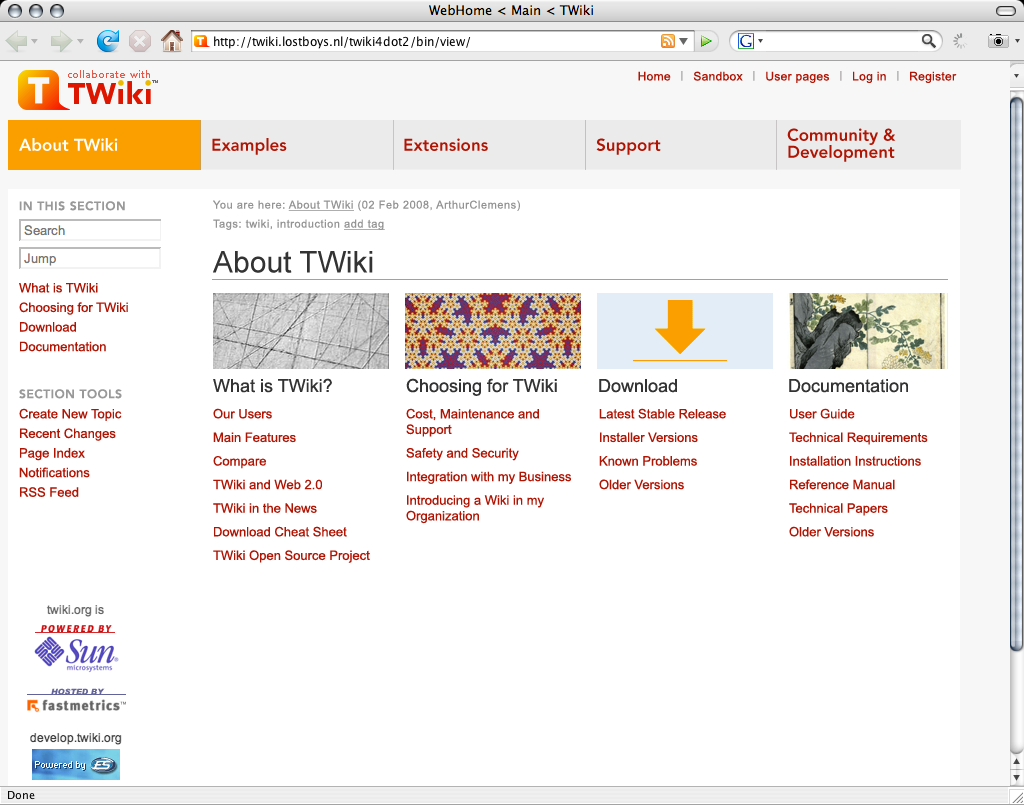
Fifth Draft
How about adding a line as shown below? It makes it much clear that these serve as tabs, which one we are currently browsing and where else we may be able to go. Pankaj's Tabs -- PankajPant - 12 Feb 2008 Reactions:- Need to visually connect the body with the tab. See "Tabs or no tabs" section...
Sixth Draft
- I tweaked Pankaj idea a bit so that the buttons look more like real tabs
- sponsors at the bottom.
New Design
The previous design hacked too quickly. This one is more thought out. It is more a design document than a final content plan for the page "About TWiki" - some elements may be missing. Rounded design -- ArthurClemens - 19 Feb 2008Discussion
Aaaah, much better. I like the new colors. I think we could do with a little more image material to illustrate the frontpage in the header position, with secondary pages having a flat header.- Wait, this is not the front page. This is a secondary page, namely "About TWIki", or the homepage of this section. - AC
- OIC. Well, I think having header art is no must, but an "opportunity" to do something nice and meaningful. Images transport emotions immediately. It makes up a nice interior. I think we need more of that stuff on TWiki.org, even on non-frontpages. - MD
- Most header art is just decoration. I prefer to have a (more) balanced menu bar. -AC
- Hm, people like things to be nicely decorated, i.e. non-techies. - MD
- They are meant to right-align to the content (that has a fixed width), but I agree it looks like it is floating.
- I will try alignment with the content area.
- Yes, "Deploying" might be better wording. Note that all of these labels are open for change in WebPageAudienceSiteStructure.
- Correct. The 4th column is meant as example triggers that can be used on other pages as well.
- Yes, but we don't have it right now. Proposals have been put in GoIsSearch.
- That font size is only for the introduction paragraph. It makes the text look less. But there are other ways - I will have a look again.
- Good idea.
- We can't remove "Edit raw". We also can't remove an edit link at the bottom because you would need to scroll back to the top to click that universal button. And then the universal button is a part of wiki promotion.
- Because this is not the front page.
- Agreed. This is not a final page layout. And this should be done on a page by page basis if we have all the elements.
is all we need sometimes. There are no palettes for the current twiki logo colours from my quick search. Someone pick the colours?
-- KwangErnLiew - 20 Feb 2008
Thanks Michael for you elaborate feedback. I've put my answers inline.
-- ArthurClemens - 20 Feb 2008
:)
-- MichaelDaum - 20 Feb 2008
BTW: I love suggestions for artwork, if not for the header than for the content.
-- ArthurClemens - 20 Feb 2008
- Updated with comments MD:
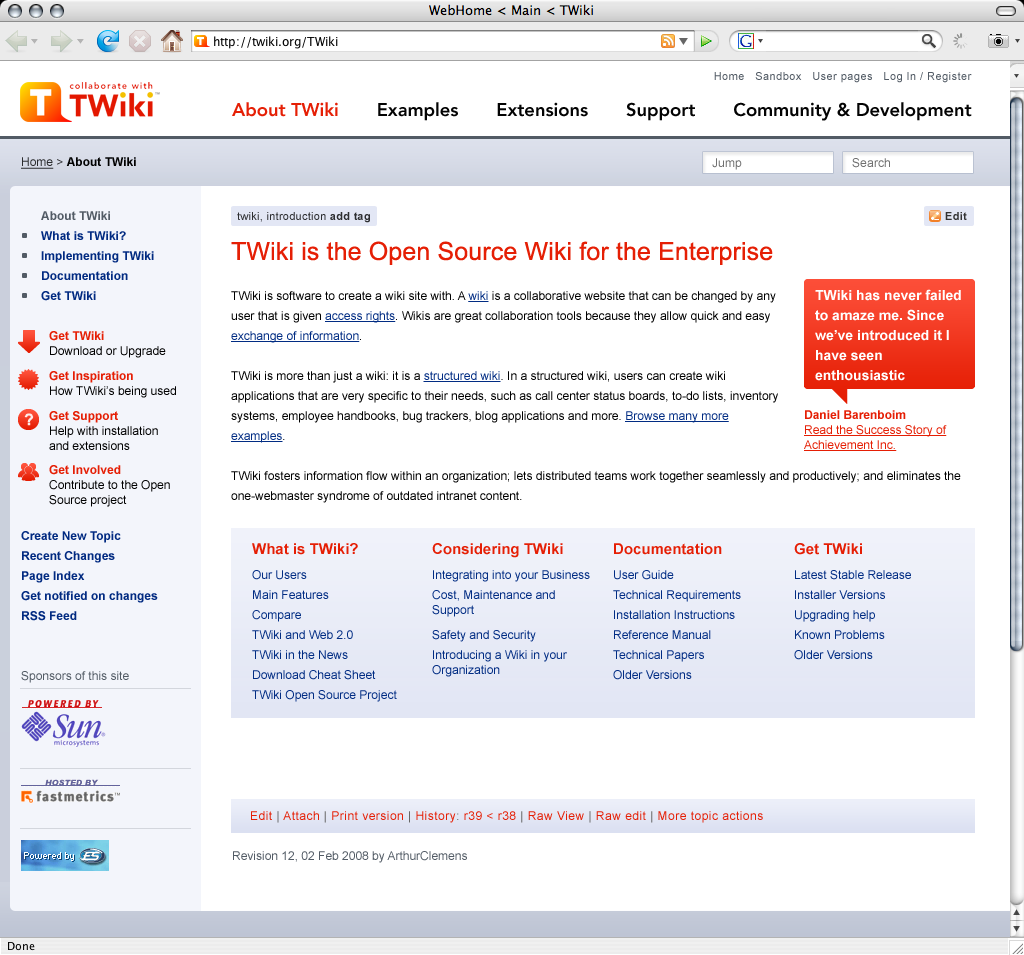
- Michael's try:
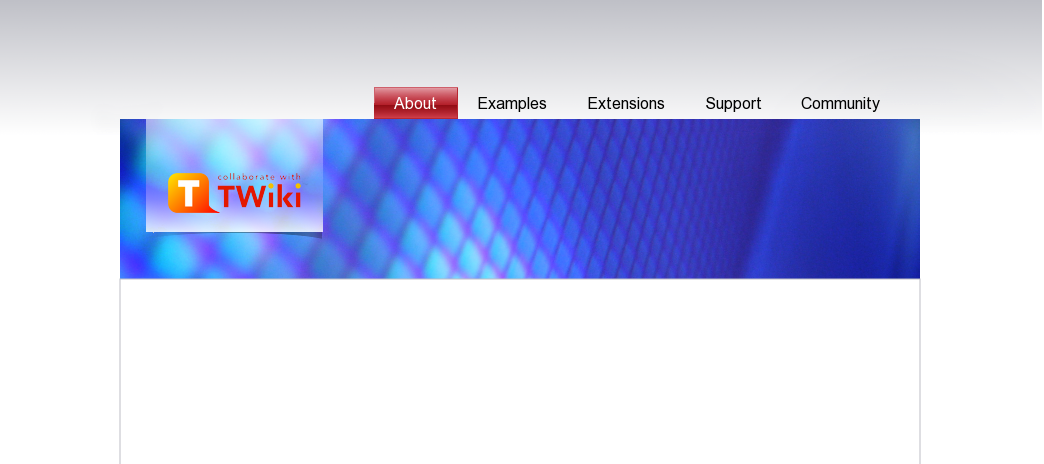
 -- ArthurClemens - 21 Feb 2008
The dark bottom bar is too heave compared to the thin header art. You aren't using enough colours. I can see only two:
shades of very light gray-blue (near-by colors with very low saturation) and red (fully saturated).
Red is used too often. It is an alarm color, used to put emphasis on certain elements.
However, it is all over the page now. Red - used as an alarm color - should be used more rarely to make it work as an alarm.
How about considering a more vital color palette with colors of at least one different hue and with more saturation.
The types in the breadcrumbs
-- ArthurClemens - 21 Feb 2008
The dark bottom bar is too heave compared to the thin header art. You aren't using enough colours. I can see only two:
shades of very light gray-blue (near-by colors with very low saturation) and red (fully saturated).
Red is used too often. It is an alarm color, used to put emphasis on certain elements.
However, it is all over the page now. Red - used as an alarm color - should be used more rarely to make it work as an alarm.
How about considering a more vital color palette with colors of at least one different hue and with more saturation.
The types in the breadcrumbs
 are too different. I wouldn't use underlines or different font weights. The breadcrumbs are in a too prominent position (right under the logo).
I like the repeated/additional navigation items in the bottom bar! Although there's an alignment problem with the sponsors and the extra navi
relative to the content area and the sidebar and the copyright note. Not sure. It doesn't feel right, maybe because spacing is not balanced.
Different text paragraphs seem to fall appart / are spreading too much / are bumpy / too many different fonts, in different positions.
Maybe consider removing / reducing the spaces between the three paragraphs. Or try to clear the area under the feature-bubble.
A suggestion: try a header art only above the content area, which is a bit higher,
and put the "TWiki is the Wiki for the Enterprise" headline on top of it. Maybe have some special typo work on the central statements
on each page with a header art supporting it.
Any comments on the variation I uploaded yesterday?
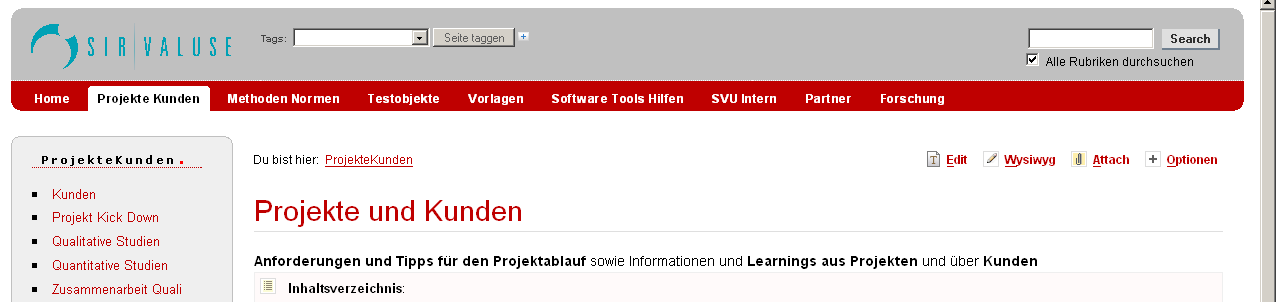
Just came across this : http://www.rakacreative.com:
are too different. I wouldn't use underlines or different font weights. The breadcrumbs are in a too prominent position (right under the logo).
I like the repeated/additional navigation items in the bottom bar! Although there's an alignment problem with the sponsors and the extra navi
relative to the content area and the sidebar and the copyright note. Not sure. It doesn't feel right, maybe because spacing is not balanced.
Different text paragraphs seem to fall appart / are spreading too much / are bumpy / too many different fonts, in different positions.
Maybe consider removing / reducing the spaces between the three paragraphs. Or try to clear the area under the feature-bubble.
A suggestion: try a header art only above the content area, which is a bit higher,
and put the "TWiki is the Wiki for the Enterprise" headline on top of it. Maybe have some special typo work on the central statements
on each page with a header art supporting it.
Any comments on the variation I uploaded yesterday?
Just came across this : http://www.rakacreative.com: 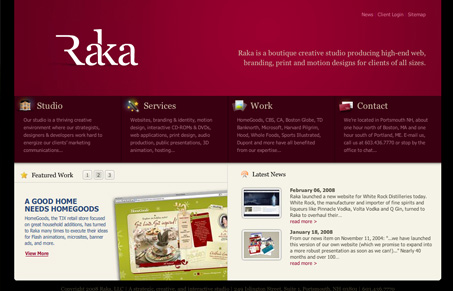 -- MichaelDaum - 22 Feb 2008
Actually, all nice sites are quite different in layout from the L-shaped layout we have at twiki. And which is a constraint as long as we use twiki.org as a tool, not just as a communication medium. For instance a high header will become a pain. A right nav bar will not work with multiwidth text content (images, tables) - same goes for a fixed content width. But we can go one step further on the landing pages of each section.
Your design is hard to judge as long as it is this clean. Only with all the content elements you will be able to judge how useful it is. My critique with the blue image is that it takes a lot of space without attributing a meaning. But your idea for a header with a headline makes sense.
-- ArthurClemens - 22 Feb 2008
Another great resource: 10 Principles Of Effective Web Design
-- ArthurClemens - 22 Feb 2008
I disagree a tiny bit about Arthur's design having too much red (though I would actually call it orange). The red is used to call out important categories of information. This is an important aspect of information organization. Used as such it is very effective. The two uses I would change would be the subheads just under the breadcrumbs and the bottom bar items.
I also like the slim header bar. Bigger headers may look pretty, but one quickly tires of them on sites very often used, because you have to do more vertical scrolling to get to the useful content. I do agree that the bottom area is much too heavy in relation to the rest of the page.
Good point about the space between paragraphs. In good information presentation it is always important that items that go together are both visually connected to each other and visually separated from other groups. So text following a head should be closer to the head, but there should be more space between that text and the next head. Running paragraphs that are not indented should have a little space between them to separate them, but it should not be so much that the paragraphs don't read as a continuation.
As far as too many fonts in the running text, probably the bold can just be eliminated to make for easier reading.
I like the clean, organized look of Arthur's work. I realize that much more will likely be fit into the page when it's final, but as a template/grid/skin, I think it provides for great visual organization and easy navigation.
There does need to be a bit more space around the Success Story--especially at the bottom.
-- DavidWolfe - 23 Feb 2008
Another approach: keeping a minimal menu and removing the left bar; instead use content navigation. This way the page starts with the most important content. Site navigation is now in the bottom bar. Obviously the sponsor logos need custom rework to fit on a dark background.
Also with more colors. The brownish link block needs more thought. We can either add imagery or short intro texts for the section, or a summary line for each link.
-- MichaelDaum - 22 Feb 2008
Actually, all nice sites are quite different in layout from the L-shaped layout we have at twiki. And which is a constraint as long as we use twiki.org as a tool, not just as a communication medium. For instance a high header will become a pain. A right nav bar will not work with multiwidth text content (images, tables) - same goes for a fixed content width. But we can go one step further on the landing pages of each section.
Your design is hard to judge as long as it is this clean. Only with all the content elements you will be able to judge how useful it is. My critique with the blue image is that it takes a lot of space without attributing a meaning. But your idea for a header with a headline makes sense.
-- ArthurClemens - 22 Feb 2008
Another great resource: 10 Principles Of Effective Web Design
-- ArthurClemens - 22 Feb 2008
I disagree a tiny bit about Arthur's design having too much red (though I would actually call it orange). The red is used to call out important categories of information. This is an important aspect of information organization. Used as such it is very effective. The two uses I would change would be the subheads just under the breadcrumbs and the bottom bar items.
I also like the slim header bar. Bigger headers may look pretty, but one quickly tires of them on sites very often used, because you have to do more vertical scrolling to get to the useful content. I do agree that the bottom area is much too heavy in relation to the rest of the page.
Good point about the space between paragraphs. In good information presentation it is always important that items that go together are both visually connected to each other and visually separated from other groups. So text following a head should be closer to the head, but there should be more space between that text and the next head. Running paragraphs that are not indented should have a little space between them to separate them, but it should not be so much that the paragraphs don't read as a continuation.
As far as too many fonts in the running text, probably the bold can just be eliminated to make for easier reading.
I like the clean, organized look of Arthur's work. I realize that much more will likely be fit into the page when it's final, but as a template/grid/skin, I think it provides for great visual organization and easy navigation.
There does need to be a bit more space around the Success Story--especially at the bottom.
-- DavidWolfe - 23 Feb 2008
Another approach: keeping a minimal menu and removing the left bar; instead use content navigation. This way the page starts with the most important content. Site navigation is now in the bottom bar. Obviously the sponsor logos need custom rework to fit on a dark background.
Also with more colors. The brownish link block needs more thought. We can either add imagery or short intro texts for the section, or a summary line for each link.
 These are the colors I have used:
 -- ArthurClemens - 23 Feb 2008
Very nice I like that last design of yours Arthur. Do you create a new skin for each of your design? What tool do you use for designing your skins? Do you just jump into the CSS and templates code?
-- StephaneLenclud - 24 Feb 2008
A no, this is just Photoshop. Works much faster
-- ArthurClemens - 23 Feb 2008
Very nice I like that last design of yours Arthur. Do you create a new skin for each of your design? What tool do you use for designing your skins? Do you just jump into the CSS and templates code?
-- StephaneLenclud - 24 Feb 2008
A no, this is just Photoshop. Works much faster  -- ArthurClemens - 24 Feb 2008
A second way to utilize the broad page setup with a showcase gallery, not unlike Michaels example of http://www.rakacreative.com.
-- ArthurClemens - 24 Feb 2008
A second way to utilize the broad page setup with a showcase gallery, not unlike Michaels example of http://www.rakacreative.com.
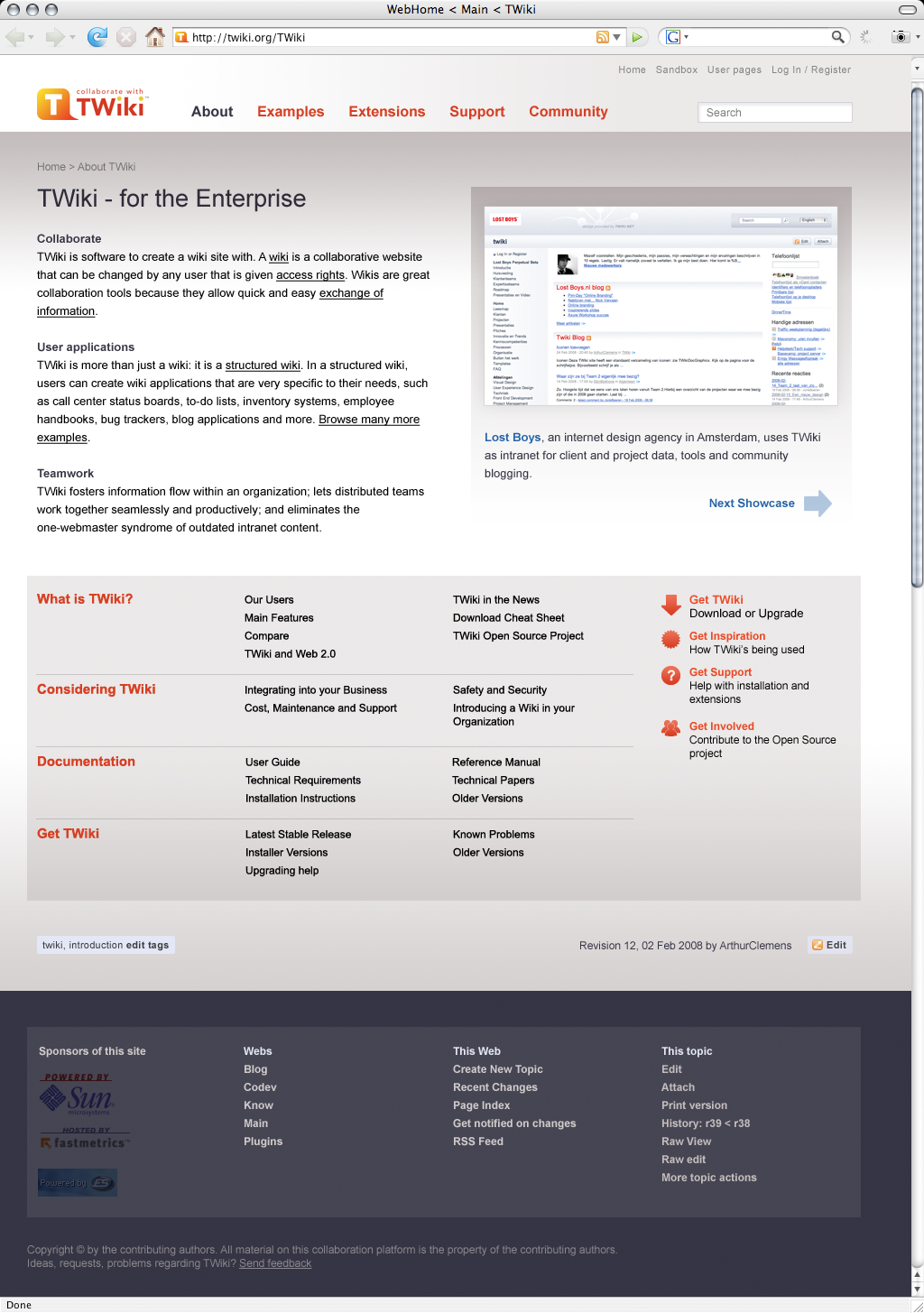 -- ArthurClemens - 24 Feb 2008
Very good progress! Arthur, you do an excellent job pushing this forward.
Here are my comments based on your most recent rounds.
There's lots of gray and gray blends.
The logos in the bottom bar shouldn't be toned down.
The header/top bar - though it has a horiz gradient - is too "untouched", i.e. its top left white corner.
The normal color of the links in the tab navi are red, while the indicator color (for the current topic) is dark-gray. How about reversing this: red attracts attention while dark-gray doesn't; attention should be generated to indicate the current location/page.
In your pallet you specified to be using a bold blue (the right most one). That's a good choice. However I cant see where it is used in your screenshot.
To make it a really balanced color map, a third color is still missing. According to your current colors (base colors = light gray + shade gray, red + light red, blue + very light blue) the third color would be in the area between yellow and green (with no specific saturation). That would be a great color for example for a h1 foreground, depending on the saturation obviously. You could also decide to use this yellow-greenish in the header art, which is missing imho
-- ArthurClemens - 24 Feb 2008
Very good progress! Arthur, you do an excellent job pushing this forward.
Here are my comments based on your most recent rounds.
There's lots of gray and gray blends.
The logos in the bottom bar shouldn't be toned down.
The header/top bar - though it has a horiz gradient - is too "untouched", i.e. its top left white corner.
The normal color of the links in the tab navi are red, while the indicator color (for the current topic) is dark-gray. How about reversing this: red attracts attention while dark-gray doesn't; attention should be generated to indicate the current location/page.
In your pallet you specified to be using a bold blue (the right most one). That's a good choice. However I cant see where it is used in your screenshot.
To make it a really balanced color map, a third color is still missing. According to your current colors (base colors = light gray + shade gray, red + light red, blue + very light blue) the third color would be in the area between yellow and green (with no specific saturation). That would be a great color for example for a h1 foreground, depending on the saturation obviously. You could also decide to use this yellow-greenish in the header art, which is missing imho  I like the design to have no side navi! This split-page (that's how I call it) works out great, giving you clearly separated sections of different
backgrounds that each focus the reader on their content, depending on how far you scrolled down. The page currently has got three sections,
not counting the header area: (1) TWiki - for Enterprise ... (2) What is TWiki?... (3) Bottom bar. So far so good. I'd add a section zero that has
got some more graphics work in it.
The universal edit button is quite hidden. Maybe it should be only visible if you are logged in, but then in a more prominent place in section 1
instead of at the bottom of section 2.
I know people using wikis don't want to scroll down passing some "punchy" graphics. They want to see their content and not some barricade
the CMS puts in between which they get bored of soon. Perfectly understandable, but not the point here.
The current work on a NewNavigationModelForTWikiDotOrg is part of marketing TWiki.org, its community and partners. It strives to
generate more attention and interest in our work, to make people stay longer on the site. It is not so much about
tempting them to click on "edit". Wiki edit usability has to step back for a while ... to come back even stronger and better later on
Therefore, let me reiterate: pictures are better in transporting emotions than anything else (even better than sound).
We need more emotions / good vibes / freshness / vitality. This is about seconds a visitor decides to stay or go away, forgetting what he has seen.
-- MichaelDaum - 25 Feb 2008
Here is another site that uses a grey-ish dark base color and one additional "feature" color that really kicks out:
http://www.ifistanbul.com/en/. See how this color changes in the different sections. Quite nice actually. Well never mind, just food for thought.
-- MichaelDaum - 25 Feb 2008
Very good progress, indeed, but just from the visual perspective I feel like this isn't a step forward. It's too grey, too clean, no action/emotions in it.
But I do like how information is represented, the middle part easily tells you what you can browse for next. The "next showcase" is a really good idea as well.
Unfortunately the bottom bar looks like it's not part of the site and it's content does not make sense for anyone new to TWiki.
And again there's no connection between the content area and the menu links. The fact that the headline "TWiki - for the enterprise" belongs to "About" is quiet easy to miss.
-- CarloSchulz - 26 Feb 2008
Arthur, would you mind attaching the PSD or XCF so I can have a play with the colours and such?
-- KwangErnLiew - 26 Feb 2008
I came across this article today and thought that some of the points it makes are along the same lines as this discussion.
Web Design Best Practices: Home Page Goals
-- DavidWolfe - 28 Feb 2008
OK, so I've picked out some colours.
I like the design to have no side navi! This split-page (that's how I call it) works out great, giving you clearly separated sections of different
backgrounds that each focus the reader on their content, depending on how far you scrolled down. The page currently has got three sections,
not counting the header area: (1) TWiki - for Enterprise ... (2) What is TWiki?... (3) Bottom bar. So far so good. I'd add a section zero that has
got some more graphics work in it.
The universal edit button is quite hidden. Maybe it should be only visible if you are logged in, but then in a more prominent place in section 1
instead of at the bottom of section 2.
I know people using wikis don't want to scroll down passing some "punchy" graphics. They want to see their content and not some barricade
the CMS puts in between which they get bored of soon. Perfectly understandable, but not the point here.
The current work on a NewNavigationModelForTWikiDotOrg is part of marketing TWiki.org, its community and partners. It strives to
generate more attention and interest in our work, to make people stay longer on the site. It is not so much about
tempting them to click on "edit". Wiki edit usability has to step back for a while ... to come back even stronger and better later on
Therefore, let me reiterate: pictures are better in transporting emotions than anything else (even better than sound).
We need more emotions / good vibes / freshness / vitality. This is about seconds a visitor decides to stay or go away, forgetting what he has seen.
-- MichaelDaum - 25 Feb 2008
Here is another site that uses a grey-ish dark base color and one additional "feature" color that really kicks out:
http://www.ifistanbul.com/en/. See how this color changes in the different sections. Quite nice actually. Well never mind, just food for thought.
-- MichaelDaum - 25 Feb 2008
Very good progress, indeed, but just from the visual perspective I feel like this isn't a step forward. It's too grey, too clean, no action/emotions in it.
But I do like how information is represented, the middle part easily tells you what you can browse for next. The "next showcase" is a really good idea as well.
Unfortunately the bottom bar looks like it's not part of the site and it's content does not make sense for anyone new to TWiki.
And again there's no connection between the content area and the menu links. The fact that the headline "TWiki - for the enterprise" belongs to "About" is quiet easy to miss.
-- CarloSchulz - 26 Feb 2008
Arthur, would you mind attaching the PSD or XCF so I can have a play with the colours and such?
-- KwangErnLiew - 26 Feb 2008
I came across this article today and thought that some of the points it makes are along the same lines as this discussion.
Web Design Best Practices: Home Page Goals
-- DavidWolfe - 28 Feb 2008
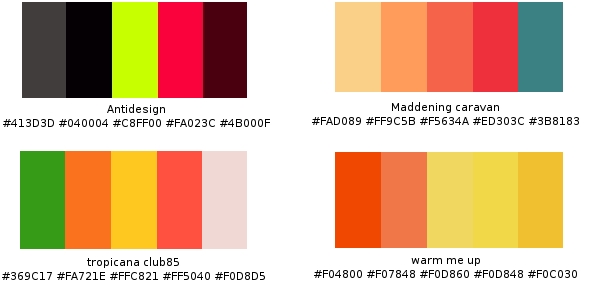
OK, so I've picked out some colours.
 Depends on how you guys want to portray TWiki in the end. It's by no means definitive, and you can make use of grey shades to blend in too.
Personally I find TWiki would go well with Antidesign or Maddening caravan.
-- KwangErnLiew - 29 Feb 2008
Doesn't have this discussion lost focus? It is about navigation, isn't it?
-- FranzJosefGigler - 29 Feb 2008
I wouldn't discount the use of colours when designing the layout of the website. Unless we agree to use the same default ones, but I think most would agree that it's a bit stale.
User interface/experience comes with colours too...not just navigation. If it's not true, I don't see why PatternSkin had the new facelift nor any of the above. Am just trying to play a small part in this. Like it or not, UI/UE needs to take colours into account.
-- KwangErnLiew - 29 Feb 2008
Colors play an importan role in navigation, and they can lead the user to focus on a specific part.
Even if the navigation is perfect from a cognoscitive point of view, if the wrong colors are used the effect will be lost.
Anyway, I understand Franz concern... By reading this page I still don't know which is the new navigation model for TWiki.org. I would like to see a diagram, mind map or whatever showing the different "knowledge areas", how they are related, how will the be navigated, which are the hub nodes, etc,etc...
-- RafaelAlvarez - 03 Mar 2008
The site structure is layed out in WebPageAudienceSiteStructure.
Yes, we need to reorganize these topics.
-- ArthurClemens - 03 Mar 2008
Navigation Rulez:: please have a look at this article on SmashingMagazine http://www.smashingmagazine.com/2008/02/26/navigation-menus-trends-and-examples/
-- MichaelDaum - 03 Apr 2008
brilliant artricle, thanks Micha
-- CarloSchulz - 03 Apr 2008
one navigation issue I have found a problem with in TWiki; I believe most developers in Code follow topics in TWiki.org by following WebChanges which reflects recent topic changes, but not topic viewes. In other words developers are only viewing topics which are incomplete or in some way incorrect which have a lot of comments added but when somebody creates a topic that is both complete and profound, nothing more should be said on the topic. if nobody says anything on the topic it doesn't appear on webchanges as often therefor it never gets any views. Seems almost sad to me, topics, as they approach perfection approach also obscurity from WebChanges and therefor the public eye. INFO modules like "Hot Topics" can go a long way to help such a thing but I don't think a top 10 list is good enough, I would like to see how [most] all topics stack up against each other just as WebChanges shows top 50, 100, 500, all recent changes.
-- TravisBarker - 03 Apr 2008
on the other end of that spectrum we could find out what topics exist that have not been viewed since their creation. which might go a long way to help people decide what information to refactor/delete
-- TravisBarker - 03 Apr 2008
I have created a new design that would be easier to implement. Important, because everyone's time is precious. It has all the action buttons at the bottom, and a twistie at the top that unfolds the action button at the top of the page. That way we can make the look easier on users that just want to browse information.
It has no top banner, so the content starts at the top of the browser window.
The T-balloon logo is part of the page titles.
vertical9.png
'Edit mode:'
vertical9_edit_pane.png
Color palette:
Depends on how you guys want to portray TWiki in the end. It's by no means definitive, and you can make use of grey shades to blend in too.
Personally I find TWiki would go well with Antidesign or Maddening caravan.
-- KwangErnLiew - 29 Feb 2008
Doesn't have this discussion lost focus? It is about navigation, isn't it?
-- FranzJosefGigler - 29 Feb 2008
I wouldn't discount the use of colours when designing the layout of the website. Unless we agree to use the same default ones, but I think most would agree that it's a bit stale.
User interface/experience comes with colours too...not just navigation. If it's not true, I don't see why PatternSkin had the new facelift nor any of the above. Am just trying to play a small part in this. Like it or not, UI/UE needs to take colours into account.
-- KwangErnLiew - 29 Feb 2008
Colors play an importan role in navigation, and they can lead the user to focus on a specific part.
Even if the navigation is perfect from a cognoscitive point of view, if the wrong colors are used the effect will be lost.
Anyway, I understand Franz concern... By reading this page I still don't know which is the new navigation model for TWiki.org. I would like to see a diagram, mind map or whatever showing the different "knowledge areas", how they are related, how will the be navigated, which are the hub nodes, etc,etc...
-- RafaelAlvarez - 03 Mar 2008
The site structure is layed out in WebPageAudienceSiteStructure.
Yes, we need to reorganize these topics.
-- ArthurClemens - 03 Mar 2008
Navigation Rulez:: please have a look at this article on SmashingMagazine http://www.smashingmagazine.com/2008/02/26/navigation-menus-trends-and-examples/
-- MichaelDaum - 03 Apr 2008
brilliant artricle, thanks Micha
-- CarloSchulz - 03 Apr 2008
one navigation issue I have found a problem with in TWiki; I believe most developers in Code follow topics in TWiki.org by following WebChanges which reflects recent topic changes, but not topic viewes. In other words developers are only viewing topics which are incomplete or in some way incorrect which have a lot of comments added but when somebody creates a topic that is both complete and profound, nothing more should be said on the topic. if nobody says anything on the topic it doesn't appear on webchanges as often therefor it never gets any views. Seems almost sad to me, topics, as they approach perfection approach also obscurity from WebChanges and therefor the public eye. INFO modules like "Hot Topics" can go a long way to help such a thing but I don't think a top 10 list is good enough, I would like to see how [most] all topics stack up against each other just as WebChanges shows top 50, 100, 500, all recent changes.
-- TravisBarker - 03 Apr 2008
on the other end of that spectrum we could find out what topics exist that have not been viewed since their creation. which might go a long way to help people decide what information to refactor/delete
-- TravisBarker - 03 Apr 2008
I have created a new design that would be easier to implement. Important, because everyone's time is precious. It has all the action buttons at the bottom, and a twistie at the top that unfolds the action button at the top of the page. That way we can make the look easier on users that just want to browse information.
It has no top banner, so the content starts at the top of the browser window.
The T-balloon logo is part of the page titles.
vertical9.png
'Edit mode:'
vertical9_edit_pane.png
Color palette:  -- ArthurClemens - 27 Jul 2008
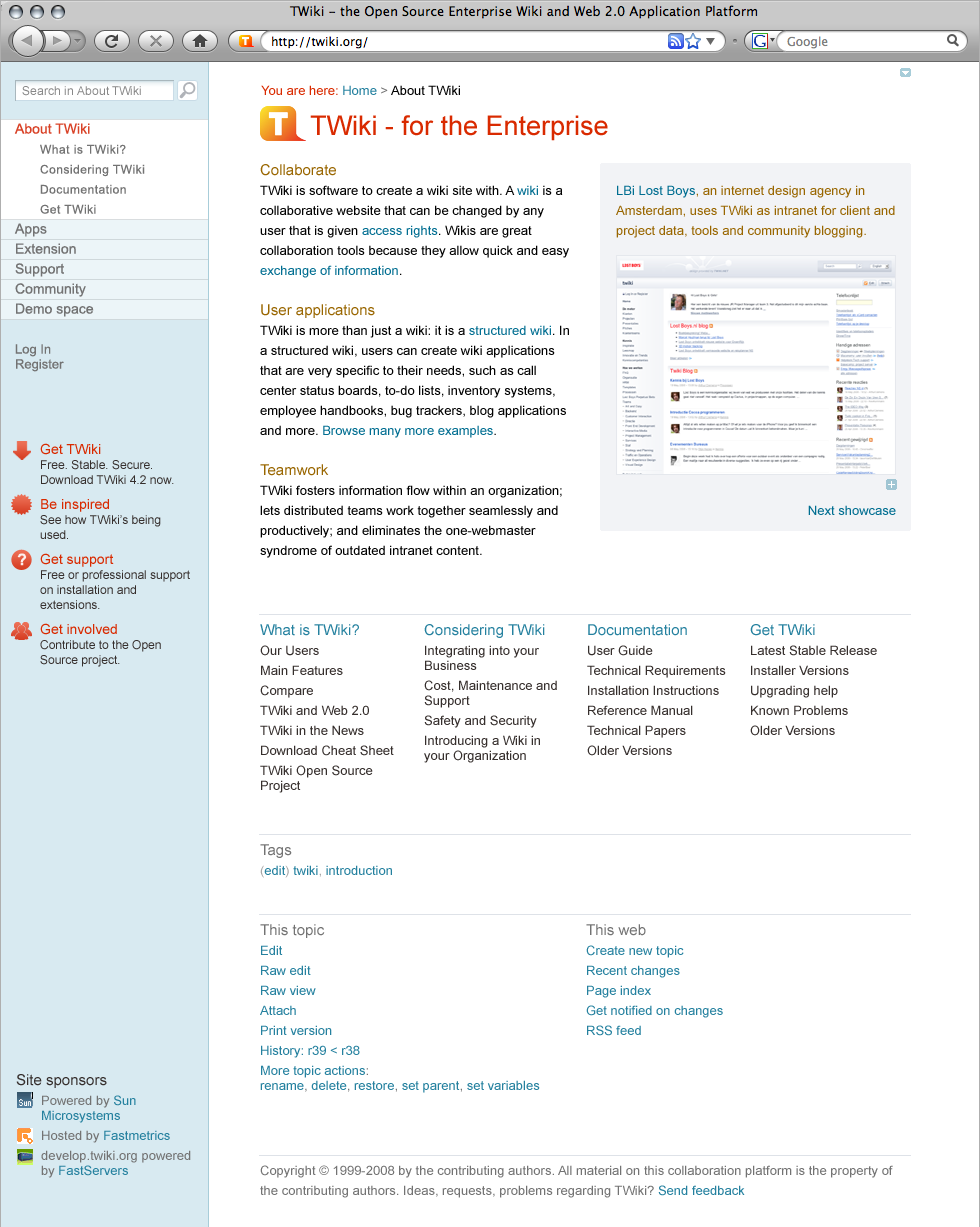
I like this new design a lot. It gives a lot of ideas for our own TWiki. I especially like the division of "This topic" and "This web" activities and the twisty to show/hide the top actions. It demonstrates clear and simple navigation to different webs as well and, in general, seems more focused on actions and specific needs than on just being an overworked TOC.
-- DavidWolfe - 27 Jul 2008
It just dawnd on me... we're talking about a new navigation model and stuff... but what are we going to do with the current content in Codev (the stale, the crufty, and the good)?
-- RafaelAlvarez - 28 Jul 2008
Good question... See TWikiOrgRenewalWorks for past discussions.
Anyway, I'm all for starting with the new pages and add the good and needed ones one after the other. And for the rest, well just do not think about it
-- CarloSchulz - 28 Jul 2008
I like the overall approach of this design a lot. Good overview, good entry points, very clear.
The only thing that does not work for me is the left column. You have a three column layout but the left column is separated by a big border which makes the column look like too wide sidebar. The result is a page which looks somehow unbalanced.
-- CarloSchulz - 29 Jul 2008
Yes, the left bar is definitely not final. The intention is to have a site wide navigation (webs) and the topics per web side by side. So the right list can become longer.
-- ArthurClemens - 29 Jul 2008
I have created a more traditional left bar. Of course the number of listed topics in each web needs to be limited (which is not a bad thing).
vertical11.png
-- ArthurClemens - 30 Jul 2008
Great work Arthur! Very good compared to the previous ones. Will this be the standard throughout the site? If that's the case, it'd be good to see some layouts for view and edit mode.
My main concern is the
-- ArthurClemens - 27 Jul 2008
I like this new design a lot. It gives a lot of ideas for our own TWiki. I especially like the division of "This topic" and "This web" activities and the twisty to show/hide the top actions. It demonstrates clear and simple navigation to different webs as well and, in general, seems more focused on actions and specific needs than on just being an overworked TOC.
-- DavidWolfe - 27 Jul 2008
It just dawnd on me... we're talking about a new navigation model and stuff... but what are we going to do with the current content in Codev (the stale, the crufty, and the good)?
-- RafaelAlvarez - 28 Jul 2008
Good question... See TWikiOrgRenewalWorks for past discussions.
Anyway, I'm all for starting with the new pages and add the good and needed ones one after the other. And for the rest, well just do not think about it
-- CarloSchulz - 28 Jul 2008
I like the overall approach of this design a lot. Good overview, good entry points, very clear.
The only thing that does not work for me is the left column. You have a three column layout but the left column is separated by a big border which makes the column look like too wide sidebar. The result is a page which looks somehow unbalanced.
-- CarloSchulz - 29 Jul 2008
Yes, the left bar is definitely not final. The intention is to have a site wide navigation (webs) and the topics per web side by side. So the right list can become longer.
-- ArthurClemens - 29 Jul 2008
I have created a more traditional left bar. Of course the number of listed topics in each web needs to be limited (which is not a bad thing).
vertical11.png
-- ArthurClemens - 30 Jul 2008
Great work Arthur! Very good compared to the previous ones. Will this be the standard throughout the site? If that's the case, it'd be good to see some layouts for view and edit mode.
My main concern is the This topic and This web where it's all the way underneath. Not sure what it is, but it's just a bother to me.
Also, what's the function of the top right arrow?
-- KwangErnLiew - 31 Jul 2008
I like this layout also. For the bottom links, it may be less intrusive if we ordered them horizontally, like at the bottom of linkedin. I tried this layout on a my TWiki site, it seems interesting: http://colas.nahaboo.net/
-- ColasNahaboo - 31 Jul 2008
I, for one, really like the "Actions" divided by "This topic" and "This web." Oops! I forgot I already said that above. But I do agree that it might be less intrusive if they were organized more horizontally, so that they take up less vertical space. Should there be a header that identifies this section as "Actions" that can be performed?
-- DavidWolfe - 31 Jul 2008
I do not like the way the Edit, Raw Edit, Attach, Print version etc suddenly becomes part of the page content. These are the buttons for the tool TWiki and they need to be clearly separated from the rest of the page. Which is what the PatternSkin does well today.
I also prefer that these controls are placed the same place as it is in your own TWiki.
When you arrive at TWiki.org for help, for support, for a plugin etc etc TWiki should look and feel like you are used to.
The main navigation pages can have a different design but please - the problem with twiki.org is the mess and poor navigation. It is not a new skin we need. It is new content on the landing pages and new navigation.
-- KennethLavrsen - 31 Jul 2008
I agree that TWiki.org should look and feel the same as my own TWiki. I guess I was making an assumption that this new design would find its way to the distributed software and onto my own TWiki. I would certainly hope that is the case. I think the design being developed here could go a long way in helping new users to find their way around my TWiki without being overwhelmed by things they don't understand yet.
-- DavidWolfe - 31 Jul 2008
Thanks for the feedback so far. I will continue working on the design in spare hours the coming week.
-- ArthurClemens - 01 Aug 2008
Cool. I like this design progress a lot. Cool efforts.
-- MartinSeibert - 02 Aug 2008
Hm, I do not like it, sorry. The parts of the page (logo, page title, search box, login®ister, top bar, bottom bar, sidebar sections, etc) show up in very unusual positions if at all; the spacing between them is unbalanced; there are no colors besides those used for fonts. There's hardly any design aspect in it at all. While I heartfully appreciate any layout and design work on TWiki, I really don't get what exactly you are aiming at with your latest screenshot (vertical11.png), Arthur. Can you explain a bit more what considerations you are following? Thanks.
-- MichaelDaum - 03 Aug 2008
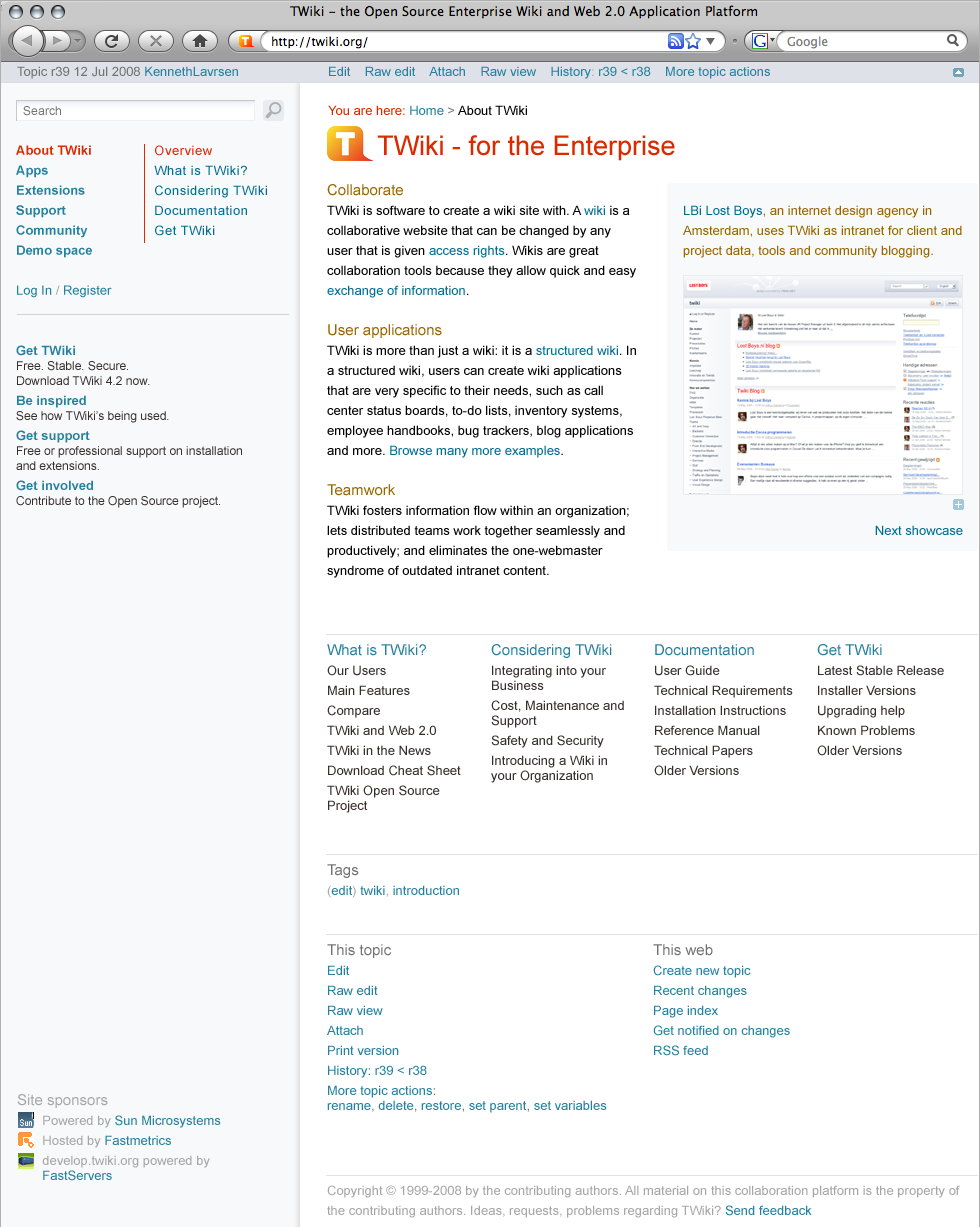
I agree, this undesign path was a dead end. A different approach with top navigation and more colors:
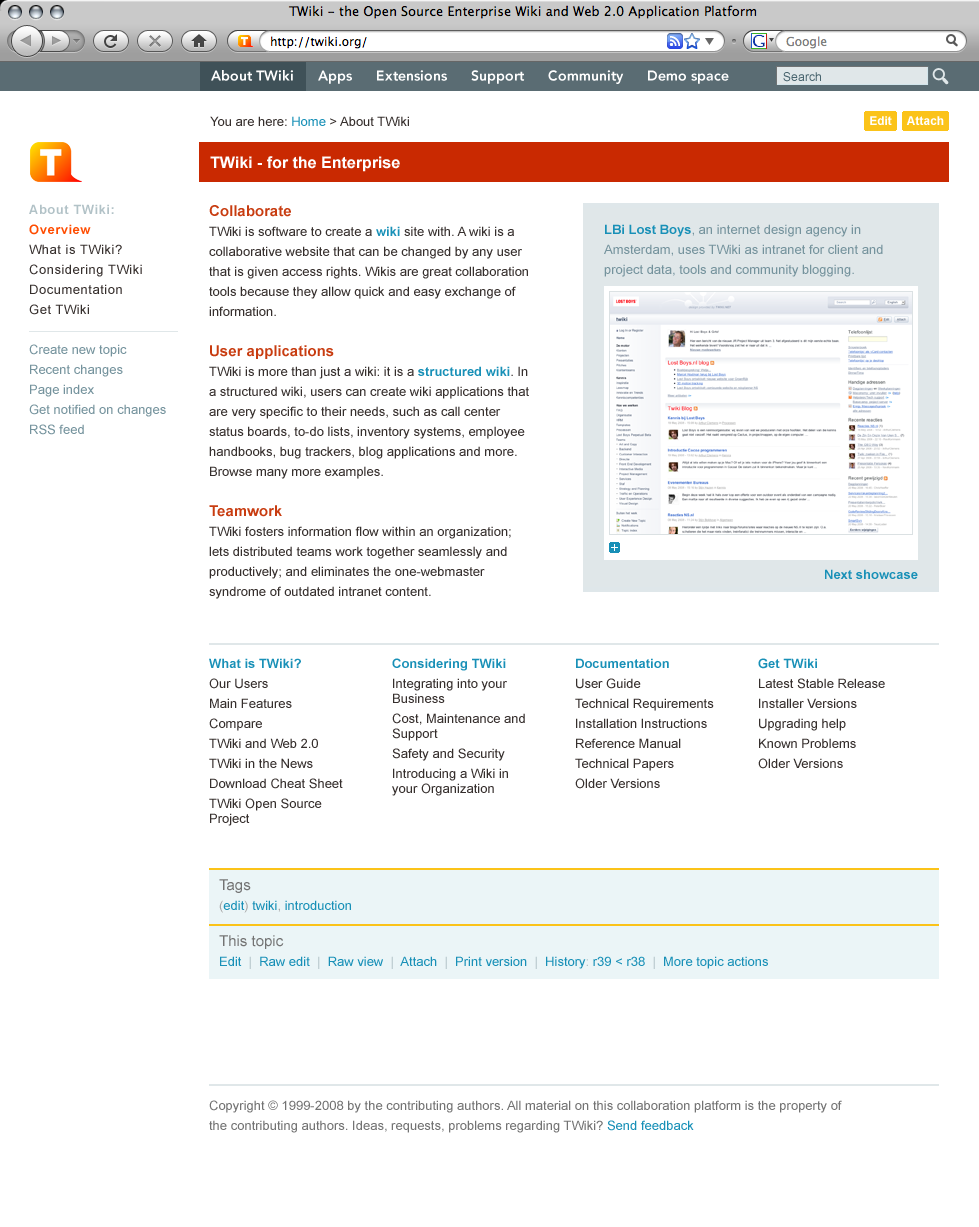 -- ArthurClemens - 03 Aug 2008
While I agree with Michael that a bit more graphics are called for (something like the current header with the graphic, search and jump boxes) and maybe some elements need to be shifted or gain more emphasis, I actually like the navigation and general layout of the previous revision better. Here's why:
Navigation in the previous revision is all in one place. In the new version, it's divided between top and left. I think this is confusing and harder to follow. The navigation all in the left bar as before may not follow the top-tabbed navigation model of most of the WWW, but it is clear, simple, and easy-to-use. Splitting it between top and left just doesn't seem to make any sense to me.
Actions are treated the same way in this new layout. They are divided between left (web) and bottom (topic) actions. This is exactly what we have now. I think that people find these divisions of like information/navigation to be confusion and unintuitive. Like items should always be presented together.
As for spacing between elements, spacing should be "unbalanced." That is, items that belong together should be separated by some space. Items or groups of items that are separate should be separated by more space. This is part of the problem with the current styles and layout of TWiki. The space between heading levels is the same or almost the same. Font sizes of head levels is the same or almost the same. Head levels 1–3 are not bold. Head levels 4–6 are bold, which is just backward. All heads are the same color, and many share the same graphic treatment (gray bar or horizontal line).
On the left bar: in the current TWiki, there is very many information/navigation elements that are quite convenient for TWiki developers and admins, but are of little day-to-day use for most users. These items take up valuable space in the left bar and discourage users from customizing their own left bar because the more they add, the longer the left bar gets, pushing items further and further down the page and making them less accessible. As most user interaction with TWiki likely involves topic and web navigation rather than action, maybe the left bar should be dedicated to navigation entirely and leave off navigation items that are admin-oriented or infrequently used (Statistics, preferences, webnotify, for example). We admins and developers can always add the action items we use most often to our personal left bar.
While color can make communication more visually appealing (you want to look at it), if that color serves no purpose in the organization of information, the communication is actually less effective (it's difficult to understand).
In my reading of all of this topic and all the other topics leading its creation, it is clear to me that the goal of this redesign is not to simply "spruce up" TWiki. The goal is to simplify navigation, presentation, and organization of key content. That might mean that some things that we are all accustomed to seeing might be moved, de-emphasized or even eliminated. Just because something has been in a given position for the past five years doesn't mean that that's the best position for that element.
-- DavidWolfe - 03 Aug 2008
I like this layout a lot.
-- MartinSeibert - 20 Oct 2008
I also like the 03 Aug 2008 - for TWiki.org.
I would not want the default skin shipped with TWiki like this because the number of webs many of us have cannot fit in a top bar horizontally.
But for TWiki.org the top bar fits well.
Only the TWiki web is not there but placed as Documentation link in left bar. I think this will fly well.
What we see is the front page.
For the general pages some things are missing for daily use. A link to the Main (Users) web, and the info of date/time/rev/Wikiname of the topic is so important for daily use. And it has to be at the top so you can decide to not read a topic without scrolling and without hovering the mouse on top of something. It can be grey and small types to be very little dominating but should be visible.
But we have the important principles kept. Edit at the top. Attach could be at the bottom only. It is rarely used and I would not mind scrolling to attach. I'd rather have a Raw Edit button at the top.
Bottom bar is good. I have the history part I need so I can see what changed. I do not need 5 revisions visible. If we installed the CompareRevisionsPlugin/HIstoryPlugin it will be even better. Backlinks is gone which is fine. It is available in More Topic Actions.
Yeah, I like it.
-- KennethLavrsen - 21 Oct 2008
This is already outdated, AFAIK, superseeded by TWikiOrgSkin.
-- MichaelDaum - 23 Oct 2008
-- ArthurClemens - 03 Aug 2008
While I agree with Michael that a bit more graphics are called for (something like the current header with the graphic, search and jump boxes) and maybe some elements need to be shifted or gain more emphasis, I actually like the navigation and general layout of the previous revision better. Here's why:
Navigation in the previous revision is all in one place. In the new version, it's divided between top and left. I think this is confusing and harder to follow. The navigation all in the left bar as before may not follow the top-tabbed navigation model of most of the WWW, but it is clear, simple, and easy-to-use. Splitting it between top and left just doesn't seem to make any sense to me.
Actions are treated the same way in this new layout. They are divided between left (web) and bottom (topic) actions. This is exactly what we have now. I think that people find these divisions of like information/navigation to be confusion and unintuitive. Like items should always be presented together.
As for spacing between elements, spacing should be "unbalanced." That is, items that belong together should be separated by some space. Items or groups of items that are separate should be separated by more space. This is part of the problem with the current styles and layout of TWiki. The space between heading levels is the same or almost the same. Font sizes of head levels is the same or almost the same. Head levels 1–3 are not bold. Head levels 4–6 are bold, which is just backward. All heads are the same color, and many share the same graphic treatment (gray bar or horizontal line).
On the left bar: in the current TWiki, there is very many information/navigation elements that are quite convenient for TWiki developers and admins, but are of little day-to-day use for most users. These items take up valuable space in the left bar and discourage users from customizing their own left bar because the more they add, the longer the left bar gets, pushing items further and further down the page and making them less accessible. As most user interaction with TWiki likely involves topic and web navigation rather than action, maybe the left bar should be dedicated to navigation entirely and leave off navigation items that are admin-oriented or infrequently used (Statistics, preferences, webnotify, for example). We admins and developers can always add the action items we use most often to our personal left bar.
While color can make communication more visually appealing (you want to look at it), if that color serves no purpose in the organization of information, the communication is actually less effective (it's difficult to understand).
In my reading of all of this topic and all the other topics leading its creation, it is clear to me that the goal of this redesign is not to simply "spruce up" TWiki. The goal is to simplify navigation, presentation, and organization of key content. That might mean that some things that we are all accustomed to seeing might be moved, de-emphasized or even eliminated. Just because something has been in a given position for the past five years doesn't mean that that's the best position for that element.
-- DavidWolfe - 03 Aug 2008
I like this layout a lot.
-- MartinSeibert - 20 Oct 2008
I also like the 03 Aug 2008 - for TWiki.org.
I would not want the default skin shipped with TWiki like this because the number of webs many of us have cannot fit in a top bar horizontally.
But for TWiki.org the top bar fits well.
Only the TWiki web is not there but placed as Documentation link in left bar. I think this will fly well.
What we see is the front page.
For the general pages some things are missing for daily use. A link to the Main (Users) web, and the info of date/time/rev/Wikiname of the topic is so important for daily use. And it has to be at the top so you can decide to not read a topic without scrolling and without hovering the mouse on top of something. It can be grey and small types to be very little dominating but should be visible.
But we have the important principles kept. Edit at the top. Attach could be at the bottom only. It is rarely used and I would not mind scrolling to attach. I'd rather have a Raw Edit button at the top.
Bottom bar is good. I have the history part I need so I can see what changed. I do not need 5 revisions visible. If we installed the CompareRevisionsPlugin/HIstoryPlugin it will be even better. Backlinks is gone which is fine. It is available in More Topic Actions.
Yeah, I like it.
-- KennethLavrsen - 21 Oct 2008
This is already outdated, AFAIK, superseeded by TWikiOrgSkin.
-- MichaelDaum - 23 Oct 2008


| I | Attachment | History | Action | Size | Date | Who | Comment |
|---|---|---|---|---|---|---|---|
 png png |
Amazon-like_tabs_1.png | r1 | manage | 252.5 K | 2008-02-12 - 19:47 | UnknownUser | Amazon-like tabs, sponsors at the bottom |
| png |
Amazon-like_tabs_2.png | r1 | manage | 252.6 K | 2008-02-12 - 19:48 | UnknownUser | Amazon-like tabs, sponsors at the bottom |
| png |
Design_TWikiDotOrg13b.png | r1 | manage | 196.6 K | 2008-02-09 - 01:48 | UnknownUser | Gray bar |
| png |
Design_TWikiDotOrg13c.png | r1 | manage | 197.7 K | 2008-02-09 - 01:59 | UnknownUser | Color coded background |
| png |
Design_TWikiDotOrg4c.png | r1 | manage | 197.2 K | 2008-02-03 - 01:18 | UnknownUser | Design proposal |
| png |
Design_TWikiDotOrg6.png | r3 r2 r1 | manage | 195.7 K | 2008-02-03 - 12:41 | UnknownUser | Less red |
| png |
Design_TWikiDotOrg7.png | r2 r1 | manage | 197.0 K | 2008-02-04 - 07:57 | UnknownUser | Red bar, blue links |
| png |
Design_TWikiDotOrg_CS.png | r1 | manage | 236.8 K | 2008-02-12 - 11:49 | UnknownUser | red & blue topbar |
| png |
IrvingtonSnap5.png | r1 | manage | 70.0 K | 2007-10-23 - 14:14 | UnknownUser | |
| png |
NavBar.png | r1 | manage | 13.7 K | 2008-02-12 - 14:32 | UnknownUser | Navigation bar mockup |
| png |
NewNavModell.png | r1 | manage | 269.4 K | 2007-10-15 - 18:35 | UnknownUser | |
| png |
TWikiPage1.png | r1 | manage | 199.9 K | 2008-02-21 - 14:21 | UnknownUser | Michael's try |
| png |
breadcrumbssnap1.png | r1 | manage | 2.4 K | 2008-02-22 - 08:52 | UnknownUser | |
| png |
broad5.png | r3 r2 r1 | manage | 172.6 K | 2008-02-24 - 00:05 | UnknownUser | Broad layout, no left bar |
| png |
broad5_colors.png | r1 | manage | 8.0 K | 2008-02-23 - 22:07 | UnknownUser | Color palette |
| png |
broad6.png | r2 r1 | manage | 732.1 K | 2008-02-24 - 22:14 | UnknownUser | Includes showcase block |
| png |
color_coding_1.png | r1 | manage | 14.2 K | 2008-02-08 - 11:11 | UnknownUser | |
| png |
color_coding_2.png | r1 | manage | 18.6 K | 2008-02-08 - 11:13 | UnknownUser | |
| png |
color_coding_3.png | r1 | manage | 20.7 K | 2008-02-08 - 11:14 | UnknownUser | |
 jpg jpg |
colours.jpg | r1 | manage | 36.6 K | 2008-02-29 - 15:51 | UnknownUser | |
| png |
palette.png | r1 | manage | 3.1 K | 2008-07-27 - 10:59 | UnknownUser | Color palette |
| jpg |
raka.jpg | r1 | manage | 46.8 K | 2008-02-22 - 10:57 | UnknownUser | http://www.rakacreative.com |
| png |
rounded16.png | r1 | manage | 123.2 K | 2008-02-19 - 20:56 | UnknownUser | New design |
| png |
rounded17.png | r1 | manage | 150.2 K | 2008-02-20 - 23:56 | UnknownUser | Updated with comments MD |
| png |
rounded20.png | r1 | manage | 211.4 K | 2008-02-21 - 20:41 | UnknownUser | Cleaner, and with picture |
| png |
vertical10.png | r3 r2 r1 | manage | 231.4 K | 2008-07-30 - 09:58 | UnknownUser | Smaller left bar |
| png |
vertical11.png | r1 | manage | 227.2 K | 2008-07-30 - 21:34 | UnknownUser | |
| png |
vertical14.png | r2 r1 | manage | 207.9 K | 2008-08-03 - 12:09 | UnknownUser | |
| png |
vertical8.png | r2 r1 | manage | 229.4 K | 2008-07-27 - 00:36 | UnknownUser | Cleaner design, wide left bar |
| png |
vertical8_edit_pane.png | r4 r3 r2 r1 | manage | 233.6 K | 2008-07-27 - 11:18 | UnknownUser | Cleaner design, wide left bar, edit mode |
| png |
vertical9.png | r2 r1 | manage | 225.4 K | 2008-07-27 - 14:19 | UnknownUser | |
| png |
vertical9_edit_pane.png | r3 r2 r1 | manage | 233.0 K | 2008-07-27 - 14:25 | UnknownUser |

Topic revision: r100 - 2008-10-23 - MichaelDaum


 Site map
 Blog web

 Create New Topic
 Index
Index Search
 Advanced search
 My topics of interest
 Changes
 Major changes only
 All tags
 Notifications
 RSS Feed
 Statistics
 Preferences
 Community
  Readme first
 Developers News
 How you can help
 Community roles
 #twiki IRC
 Lima Release
 Feature Proposals
 Bugs Changes
 Categories


 Account




































 Ideas, requests, problems regarding TWiki? Send feedback. Ask community in the support forum.
Copyright © 1999-2026 by the contributing authors. All material on this collaboration platform is the property of the contributing authors.