SID-00474: Problem with Personal LeftBar WebLeftBar
| Status: |
 Answered Answered |
TWiki version: |
4.3.1 |
Perl version: |
|
| Category: |
CategoryMissingFunctionality |
Server OS: |
Linux from Debian Stable 4.0.4 |
Last update: |
16 years ago |
I am trying to create a personal sidebar for the
TWikiAdminUser. However, creating TWikiAdminUserLeftBar, copying the content from
WebLeftBar and altering it, did not work. my Twiki still loads the original WebLeftBar. Same thing happens with other users.
Wo do I do wrong?
--
ChristophSchmitz - 2009-08-11
Discussion and Answer
1. Did you create TWikiAdminUserLeftBar in the Main/Users web?
2. Don't copy WebLeftBar into it: it should only have the user-specific content that is
in addtion to the WebLeftBar. The content of the user left bar and web left bar are merged at run time.
E.g.,
SeanCMorganLeftBar looks like this:
Customise this topic; samples and ideas available at TWiki:TWiki.WebLeftBarCookbook.

%STARTINCLUDE% *My links:*
   * [[%SCRIPTURL{view}%/Support/MyRecentQuestions][My support disc'ns]]
   * [[Support.AnsweredQuestions][Answered Questions]]
   * ...
<a class="twikiSmallish" href="%SCRIPTURLPATH{"edit"}%/%WEB%/%TOPIC%?t=%GMTIME{"$epoch"}%">edit</a>
%STOPINCLUDE%
Only the content between STARTINCLUDE and STOPINCLUDE appears in the user area of my left bar.
--
SeanCMorgan - 2009-08-11
Good explanation Sean. Some addition:
Initially, click on the "Create personal sidebar" link in the sidebar. This will create a personal sidebar for you based on the
TWiki.WebLeftBarPersonalTemplate page.
--
PeterThoeny - 2009-08-12
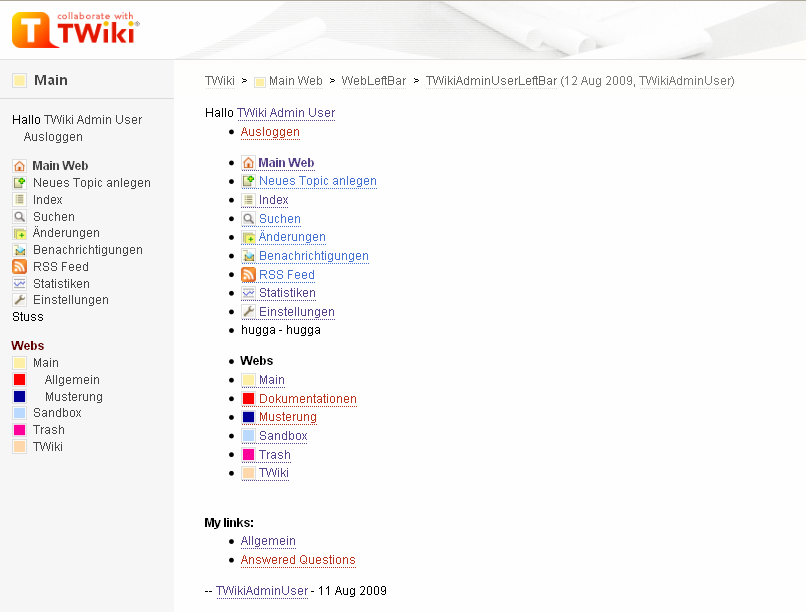
Thanks for the help. I tried all that, but still, the new bar just will not load. I still only see the standard
WebLeftBar. See attached screenshot with the 'TWikiAdminUserLeftBar' Topic and the actual leftbar...
--
ChristophSchmitz - 2009-08-12
Problem solved:
The <user>LeftBar was set up with
WebLeftBar as the parent topic. Deleted it and set it up again. It now works like a charm.
Thanks for the help, Sean and Peter.
--
ChristophSchmitz - 2009-08-12
--
ChristophSchmitz - 2009-08-12
 If you answer a question - or someone answered one of your questions - please remember to edit the page and set the status to answered. The status selector is below the edit box.
*


 png
png 


 Site map
 Blog web

 Search
 Changes
 RSS Feed
 Notifications
 Statistics
 Preferences
 Register new user
 Support Forum
  Ask a question
 Open questions
  My recent questions
 Get quick help in #twiki IRC channel





 Ideas, requests, problems regarding TWiki? Send feedback. Ask community in the support forum.