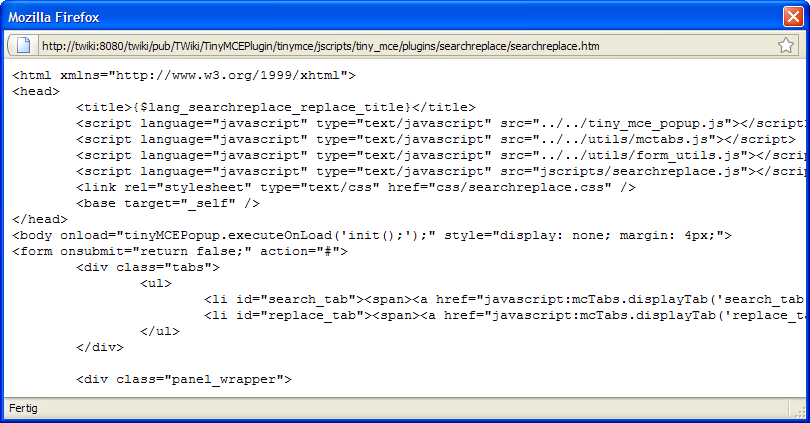
SID-00191: Search/Replace does not work
| Status: |  Unanswered Unanswered |
TWiki version: | 4.2.4 | Perl version: | 5.8.8 |
| Category: | CategoryEditing | Server OS: | Windows Server 2008 | Last update: | 17 years ago |
If I do the same e.g. on TWiki Support site, the search replace form is shown correctly, so I assume that it doesnt depenon my browsers settings... My Configuration: http://twiki.org/p/pub/Support/SID-00150/TWiki_Configuration.htm
 Thanks in advance
Lars -- LarsNeideck - 16 Mar 2009
Discussion and Answer
Sorry, everything works now. It was the Apache Configuration / Mime Type stuff. -- LarsNeideck - 17 Mar 2009 If you answer a question - or someone answered one of your questions - please remember to edit the page and set the status to answered. The status selector is below the edit box.
 - Search+Replace Code Window:

| SupportForm | |
|---|---|
| Status | Unanswered |
| Title | Search/Replace does not work |
| SupportCategory | CategoryEditing |
| TWiki version | 4.2.4 |
| Server OS | Windows Server 2008 |
| Web server | Apache 2.2 |
| Perl version | 5.8.8 |


| I | Attachment | History | Action | Size | Date | Who | Comment |
|---|---|---|---|---|---|---|---|
 png png |
SearchReplace.PNG | r1 | manage | 37.6 K | 2009-03-16 - 13:51 | LarsNeideck | Search+Replace Code Window |
 Edit | Attach |
 Topic revision: r2 - 2009-03-17 - LarsNeideck


 Site map
 Blog web

 Search
 Changes
 RSS Feed
 Notifications
 Statistics
 Preferences
 Register new user
 Support Forum
  Ask a question
 Open questions
  My recent questions
 Get quick help in #twiki IRC channel




 Ideas, requests, problems regarding TWiki? Send feedback. Ask community in the support forum.
Copyright © 1999-2026 by the contributing authors. All material on this collaboration platform is the property of the contributing authors.