Question
I find the Jump form (upper right corner of topics) to be an interesting but nonintuitive thing. Most web sites/pages have Search in that position. It appears I'm not alone in my opinion; as management has asked me to determine how difficult it would be to replace the Jump box with Search functionality.3.27. I found WebPreferencesAddingASearchButton which looks... non-trivial. However, it did haave the enticing statement "The TWiki core will be enhanced at some point to allow this." As that topic is 18 months old, I wonder if there's anything helpful and new in 01 September 2004?Environment
Answer
You are right that this is a much needed functionality. A more recent discussion about it can be found in Codev.GoIsSearch. -- ArthurClemens - 07 Nov 2004
That's what I did in my WebTopBar on my intranet:
Below is my WebTopBar : |

|

<noautolink>
</form><div class="twikiLeft">
<a href="%WIKILOGOURL%"><img src="%WIKILOGOIMG%" border="0" alt="Home"/></a>
</div>
<div class="twikiRight twikiSearchBox">
<table border="0" cellpadding="0" cellspacing="0">
<tr>
<td>
<!--
<form action="%SCRIPTURLPATH%/view%SCRIPTSUFFIX%"><input type="submit" class="twikiSubmit" value="Go:" /><input type="text" name="topic" value="%URLPARAM{ "search" encode="entity" }%" size="16" /></form>
-->
<A href="javascript:openPopupWin('/twiki/pub/ScientificCalculator2.1/popup.html')">calc</a> <form action="http://www.google.com/search"><input type="submit" class="twikiSubmit" value="Google:" /><input type="text" name="q" value="" size="16" /></form>%BR%
<A TARGET="_blank" HREF="http://RT.company.com/rt3/">RqTrk</A> <form action="%SCRIPTURLPATH%/view%SCRIPTSUFFIX%/%INCLUDINGWEB%/WebSearch"><input type="submit" class="twikiSubmit" value="Search:" /><input type="text" name="search" value="%URLPARAM{ "search" encode="entity" }%" size="16" />%BR%
Search [[SearchHelp][Help]], [[%INCLUDINGWEB%.WebSearchAdvanced][Adv.]] <input type="checkbox" class="twikiCheckbox" id="web" name="web" %CALC{$IF($EXACT(%URLPARAM{web}%,),,checked="checked")}% /><label for="web">All site</label>%BR%
<input type="radio" class="twikiRadioButton" id="textbody" name="scope" value="text" /><label for="textbody">Text body </label>
<input type="radio" class="twikiRadioButton" id="topictitle" name="scope" value="topic" checked="checked" /><label for="topictitle">Title </label>
<input type="radio" class="twikiRadioButton" id="both" name="scope" value="all" %CALC{$IF($EXACT(%URLPARAM{scope}%,all),checked="checked")}% /><label for="both">Both </label>
</form>
</td></tr>
</table>
</div>
-- GillesEricDescamps - 10 Nov 2004
Thanks Giles! I'm impresssed.
One of our people made a simpler change that only searches the current web (below). Yours is more flexible but I'll put his here for completeness and for anyone who doesn't need the "advanced" search capability (etc :-):
<div class="twikiLeft">
  <a href="%WIKILOGOURL%"><img src="%WIKILOGOIMG%" border="0" alt="Home"/></a>
</div>
<div class="twikiRight twikiSearchBox">
  <table border="0" cellpadding="0" cellspacing="0">
  <tr>
    <td><label for="go">Search this Web: </label><input type="text" id="search" name="search" size="16" /></td>
  </tr>
  </table>
</div>
-- VickiBrown - 12 Nov 2004
Two more details. I found that on people with small screens (1280x1024) they tend to have narrow browsers, and with my big logo,
stuff from the top bar would fall onto the main page breaking completely the layout and looking soo ugly.
This was particulary true with Internet Explorer.
Go to .../pub/TWiki/PatternSkin/layout.css, find the ".twikiTopBar definition, and add an "overflow:hidden".
.twikiTopBar {
        height:90px;      /* I've a taller than standard 60px logo */
    overflow:hidden
}
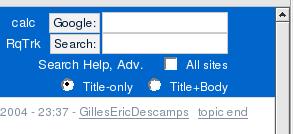
| Second, your topic made me think, and I enhanced my WebTopBar to show only two buttons (instead of three) for selecting the depth of the search. I based this on the fact that everybody is used to search emails in outlook and they know to search "subject-only" or "subject+body". So I replaced the labels with : "title-only" and "title+body". (I like the word body because it's explicit that the search will look inside the pages, but will ignore the attachments. |

|
<noautolink>
</form><div class="twikiLeft">
<a href="%WIKILOGOURL%"><img src="%WIKILOGOIMG%" border="0" alt="Home"/></a>
</div>
<div class="twikiRight twikiSearchBox">
<table border="0" cellpadding="0" cellspacing="0">
<tr>
<td>
<!--
<form action="%SCRIPTURLPATH%/view%SCRIPTSUFFIX%"><input type="submit" class="twikiSubmit" value="Go:" /><input type="text" name="topic" value="%URLPARAM{ "search" encode="entity" }%" size="16" /></form>
-->
<form action="http://www.google.com/search"><input type="submit" class="twikiSubmit" value="Google:" /><input type="text" name="q" value="" size="16" /></form>%BR%
<form action="%SCRIPTURLPATH%/view%SCRIPTSUFFIX%/%INCLUDINGWEB%/WebSearch"><input type="submit" class="twikiSubmit" value="Search:" /><input type="text" name="search" value="%URLPARAM{ "search" encode="entity" }%" size="16" />%BR%
Search [[SearchHelp][Help]], [[%INCLUDINGWEB%.WebSearchAdvanced][Adv.]] <input type="checkbox" class="twikiCheckbox" id="web" name="web" %CALC{$IF($EXACT(%URLPARAM{web}%,),,checked="checked")}% /><label for="web">All site</label>%BR%
<input type="radio" class="twikiRadioButton" id="textbody" name="scope" value="text" /><label for="textbody">Text body </label>
<input type="radio" class="twikiRadioButton" id="topictitle" name="scope" value="topic" checked="checked" /><label for="topictitle">Title </label>
<input type="radio" class="twikiRadioButton" id="both" name="scope" value="all" %CALC{$IF($EXACT(%URLPARAM{scope}%,all),checked="checked")}% /><label for="both">Both </label>
</form>
</td></tr>
</table>
</div>
Is closer to what a standard site would need - but having separate boxes depending on whether the terms are destined for google or twiki's search seems overkill. Any idea how to have a radio button and bounce the search to google if the type = google?
-- MartinCleaver - 02 Jan 2005


| I | Attachment | History | Action | Size | Date | Who | Comment |
|---|---|---|---|---|---|---|---|
 jpg jpg |
twikisearch01.jpg | r1 | manage | 17.1 K | 2004-11-10 - 22:40 | UnknownUser | right of WebTopBar |
| jpg |
twikisearch02.jpg | r1 | manage | 8.8 K | 2004-11-13 - 02:11 | UnknownUser |

Topic revision: r11 - 2007-01-04 - TWikiGuest


 Site map
 Blog web

 Search
 Changes
 RSS Feed
 Notifications
 Statistics
 Preferences
 Register new user
 Support Forum
  Ask a question
 Open questions
  My recent questions
 Get quick help in #twiki IRC channel




 Ideas, requests, problems regarding TWiki? Send feedback. Ask community in the support forum.
Copyright © 1999-2026 by the contributing authors. All material on this collaboration platform is the property of the contributing authors.