Question
Help, I'm locked out of configure! I upgraded from 4.0.0 to 4.0.5, everything worked fine, including configure. I wanted to install some new plugins (DirectedWedMapPlugin). After installing, I went to activate them in configure. Configure wants me to login using TWikiName and password, I provide mine, I'm in the TWikiAdmin group, but configure does not accept them. Help - how do I get back into configure? Thanks, DanEnvironment
Answer
 If you answer a question - or someone answered one of your questions - please remember to edit the page and set the status to answered. The status selector is below the edit box.
 $TWiki::cfg{Password} line in twiki/lib/LocalSite.cfg
-- PeterThoeny - 07 Nov 2006
This does not help. I removed the said line, and still get the prompt.
The prompt is strange - I'm attaching the dialog - it looks like some mix-up.
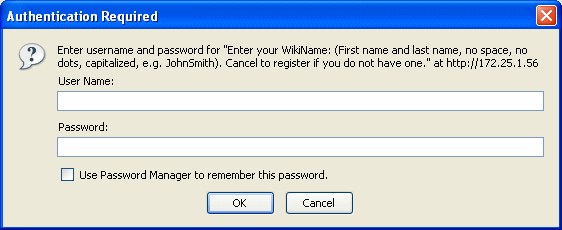 -- DanBarDov - 09 Nov 2006
When you upgraded you probably also installed a more secure setup for Apache that limits the access to the configure script.
So you need to use your TWiki username and password to access configure.
And the special configure password to SAVE your configure settings.
You can also setup the Apache config protection of configure to allow access from internal IP addresses and no password. For an Intranet site you may ommit this completely. It is only on the public Internet that you need the double protection.
-- KennethLavrsen - 10 Nov 2006
Thank you for your answer.
However:
I did not do anything with Apache - unless you mean twiki 4.0.5 comes with a more elaborate security scheme.
The dialog will not take my Twiki name and password. Whatever the authentication is, it fails. I tried it with several usernames/password, including one I created from scratch in order to try to get in.
I do have the special configure password. But until I get into configure its pretty much useless.
Your last remark about changing the Apache config protection - how do I do that? Can you point to an explanation, or give one? I sure as hell don't need any double protection.
Dan
-- DanBarDov - 12 Nov 2006
Don't know if you have had an answer to this problem but we have had the same problem and just figured it out today.
The 'twiki.conf' file that is referenceed in the 'apache2.conf' file (see http://twiki.org/cgi-bin/view/TWiki/ApacheConfigGenerator
-- DanBarDov - 09 Nov 2006
When you upgraded you probably also installed a more secure setup for Apache that limits the access to the configure script.
So you need to use your TWiki username and password to access configure.
And the special configure password to SAVE your configure settings.
You can also setup the Apache config protection of configure to allow access from internal IP addresses and no password. For an Intranet site you may ommit this completely. It is only on the public Internet that you need the double protection.
-- KennethLavrsen - 10 Nov 2006
Thank you for your answer.
However:
I did not do anything with Apache - unless you mean twiki 4.0.5 comes with a more elaborate security scheme.
The dialog will not take my Twiki name and password. Whatever the authentication is, it fails. I tried it with several usernames/password, including one I created from scratch in order to try to get in.
I do have the special configure password. But until I get into configure its pretty much useless.
Your last remark about changing the Apache config protection - how do I do that? Can you point to an explanation, or give one? I sure as hell don't need any double protection.
Dan
-- DanBarDov - 12 Nov 2006
Don't know if you have had an answer to this problem but we have had the same problem and just figured it out today.
The 'twiki.conf' file that is referenceed in the 'apache2.conf' file (see http://twiki.org/cgi-bin/view/TWiki/ApacheConfigGenerator ), has a section about the 'configure' script that controls the authentication.
You may be trying to access 'configure' from a different IP address as is defined in this section.
Hope this helps
-- DuncanKinnear - 21 Nov 2006
Me too! I'm attempting a new install of TWiki 4.0.5 with Apache 2.0 on Suse Linux 9.3, and get stuck at the "Authentication Required" dialog shown above in the posting from DanBarDov. Same result accessing via localhost or from any other computer in my LAN. Hacked for hours, totally stuck.
-- VaughnSpurlin - 25 Nov 2006
-- JohnVKnowles - 29 Nov 2006
Same problem. Tried to change the Apache script but still gettting the login prompt with no love for my username.
-- JohnVKnowles - 29 Nov 2006
goto the twiki/bin dir, edit the .htaccess file. In it there will be a section that references configure.*, and contains lines to the effect of
), has a section about the 'configure' script that controls the authentication.
You may be trying to access 'configure' from a different IP address as is defined in this section.
Hope this helps
-- DuncanKinnear - 21 Nov 2006
Me too! I'm attempting a new install of TWiki 4.0.5 with Apache 2.0 on Suse Linux 9.3, and get stuck at the "Authentication Required" dialog shown above in the posting from DanBarDov. Same result accessing via localhost or from any other computer in my LAN. Hacked for hours, totally stuck.
-- VaughnSpurlin - 25 Nov 2006
-- JohnVKnowles - 29 Nov 2006
Same problem. Tried to change the Apache script but still gettting the login prompt with no love for my username.
-- JohnVKnowles - 29 Nov 2006
goto the twiki/bin dir, edit the .htaccess file. In it there will be a section that references configure.*, and contains lines to the effect of Deny all and Allow from 127.0.0.1, 198.186.1.0
it probably has a line like require user {Administrator} that should be changed to your user, very temporarily, you could comment out the entire section, but be aware that you are then opening yourself to hackers.
-- SvenDowideit - 29 Nov 2006
The answer regarding:
The 'twiki.conf' file that is referenceed in the 'apache2.conf' file (see http://twiki.org/cgi-bin/view/TWiki/ApacheConfigGenerator), has a section about the 'configure' script that controls the authentication.
was it!
(I had to change the ip address allowed to run configure)
Thanks.
-- DanBarDov - 12 Dec 2006
I guess this is answered, then.
-- CrawfordCurrie - 14 Dec 2006
Regarding "Allow from 127.0.0.1, 198.186.1.0" in the .htaccess template: I have found that separating IP numbers with a comma (e.g. 127.0.0.1, 198.186.1.0) caused failure to authenticate. Separating with spacebar (127.0.0.1 198.186.1.0) worked. You can also do wildcards, e.g. 198.186. will actually work (good for dialup modem users or non-static IPs).
So maybe someone should edit the bin/.htaccess template (for the next release) and remove the comma. I created a bug report for this suggestion at http://develop.twiki.org/~twiki4/cgi-bin/view/Bugs/Item3572. Update: The TWiki developers have made the modifications, is now in MAIN and Patch04x01 branches.
-- EricWoods - 06 Feb 2007
The other problem that I found was with the file permissions of .htpasswd
If only the owner can read and write (600) then I have the same problems as above. If both group and others can also read (644) it works. Similar problems at CannotRunTheConfigure. Is it insecure to increase the permissions on this file so much? Can I change the ownership of the file or something so that it does not need so many permissions? - Update: I am on a shared host, so I cannot chown (probably because I am not the superuser). I can chgrp, but only to a group I am a member of, and I don't seem to be in the same group as "www". So the end result is I can change permissions, but not ownership.
suggests to change permissions so that "the only one that can read (.htpasswd) file in the "secret" directory is the owner and the server".
Whereas
http://www.calpoly.edu/~www/htaccess_setup.html
suggests granting read access to 'group' and 'other' for the files .htaccess and .htpasswd
I also tried going to www.mytwikidomain.com/.htaccess and www.mytwikidomain.com/.htpasswd in a web browser, and downloading it in a dedicated downloading app (NetTransport) but both failed due to "Forbidden". Both files had read permissions for 'owner', 'group' and 'other'. So maybe it is safe to leave read permissions for all. Though it is not a definitive proof - maybe it leaves them vulnerable in a way that I (not an expert) am not aware of...
-- EricWoods - 20 Feb 2007
anwsered and resolved.
-- DanBarDov - 20 Feb 2007


| I | Attachment | History | Action | Size | Date | Who | Comment |
|---|---|---|---|---|---|---|---|
 gif gif |
Image3.gif | r1 | manage | 9.4 K | 2006-11-09 - 08:48 | UnknownUser |

Topic revision: r17 - 2007-07-25 - FranzJosefGigler


 Site map
 Blog web

 Search
 Changes
 RSS Feed
 Notifications
 Statistics
 Preferences
 Register new user
 Support Forum
  Ask a question
 Open questions
  My recent questions
 Get quick help in #twiki IRC channel


 Ideas, requests, problems regarding TWiki? Send feedback. Ask community in the support forum.
Copyright © 1999-2026 by the contributing authors. All material on this collaboration platform is the property of the contributing authors.