WundergroundPlugin
Provides weather forecast for a specified place, using the Weather Underground service.Syntax Rules
%WEATHER{"5-digit-zip" options...}% %WEATHER{"City, State" options...}% %WEATHER{"City, Country" options...}% %WEATHER{"AirportCode" options...}% %WEATHER{"lat,long" options...}% %WEATHER{"IP:address" options...}% %WEATHER{ options...}% Expands to the weather forecast obtained from Weather Underground's weather API for the specified place as a table. Additional information can be obtained by hovering over the table cells. Hyperlinks to the full forecast and to the terms-of-service page are included. Note that because some data is displayed conditionally, the table size may vary. The default location is the IP address of the Wiki client. IP geolocation is imprecise, and so shouldn't be relied upon. It definitely won't work for private IP addresses.lat,long are in decimal degrees.
The Weather Underground servers are queried at most every 15 minutes for the same data to reduce the chance of exceeding the license quota. Cached data is served between queries.
Options
Options are specified in the usual format -- each option is of the formname="value", where the quotes are required. multiple options are separated by spaces.
language
Specifies the language of the forecast. Default is "en". Note that the tags are not the ISO country or language codes.See the Weather Underground documentation for the list of supported languages and tags.
heading
Specifies whether or not to include the place name and forecast time before the table. Default is true.tableattributes
Specifies a string to be passed to the %TABLE% directive of the TablePlugin. May be used to customize the formatting of the table. Note that double quotes must be escaped with a backslash.units
Specifies the units for measurements: ' metric ' uses SI units (°C, km/H, etc); ' us ' uses English units (°F, mi/H, etc). The default is us.future
Specifies how many days beyond current conditions to forecast. 0 means the rest of today. 1 will include tomorrow. The maximum value is 4 (a Weather underground limit).nocache
If set to a true value, the cache will be ignored. Use only if your license is unlimited and you want up-to-the-second data. This is rarely wise.Issues
- At this writing, the Weather Underground geolocator does not support IPv6 addresses.
- Strings initiated by the plugin do not follow the language codes. They can be replaced using %MAKETEXT%
- Weather Underground uses observations from its own network of stations. These may (or may not) agree with official observing stations.
- Links to the Weather Underground website in this document may have changed by the time you read this.
- %WEATHER% can not be embedded in a TML table (work-around is to embed in an HTML table).
Examples
%WEATHER{"85003"}% %WEATHER{"85003"}% %WEATHER{"London, England" tableattributes="tableframe=\"border\"" future="0"}% %WEATHER{"London, England" tableattributes="tableframe=\"border\"" future="0"}% %WEATHER{"CDG" language="fr" units="metric" tableattributes="databg=\"none\"" heading="1" future="3"}% %WEATHER{"CDG" language="fr" units="metric" tableattributes="databg=\"none\"" heading="1" future="3"}%The plugin is not enabled on this system. Here is a screenshot showing the expansion of the examples. It does not exactly match the latest version of plugin. Of course the links and hover text are not active in this screenshot.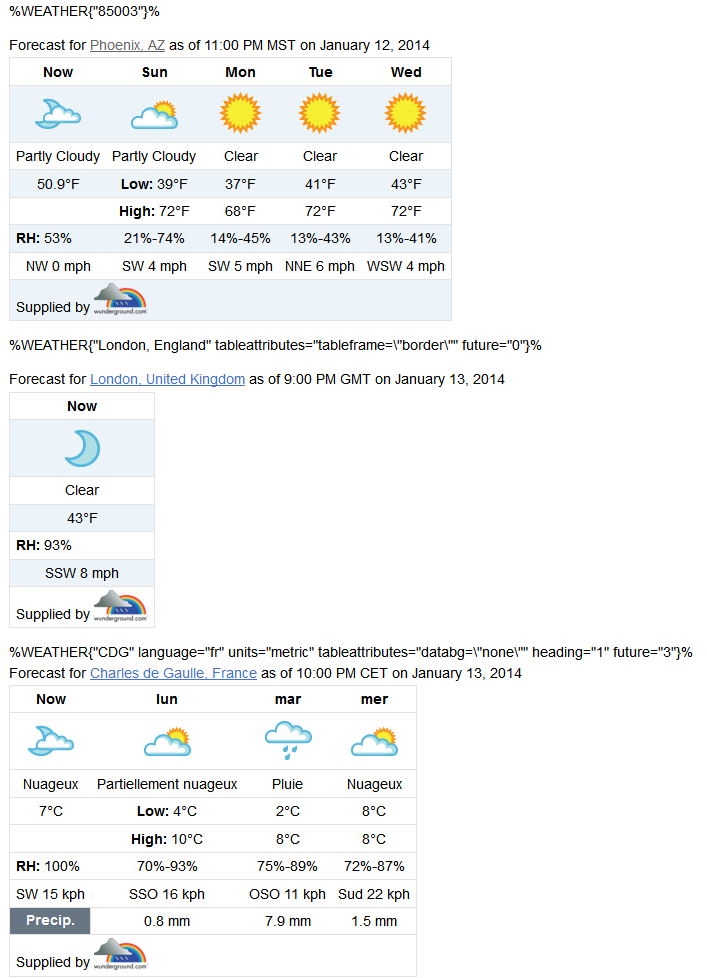 .
.
Plugin Settings
There are no user settings for this plugin. The API key is stored in{Plugins}{WundergroundPlugin}{ApiKey}, found in the Extensions section of the configure script. This can only be done by the wiki administrator.
Plugin release notes
This replaces the obsolete GoogleWeatherPlugin. It provides better data and some additional location options. It also provides more detailed data than GoogleWeatherPlugin did - hovering over most elements is worthwhile. It should service the %WEATHER% macros in existing topics, although the resulting table size and contents vary. Some options from GoogleWeatherPlugin are not required/used by WundergroundPlugin; they are ignored for compatibility with existing topics, but should be removed from topics when the opportunity arises. As noted above, a WU license key is required (but for many applications, a free license suffices.) This release is alpha quality - this plugin is not completely internationalized.Plugin Installation Instructions
Note: You do not need to install anything on the browser to use this plugin. The following instructions are for the administrator who installs the plugin on the TWiki server. Weather Underground requires a license key to use it's API. Free licenses are available, although for heavy use fees are required. To use this plugin, you must obtain a license key. Weather Underground's website describes the options. At this writing, obtaining a key is a two-step process. Create an account, then obtain the license. The plugin author has no connection to Weather Underground, and does not vouch for the service provided. You must determine whether the service is suitable for your needs, and obey the licensing restrictions that accompany your license. The plugin only provides an interface to the service from TWiki topics. Note that the attribution to Weather Underground is required by the license.- Download the ZIP file from the Plugin Home (see below)
- Unzip WundergroundPlugin.zip in your twiki installation directory. Content:
File: Description: data/TWiki/WundergroundPlugin.txtPlugin topic lib/TWiki/Plugins/WundergroundPlugin.pmPlugin Perl module lib/TWiki/Plugins/WundergroundPlugin/Config.specConfiguration pub/TWiki/WundergroundPlugin/wundergroundLogo_4c.pngLogo master pub/TWiki/WundergroundPlugin/wundergroundLogo_4c_small.pngLogo pub/TWiki/WundergroundPlugin/examples.pngScreen capture - Configure the Plugin:
- You must Obtain a license key from Weather Underground's website
- Then, use the configure script to install the key in
{Plugins}{WundergroundPlugin}{ApiKey}, found in theExtensionssection. - Install your API key where indicated.
- Then, use the configure script to install the key in
- Finally check the
{Plugins}{WundergroundPlugin}{Enabled}box, found in thePluginssection of configure to enable the Plugin.
- You must Obtain a license key from Weather Underground's website
Plugin Info
| Plugin Author: | TWiki:Main.TimotheLitt |
| Copyright: | © 2010, 2013, TWiki:Main.TimotheLitt |
| License: | GPL (GNU General Public License) |
| Plugin Version: | 2014-01-12 (V1.001) |
| Change History: | |
| 2014-01-12 | Initial version |
| 2014-01-13 | V1.01 - Packaging cleanup, fix utf-8 encodings |
| TWiki Dependency: | $TWiki::Plugins::VERSION 1.1 |
| CPAN Dependencies: | CPAN:JSON CPAN:Data::Serializer CPAN:Encode |
| Other Dependencies: | none |
| Perl Version: | 5.008 |
| Benchmarks: |
GoodStyle nn%, FormattedSearch nn%, WundergroundPlugin nn% |
| Plugin Home: | http://TWiki.org/cgi-bin/view/Plugins/WundergroundPlugin |
| Feedback: | http://TWiki.org/cgi-bin/view/Plugins/WundergroundPluginDev |
| Appraisal: | http://TWiki.org/cgi-bin/view/Plugins/WundergroundPluginAppraisal |
- 13 Jan 2014 

| I | Attachment | History | Action | Size | Date | Who | Comment |
|---|---|---|---|---|---|---|---|
 zip zip |
WundergroundPlugin.zip | r2 r1 | manage | 161.0 K | 2014-01-14 - 00:17 | UnknownUser | Plugin release kit |

Topic revision: r3 - 2014-01-14 - TimotheLitt


 Site map
 Blog web

 Index
Index Search
 Search extensions
 Search by tags
 Changes
 Notifications
 RSS Feed
 Statistics
 Preferences
 Community
  Readme first!
 Rate extensions!
 Add-Ons
  Development topics
 Idea topics
 Plugins
  Development topics
 Idea topics
 Skins
Skins  Development topics
 Idea topics
 Code Contribs
  Development topics
 Idea topics


 Account





 Ideas, requests, problems regarding TWiki? Send feedback. Ask community in the support forum.
Copyright © 1999-2026 by the contributing authors. All material on this collaboration platform is the property of the contributing authors.