Message Board Plugin
This is a database based message board plugin for the TWiki system. Users can post and read messages from a database as if it was a message board fixed on the wall.
Syntax Rules
Use the TWiki Tag
%MESSAGE_BOARD% with options:
| Option Name |
Value Range |
Description |
displayOnly |
'0' or '1' |
When set to 1 causes Message Board to just display messages, not allowing users to post new messages. When set to 0 will display posted messages and allow users to post new messages. Defaults to 0. |
messageOrder |
'ASC', 'DESC' |
Chooses the order of messages, ASC meaning newer messages showing first, DESC meaning older messages showing first. Defaults to ASC. |
MessageBoardPlugin Screen Shots
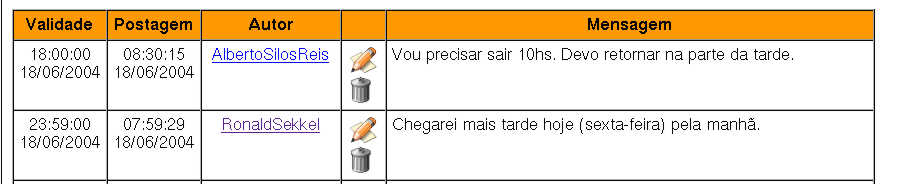
- This is the look'n'feel of the MessageBoard posted messages. Please don't take this too seriously: it's pretty customized (I've translated about all texts and messages so folks at my company could read it).
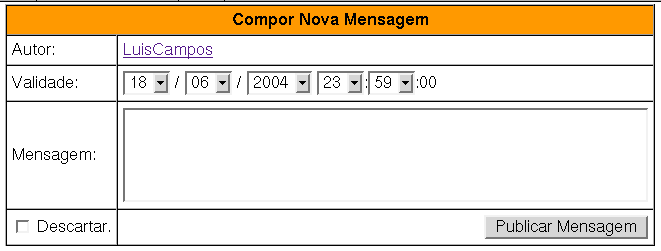
- And this is the message posting form (displayed under the posted messages). Again, don't take this too seriously, its almost completelly translated to portuguese (and the plugin original is english).
MessageBoardPlugin Global Settings
- One line description, shown in the TextFormattingRules topic:
- Set SHORTDESCRIPTION = Database-Based message board plugin.
- Color Settings
- Set TABLE_HEAD_COLOR = #E3E9A5
- Set REVERSE_LINE_COLOR = #CCCCCC
- Icons and Image Settings
- Set TRASH_CAN_ICON_LINK =

- Set PENCIL_ICON_LINK =

- Database Settings
- Set DB_DRIVER = mysql
- Set DB_SERVER = ip_address or hostname here
- Set DB_SERVER_PORT = 3306
- Set DB_DATABASE = message_board
- Set DB_TABLE = message
- Set DB_USER = board
- Set DB_PASSWORD = password
- Plugin Messages (so you can internationalize them):
- Error opening connection to the database
- Set MSG_DB_CONNECT_ERROR =
 Error connecting to the database
- Error closing connection to the database
- Set MSG_DB_CLOSE_ERROR = Error closing the database connection
- Error during query preparation
- Set MSG_DB_PREPARE_ERROR = Error preparing query
- Error during data fetch
- Set MSG_DB_FETCH_ERROR = Error fetching data from database
- Error during query execution
- Set MSG_DB_EXECUTE_ERROR = Error executing query
- No data found error
- Set MSG_DB_NO_DATA_ERROR = No data found
- Update error message
- Set MSG_DB_UPDATE_ERROR = Error updating data
- Insert error message
- Set MSG_DB_INSERT_ERROR = Error inserting data
- Debug plugin: (See output in
data/debug.txt)
Plugin Installation Instructions
Note: You do not need to install anything on the browser to use this plugin. The following instructions are for the administrator who installs the plugin on the server where TWiki is running.
- Download the ZIP file from the Plugin web (see below)
- Unzip
MessageBoardPlugin.zip in your twiki installation directory. Content: | File: | Description: |
data/TWiki/MessageBoardPlugin.txt | Plugin topic |
data/TWiki/MessageBoardPlugin.txt,v | Plugin topic repository |
lib/TWiki/Plugins/MessageBoardPlugin.pm | Plugin Perl module |
pub/TWiki/MessageBoardPlugin/trashcan.png | Trash Can Icon |
pub/TWiki/MessageBoardPlugin/editicon.png | Pencil and Paper Icon |
- Create a table into your database using (this is mysql SQL, the only DB supported at the moment)
    CREATE DATABASE message_board;

    CREATE TABLE message(
      id INT PRIMARY KEY AUTO_INCREMENT,
      author VARCHAR(50) NOT NULL,
      due DATETIME NOT NULL,
      posted DATETIME NOT NULL,
      msg TEXT NOT NULL,
      dropped ENUM( 'Y', 'N' ) NOT NULL DEFAULT 'N'
    )
- Create a new user and give it appropriated permissions:
      GRANT SELECT, INSERT, UPDATE, DELETE
        ON messsage_board.message
        TO board IDENTIFIED BY 'b0aRd'
- Test if the plugin is correctly installed:
- Open a MessageBoardTestArea and insert
%MESSAGE_BOARD{ messageOrder="DESC" }% into the topic. Preview, save and try to post a message.
Plugin Info
Related Topics: TWikiPreferences,
TWikiPlugins,
DefaultPlugin
--
TWiki:LuisCamposDeCarvalho
- 17 Jun 2004


 md5
md5  tgz
tgz 


 Site map
 Blog web

 Index
Index Search
 Search extensions
 Search by tags
 Changes
 Notifications
 RSS Feed
 Statistics
 Preferences
 Community
  Readme first!
 Rate extensions!
 Add-Ons
  Development topics
 Idea topics
 Plugins
  Development topics
 Idea topics
 Skins
Skins  Development topics
 Idea topics
 Code Contribs
  Development topics
 Idea topics


 Account


 Ideas, requests, problems regarding TWiki? Send feedback. Ask community in the support forum.