Question
How can i show the attachment table by default?Environment
Answer
Do you mean: after a file has been attached? Or how to make it fold out? If so: on a particular page or on all pages (i.e. to disable twisty collapse). -- ArthurClemens - 30 May 2006 The attachment table (listing the attached files) should be visible ("fold out") by default on all pages cause the small cell "show attachments" will be overlooked. But i don't know how to manage this. I've red something about that twisty plugin but didn't understand how it could help. Cookies are an other option but i'd like to handle this without too much coding... if it's possible. -- FrankSpangenberg - 30 May 2006 TWiki 4.0.2: go totemplates dir and edit attachtables.pattern.tmpl. Change the following part:
%{ Header for topic attachment table }%
%TMPL:DEF{ATTACH:files:header}%
<div class="twikiAttachments">
%TABLE{tableborder="0" cellpadding="0" cellspacing="0" databg="#FFFFFF" id="twikiAttachmentsTable" summary="%MAKETEXT{"Topic attachments"}%" caption="%MAKETEXT{"Topic attachments"}%" }%
<span id="attachmentsshow" class="twistyMakeOpaque"><a href="#" class="twistyTrigger">%ICON{toggleopen}%<span class="twikiLinkLabel" id="attachmentsshowlink">%MAKETEXT{"Show attachments"}%</span></a></span><span id="attachmentshide" class="twistyHidden twistyMakeOpaque"><a href="#" class="twistyTrigger">%ICON{toggleclose}%<span class="twikiLinkLabel" id="attachmentshidelink">%MAKETEXT{"Hide attachments"}%</span></a></span>
<div id="attachmentstoggle" class="twistyMakeHidden twistyRememberSetting">
%TMPL:P{ATTACH:files:header(toprow)}%
%TMPL:END%
to:
%{ Header for topic attachment table }%
%TMPL:DEF{ATTACH:files:header}%
<div class="twikiAttachments">
%TMPL:P{context="TablePluginEnabled" then="ATTACH:files:tableformat"}%
<div>
%TMPL:P{ATTACH:files:header(toprow)}%
%TMPL:END%
This will remove the twisty from the attachment table.
-- ArthurClemens - 30 May 2006
Thanks, it's working fine.
-- FrankSpangenberg - 31 May 2006
Unfortunately, overriding the template by a custom skin is not working here because of the reading order of this template file. Best solution I see is to make the change in attachtables.pattern.tmpl (Bugs:Item2564 ).
-- ArthurClemens - 29 Jun 2006
Please tell me how you can modify the tables that contain the attachments. I want to remove the "time" on the table, to decrease the size of the column displaying the name of the file, and increase the size, dramatically of the "Comment" section.
This would mean that the Comment section would have more room to describe the file that is being uploaded.
Can you give me direction on how to do this. I've reviewed the attach.table.tmpl but it doesn't show sizing of columns.
Thanks
-- RichardHobbs - 13 May 2007
The table attributes are set in
).
-- ArthurClemens - 29 Jun 2006
Please tell me how you can modify the tables that contain the attachments. I want to remove the "time" on the table, to decrease the size of the column displaying the name of the file, and increase the size, dramatically of the "Comment" section.
This would mean that the Comment section would have more room to describe the file that is being uploaded.
Can you give me direction on how to do this. I've reviewed the attach.table.tmpl but it doesn't show sizing of columns.
Thanks
-- RichardHobbs - 13 May 2007
The table attributes are set in attachtables.pattern.tmpl.
-- ArthurClemens - 13 May 2007
 addform.classic.tmpl 0 k 0444
 addform.pattern.tmpl 0 k 0444
 addform.tmpl 0 k 0444
 attach.classic.tmpl 2 k 0444
 attach.pattern.tmpl 3 k 0444
 attach.tmpl 2 k 0444
 attachagain.classic.tmpl 1 k 0444
 attachagain.pattern.tmpl 2 k 0444
 attachagain.tmpl 1 k 0444
 attachnew.classic.tmpl 0 k 0444
 attachnew.pattern.tmpl 0 k 0444
 attachnew.tmpl 0 k 0444
 attachtables.classic.tmpl 1 k 0444
 attachtables.kupu.tmpl 0 k 0444
 attachtables.pattern.tmpl 2 k 0444
 attachtables.tmpl
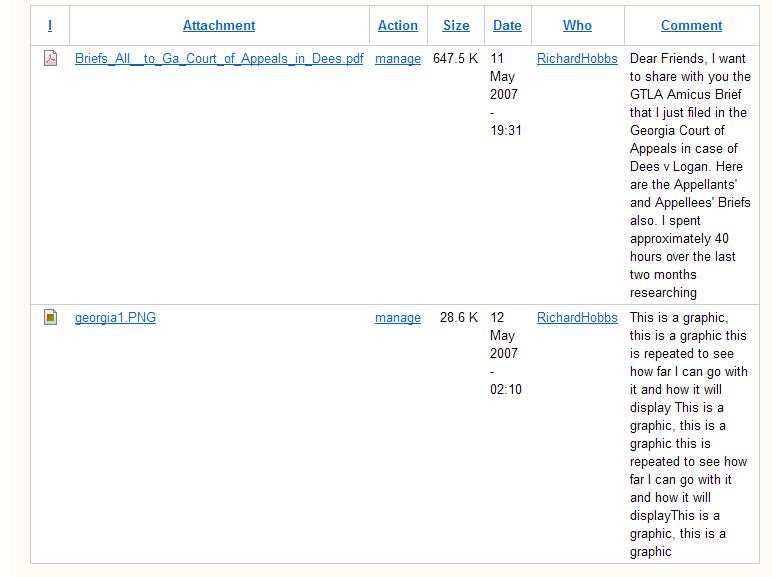
THESE ARE THE FILES i CAN MANAGE FROM MY CONTROL PANEL. I've looked at attachtables.pattern.tmpl and cannot find where to modify the screen. I'll attach what it looks like below -- RichardHobbs - 14 May 2007 I've uploaded below the jpg of my website attachment table. I suspect that the table is self-adjusting, ergo, I must tell members to name the files with short names, and then explain them away in the comments. I still find the TIME display unnecessary. * This shows the uneven columns, I want to get rid of time, and increase size of comment column:
 -- RichardHobbs - 14 May 2007
There are 2 ways to change underscores in attachment link labels to spaces.
-- RichardHobbs - 14 May 2007
There are 2 ways to change underscores in attachment link labels to spaces.
- 1. Using javascript
- In
attachtables.pattern.tmplreplace the javascript with this:<script type="text/javascript"> //<![CDATA[ var table = document.getElementById("twikiAttachmentsTable"); if (table) { var count = table.getElementsByTagName("tr").length - 1; var countStr = "(" + count + ")"; var showlink = document.getElementById('attachmentslistshow'); if (showlink != undefined) showlink.firstChild.innerHTML += " " + countStr; var hidelink = document.getElementById('attachmentslisthide'); if (hidelink != undefined) hidelink.firstChild.innerHTML += " " + countStr; // START SPACE OUT UNDERSCORE LINK LABELS var links = table.getElementsByTagName("a"); var i, ilen = links.length; for (i=0; i<ilen; ++i) { if (links[i].nodeType == 1) { var linkText = links[i].firstChild.data; if (linkText) { links[i].firstChild.data = linkText.replace(/_/g, " "); } } } // END SPACE OUT UNDERSCORE LINK LABELS } //]]> </script>
- In
- 2. Using SpacedWikiWordPlugin
- Install and enable the plugin
- Set variable
SPACE_OUT_UNDERSCORE_LINKSto1 - Variable
SPACE_OUT_WIKI_WORD_LINKSmay be set to0
- Set variable
- In
attachtables.pattern.tmpl, look for this line:%{ A basic row definition, for attachment table and attach screen }%- In that block, change
%A_FILE%to<noautolink>%SPACEOUT{"%A_FILE%"}%</noautolink>
- In that block, change
- Install and enable the plugin


| I | Attachment | History | Action | Size | Date | Who | Comment |
|---|---|---|---|---|---|---|---|
 jpg jpg |
attachement_picture.JPG | r1 | manage | 49.2 K | 2007-05-14 - 20:57 | UnknownUser | This shows the uneven columns, I want to get rid of time, and increase size of comment column |

Topic revision: r11 - 2007-05-14 - ArthurClemens


 Site map
 Blog web

 Search
 Changes
 RSS Feed
 Notifications
 Statistics
 Preferences
 Register new user
 Support Forum
  Ask a question
 Open questions
  My recent questions
 Get quick help in #twiki IRC channel


 Ideas, requests, problems regarding TWiki? Send feedback. Ask community in the support forum.
Copyright © 1999-2026 by the contributing authors. All material on this collaboration platform is the property of the contributing authors.