Question
what i have to do, to get an "RawEdit-Button" on top of my page, besides the wysiwyg- and attach-button? i believe, i saw somewhere a plugin, but now i can't found anything. yes, i know, there is a link below the articles, but i'm not interested to scroll down every time to edit. thx a lotEnvironment
Answer
 If you answer a question - or someone answered one of your questions - please remember to edit the page and set the status to answered. The status selector is below the edit box.
%TMPL:DEF{"top:toolbarbuttons"}%%TMPL:P{"activatable_edit_or_create"}%%TMPL:P{"action_activatable_raw_edit"}% %TMPL:P{"activatable_attach"}%%TMPL:END%
Check out also TWikiRawEditDefault04x02. -- EnriqueCadalso - 05 May 2008
thx for answer, but your tip don't work. i use the twikinet-skin and now i have a solution. in the file "viewtopbar.twikinet.tmpl" i added the following code within the edit_topic_link:rounded-Definition-Tag:
</td><td><a href="%SCRIPTURL{"edit"}%/%WEB%/%TOPIC%?t=%GMTIME{"$epoch"}%%TMPL:P{"url_param_editaction"}%;nowysiwyg=1">
%TMPL:P{"toptoolbar:buttons:rounded:before"}%
<span class="twikiLinkLabel twikinetEditIcon" style="height:17px">RawEdit</span>
%TMPL:P{"toptoolbar:buttons:rounded:after"}%
</a></td><td>
-- BjoernHering - 21 May 2008
Where might I find this in the Pattern skin? I want to reinstate the top Print button.
-- DavidWolfe - 21 May 2008
Nevermind, I found it. It was in "view.pattern.tmpl" I changed:
%TMPL:DEF{"top:toolbarbuttons"}%%TMPL:P{"activatable_edit_or_create"}%%TMPL:P{"activatable_attach"}%%TMPL:END%
to:
%TMPL:DEF{"top:toolbarbuttons"}%%TMPL:P{"activatable_edit_or_create"}%%TMPL:P{"activatable_attach"}%%TMPL:P{"activatable_printable"}%%TMPL:END%
-- DavidWolfe - 21 May 2008
I have used this to put a raw edit button next to my WYSIWYG button on the top of each topic (that's what all the users are used to), and it's great.
But does anyone know how to get rid of the pipe character that appears after the Raw Edit button? I can't find where it's telling it to put a separator.
Thanks! 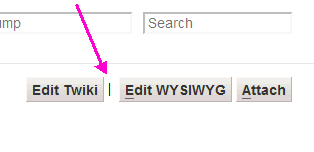 -- KathyDeLaCruz - 26 Feb 2009
In twiki.pattern.tmpl is defined
-- KathyDeLaCruz - 26 Feb 2009
In twiki.pattern.tmpl is defined
%TMPL:DEF{"sep"}%<span class='twikiSeparator'> | </span>%TMPL:END%
It is used in viewtopicactionbuttons.tmpl inserted between the buttons as
%TMPL:P{"sep"}%
-- EnriqueCadalso - 26 Feb 2009
Thanks, Enrique!
In case anyone else wants to do this, here's what I defined in viewtopicactionsbuttons.pattern.tmpl:
%TMPL:DEF{"raw_edit"}%%TMPL:P{context="new_topic" then="" else="raw_edit_link"}%%TMPL:END%
from the original:
%TMPL:DEF{"raw_edit"}%%TMPL:P{context="new_topic" then="" else="raw_edit_link"}%%TMPL:P{context="new_topic" then="" else="sep"}%%TMPL:END%
-- KathyDeLaCruz - 26 Feb 2009
* 

| I | Attachment | History | Action | Size | Date | Who | Comment |
|---|---|---|---|---|---|---|---|
 png png |
toolbar_pipe.png | r1 | manage | 3.5 K | 2009-02-26 - 01:31 | UnknownUser |

Topic revision: r9 - 2009-02-26 - KathyDeLaCruz


 Site map
 Blog web

 Search
 Changes
 RSS Feed
 Notifications
 Statistics
 Preferences
 Register new user
 Support Forum
  Ask a question
 Open questions
  My recent questions
 Get quick help in #twiki IRC channel


 Ideas, requests, problems regarding TWiki? Send feedback. Ask community in the support forum.
Copyright © 1999-2026 by the contributing authors. All material on this collaboration platform is the property of the contributing authors.