SID-02166: DASHBOARD does weird stuff when boxes are resized
| Status: |  Answered Answered |
TWiki version: | 6.0.2 | Perl version: | 5.10.1 |
| Category: | TWikiDashboardAddOn | Server OS: | linux 2.6.32-573.18.1.el6.x86_64 | Last update: | 10 years ago |
 Andrew Schwartz - 2016-03-01
Discussion and Answer
Empty lines likely cause an issue with top alignment. Make sure there are no empty lines between%DASHBOARD{ section="box_end" }% and %DASHBOARD{ section="box_start" }%. (Yes that is between box_end and box_start.) Empty lines introduce p tags, which interfere with the floats.
The box height should be no issue unless you customize the margin or padding.
--  Peter Thoeny - 2016-03-02
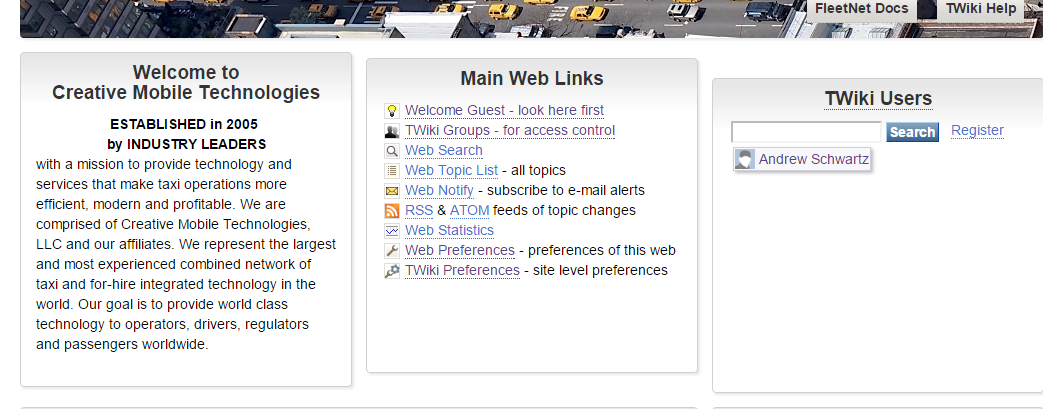
I removed all spaces as you suggest, the results are below, in the second image. All the box heights are the same.
I have found that adding 20px to boxes 2 and 3 "fixes" the problem.
Peter Thoeny - 2016-03-02
I removed all spaces as you suggest, the results are below, in the second image. All the box heights are the same.
I have found that adding 20px to boxes 2 and 3 "fixes" the problem.
 -- Andrew Schwartz - 2016-03-02
That is likely because some of the boxes have custom margin or padding.
Lets test this here:
-- Andrew Schwartz - 2016-03-02
That is likely because some of the boxes have custom margin or padding.
Lets test this here:
Test box height
Box 1, 300px
This box 300px high
Box 2, 300px
Is this box also 300px? It should be
Box 3, 300px
Is this box also 300px? It should be
Box 4, short height
This box has 40 pixel height
Box 5, short height
This box has 40 pixel height
Box 6, short height
This box has 40 pixel height
| Web | Description | Links |
|---|---|---|
| TWiki home with users and groups for access control |      |
|
| Official documentation of the TWiki-6.1 Release | |
|
| Blog of the TWiki.org community | |
|
| TWiki development: the core collaboration zone for the TWiki Project. | |
|
| Repository for TWiki Plugins, Skins and Add-Ons. | |
|
| Sandbox test area. Use this workspace to try out TWiki. | |
|
| Tech support for the TWiki collaboration platform. | |
|
| TWiki documentation, welcome, registration and other starting points | |
|
| Official documentation of the TWiki Release 01-Dec-2001 | |
|
| Official documentation of the TWiki Release 01-Feb-2003 | |
|
| Official documentation of the TWiki Release 01-Sep-2004 | |
|
| Official documentation of the TWiki Release 4.0 | |
|
| Official documentation of the TWiki Release 4.1 | |
|
| Official documentation of the TWiki Release 4.2 | |
|
| Official documentation of the TWiki Release 4.3 | |
|
| Official documentation of the TWiki-5.0 Release | |
|
| Official documentation of the TWiki-5.1 Release | |
|
| Official documentation of the TWiki-6.0 Release | |
|
| Keep track of Wiki Wednesday events | |
|
 Webs are color-coded for identification and reference. Contact info@twikiPLEASENOSPAM.org if you need a workspace web for your team. Webs are color-coded for identification and reference. Contact info@twikiPLEASENOSPAM.org if you need a workspace web for your team. |
||

| Legend: |
 Search the web Search the web  See recent changes in the web See recent changes in the web  Subscribe to get notified of changes by e-mail Subscribe to get notified of changes by e-mail  Usage statistics of the web Usage statistics of the web  Web-specific preferences Web-specific preferences
|
Peter Thoeny - 2016-03-03
OK, I surrender. It works here. I never changed anything but the height param (and I did add some line breaks which I later removed), but it's not working the same way on my site.
Thanks for your time an efforts, and I apologize for wasting your time.
-- Andrew Schwartz - 2016-03-03
I mentioned it a 3rd time: That is likely because some of the boxes have custom margin or padding. It looks like use two boxes from TWiki one one of your own.
-- Peter Thoeny - 2016-03-03
No problem, and thanks again.
-- Andrew Schwartz - 2016-03-03
 If you answer a question - or someone answered one of your questions - please remember to edit the page and set the status to answered. The status selector is below the edit box.
 | SupportForm | |
|---|---|
| Status | Answered |
| Title | DASHBOARD does weird stuff when boxes are resized |
| SupportCategory | TWikiDashboardAddOn |
| TWiki version | 6.0.2 |
| Server OS | linux 2.6.32-573.18.1.el6.x86_64 |
| Web server | Apache 2.4.18 |
| Perl version | 5.10.1 |
| Browser & version | Google Chrome 48.0.2564.116 |


| I | Attachment | History | Action | Size | Date | Who | Comment |
|---|---|---|---|---|---|---|---|
 png png |
error.png | r1 | manage | 150.5 K | 2016-03-01 - 22:15 | AndrewSchwartz | |
| png |
error2.png | r1 | manage | 124.4 K | 2016-03-02 - 19:20 | AndrewSchwartz |

Topic revision: r7 - 2016-03-03 - AndrewSchwartz


 Site map
 Blog web

 Changes
 RSS Feed
 Register new user
 Support Forum
  Ask a question
 Open questions
  My recent questions
 Get quick help in #twiki IRC channel






 Ideas, requests, problems regarding TWiki? Send feedback. Ask community in the support forum.
Copyright © 1999-2026 by the contributing authors. All material on this collaboration platform is the property of the contributing authors.