SID-01554: Cannot create parentless new webs in ManagingWebs
| Status: |  Answered Answered |
TWiki version: | 5.1.2 | Perl version: | 5.16.0 |
| Category: | CategoryForms | Server OS: | openSUSE 12.1, kernel 3.4 | Last update: | 13 years ago |
TWiki, like TWiki.MyNewWeb is created. How do I create a parentless web?
-- StephanWiesebach - 2012-10-11
Discussion and Answer
Not sure what is wrong with your setup. I just re-tested on a fresh TWiki-5.1.2 install and webs are created at the root. Did you install additional plugins? What kind of configuration do you have? -- PeterThoeny - 2012-10-11 Hello Peter, thanks for the very fast answer. I am at least glad to hear, that it is at first glance no newbie issue from my side. So, please find attached the configuration file. Hope that helps. Many thanks in advance. Stephan -- StephanWiesebach - 2012-10-11 Could you attachedtwiki/lib/LocalSite.cfg ?
-- PeterThoeny - 2012-10-11
Oh - yes, sure. Please find attached my LocalSite.cfg.- Stephan -- StephanWiesebach - 2012-10-12 Some entries look goofy in your LocalSite.cfg, such as
$TWiki::cfg{NameFilter} = qr/(?^:(?^:(?^:(?^:(?^:(?^:(?^:(?^:(?^:(?^:(?^:[\s\*?~^\$\#@%`"'&;|<>\[\]\+\x00-\x1f])))))))))))/;
By default, this should be:
$TWiki::cfg{NameFilter} = '[\\s\\*?~^\\$\\#@%`"\'&;|<>\\[\\]\\+\\x00-\\x1f]';
I recommend to remove the file and redo the configuration by running configure.
-- PeterThoeny - 2012-10-12
Hi Peter,
attached you find the new LocalSite.cfg file.
It now looks better, the described behaviour unfortunately is the same after a fresh configure.
What might be a next step?
-- StephanWiesebach - 2012-10-12
I don't know why you get sub-web below the TWiki web. It works as expected on my test install, even if hierarchical webs are enabled like on yours.
As a workaround for now, you can move your newly created web: Go to the web's WebPreferences, click on the "Rename/move/delete web..." link at the bottom, and empty out the "Parent web" pulldown.
Here is a wild guess: You are using a very recent Perl version, and it is a .0 release. The latest release is 5.16.1 - you might want to try that.
You could also try to manually change the compiled regexes in LocalSite.cfg to strings to see if that helps:
$TWiki::cfg{LoginNameFilterIn} = '^[^\\s\\*?~^\\$@%`"\'&;|<>\\x00-\\x1f]+$';
$TWiki::cfg{NameFilter} = '[\\s\\*?~^\\$\\#@%`"\'&;|<>\\[\\]\\+\\x00-\\x1f]';
$TWiki::cfg{RCS}{asciiFileSuffixes} = '\\.(txt|html|xml|pl)$';
$TWiki::cfg{UploadFilter} = '^(\\.htaccess|.*\\.(?i)(?:php[0-9s]?(\\..*)?|[sp]htm[l]?(\\..*)?|pl|py|cgi))$';
-- PeterThoeny - 2012-10-12
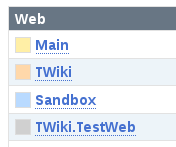
OK, I could finally reproduce the issue. It turns out to be a visual bug only in the SiteMap shown in Main.WebHome if the name of the web is a WikiWord. That is, the web is created at the root as expected, but it is shown as TWiki.WikiWordWeb in the sitemap.
Fix: Edit TWiki.SiteMap (which gets included by Main.WebHome) and in the SEARCH format, replace $percntCALC{ with $percntCALCULATE{.
This is tracked in TWikibug:Item7005 .
-- PeterThoeny - 2012-10-22
Excellent! This brings back the trust in this very mature and feature-rich wiki.
.
-- PeterThoeny - 2012-10-22
Excellent! This brings back the trust in this very mature and feature-rich wiki.Many thanks!
- Stephan -- StephanWiesebach - 2012-10-23
 If you answer a question - or someone answered one of your questions - please remember to edit the page and set the status to answered. The status selector is below the edit box.
 - StephansTWiki_configure.html: My Configuration
- LocalSite.cfg: My Configuration (text based)
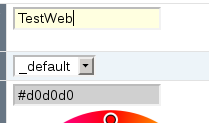
- some screenshots showing the behaviour:

-

- LocalSite.cfg: LocalSite after a fresh reconfigure
| SupportForm | |
|---|---|
| Status | Answered |
| Title | Cannot create parentless new webs in ManagingWebs |
| SupportCategory | CategoryForms |
| TWiki version | 5.1.2 |
| Server OS | openSUSE 12.1, kernel 3.4 |
| Web server | Apache 2.2 |
| Perl version | 5.16.0 |
| Browser & version | Firefox 15.0.1 |


| I | Attachment | History | Action | Size | Date | Who | Comment |
|---|---|---|---|---|---|---|---|
 png png |
1_managingwebs.png | r1 | manage | 4.0 K | 2012-10-12 - 07:00 | StephanWiesebach | some screenshots showing the behaviour |
| png |
2_twiki.testweb.png | r1 | manage | 4.1 K | 2012-10-12 - 07:00 | StephanWiesebach | some screenshots showing the behaviour |
 cfg cfg |
LocalSite.cfg | r2 r1 | manage | 10.8 K | 2012-10-12 - 09:31 | StephanWiesebach | LocalSite after a fresh reconfigure |
 html html |
StephansTWiki_configure.html | r1 | manage | 185.2 K | 2012-10-11 - 19:57 | StephanWiesebach | My Configuration |

Topic revision: r10 - 2012-10-23 - StephanWiesebach


 Site map
 Blog web

 Search
 Changes
 RSS Feed
 Notifications
 Statistics
 Preferences
 Register new user
 Support Forum
  Ask a question
 Open questions
  My recent questions
 Get quick help in #twiki IRC channel





 Ideas, requests, problems regarding TWiki? Send feedback. Ask community in the support forum.
Copyright © 1999-2026 by the contributing authors. All material on this collaboration platform is the property of the contributing authors.