SID-00564: Can't Create TWiki Forms Template for ExcelImportExportPlugin
| Status: |
 Answered Answered |
TWiki version: |
4.3.2 |
Perl version: |
Perl 5.5 |
| Category: |
ExcelImportExportPlugin |
Server OS: |
Red Hat Linux 7.5 |
Last update: |
14 years ago |
I cannot create a template form for
ExcelImportExportPlugin. I tried for weeks, with the help of others in our tech support staff to do so using the documentation on line, but found it lacking. Can someone please send us what a template form for Excelimportexport should look like so we can reverse engineer it or tell us how to make a working one in language we can understand? We tried using the following information along with
TWikiTemplates and
TWikiForms.
************************ Mapping between Excel Spreadsheet and TWiki Table
In its simplest form, the correspondence between the Excel spreadsheet and the TWiki table is established through a
TWikiForms template. This for corresponds to the header row in the spreadsheet: each field in the form is the same as a column field in the header row. All fields except date fields are assumed to be of type text.
Note that the order of the fields need not be the same, nor do all the column fields have to be present. Missing fields will be omitted in the import or export operations.
More details of the generated Excel spreadsheet can be defined in a mapping table, which is a table with the following layout:
Field    Meaning    Default
Name    Name of the form field
Short Name    Excel column header. The Short Name and Name need to be the same if you want to be able to import the exported files without changing the column headers
Width    Width of the Excel column
Orientation    Vertical orientation of the Excel column, either h (horizontal) or v (vertical)    h
Data Type    empty, text, or date    text
The mapping table, if present, overrides the form definition. If neither form nor mapping table are given, the column headings are inferred from the header line in table or spreadsheet. (A header line must be present, if a form or mapping table is not given.)
--
DanielBeaulieu - 2009-10-09
Discussion and Answer
This is just a copy-and-paste from a working test. I hope it helps...
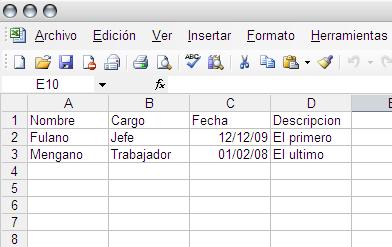
I have this excel table (prueba.xls)

I create and register this form definition (
MiExcelForm)
| *Name* | *Type* | *Size* | *Values* | *Tooltip message* | *Attributes* |
| Nombre | text | 50 |  | | |
| Fecha | date | 20 | | | |
| Cargo | text | 100 | | | |
I attached the prueba.xls file to a new page with this content.
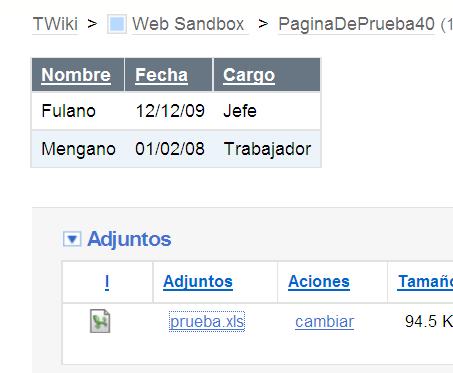
%EXCEL2TABLE{file="prueba" template="MiExcelForm"}%
So I end with this

--
EnriqueCadalso - 2009-10-12
Closing this question after more than 30 days of inactivity. Feel free to reopen if needed. Consider engaging one of the
TWiki consultants if you need timely help. We invite you to
get involved with the community, it is more likely you get community support if you support the open source project!
--
PeterThoeny - 2009-11-23
Thank you, this did work, I appreciate it.
--
DanielBeaulieu - 2009-11-23
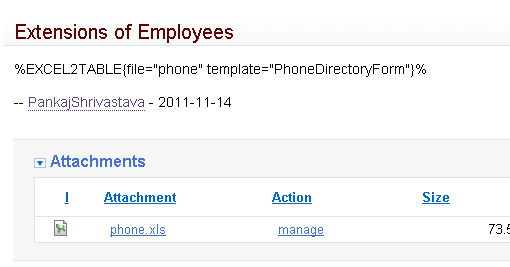
I am facing a similar problem. I did the steps similar to what is described above. However, on my page, the text comes up literally as it is. Please see attached picture in excel_table_problem.png.I have create the form also in the same Web and it matches the fields in the Excel file.
--
PankajShrivastava - 2011-11-16
Pankaj, that means the plugin is not enabled (run configure to enable it), ir the plugin dies due to some issues/bugs.
--
PeterThoeny - 2011-11-16
I figured the problem was that the plugin was installed but not enabled. I enabled the plugin in TWiki Configuration and the spreadsheet started showing up in the table. Thank you for pointing this out. It so happened that the dependencies of this plugin were not installed (
ParseExcel.pm) in the first instance and there were errors during my first loading. Perhaps that put the plugin in the 'not enabled' state. I fixed the dependency and tried again and found this problem. This was good learning for me :-).
--
PankajShrivastava - 2011-11-16
I am glad it worked out. Closing this question...
--
PeterThoeny - 2011-11-16
 If you answer a question - or someone answered one of your questions - please remember to edit the page and set the status to answered. The status selector is below the edit box.


 png
png  jpg
jpg 


 Site map
 Blog web

 Search
 Changes
 RSS Feed
 Notifications
 Statistics
 Preferences
 Register new user
 Support Forum
  Ask a question
 Open questions
  My recent questions
 Get quick help in #twiki IRC channel






 Ideas, requests, problems regarding TWiki? Send feedback. Ask community in the support forum.