Question
Why the same
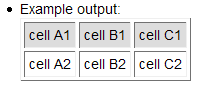
| cell A1 |
cell B1 |
cell C1 |
| cell A2 |
cell B2 |
cell C2 |
shown up differently after installing the latest twiki 4.1.2?
How do I get back the nice boxes for each cell?
I tried setting VBAR = | but it just wont' draw the boxes around each and every cells.
Also changing border="0" to border="1" will involve modifying too many filers
I attached the table format that I need.
Thanks,
-Tony
Environment
--
TWikiGuest - 30 Oct 2007
Answer
 If you answer a question - or someone answered one of your questions - please remember to edit the page and set the status to answered. The status selector is below the edit box.
You can use
TablePlugin to control attributes (appearance) of table.
--
MarcoSilva - 30 Oct 2007
example
%TABLE{ cellborder="1" headerbg="#ff0000"}%
| cell A1 |
cell B1 |
| cell A2 |
cell B2 |
--
MarcoSilva - 30 Oct 2007
This is controlled by the CSS of the default
PatternSkin, as you can see if you enable a
different skin.. Unfortunately it looks like the border cannot be overloaded with the TABLE settings. This might have been fixed in the upcoming 4.2 release. May be
ArthurClemens can shed light on this.
--
PeterThoeny - 30 Oct 2007


 png
png 


 Site map
 Blog web

 Search
 Changes
 RSS Feed
 Notifications
 Statistics
 Preferences
 Register new user
 Support Forum
  Ask a question
 Open questions
  My recent questions
 Get quick help in #twiki IRC channel




 Ideas, requests, problems regarding TWiki? Send feedback. Ask community in the support forum.