Question
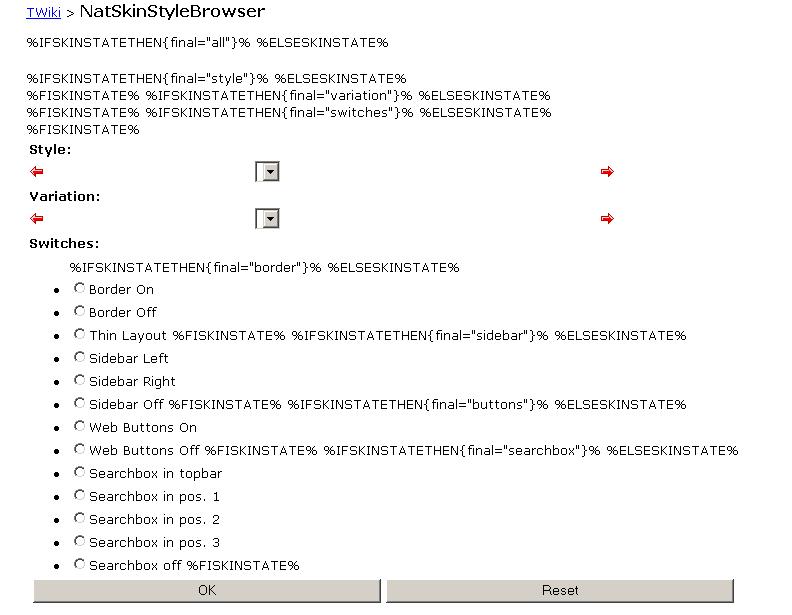
I have a TWIKI Site which has the Dragon Skin applied. I am trying to overide a TwikiWeb created on this site, with a NAT skin. After installing Nat Skin on bringing up the Home page for the TwikiWeb, I see the below code snippets on diferrent areas of the screen %IFDEFINEDTHEN{""}% %FIDEFINED% %IFDEFINEDTHEN{"" action="view"}% %ELSIFDEFINED{""}% %FIDEFINED% %IFDEFINEDTHEN{""}% %ELSEDEFINED% %FIDEFINED% Also I would like to override a LOGO set for the TWIKI site on the TWIKI web. Is there a way to do this? Please let me know what could be the cause for this display. Thanks, Rajeev.Environment
Answer
 If you answer a question - or someone answered one of your questions - please remember to edit the page and set the status to answered. The status selector is below the edit box.
* Set SKIN = nat
to the WebPreferences to switch to NAT for all topics in the web. Adding it to any other topic
will display this topic using the NatSkin. You might want to check a topic using different
skins by adding ?skin=nat to the url.
-- MichaelDaum - 15 Mar 2006
Hi Michael,
Thanks for confirming.
Will appreciate if you can take a look at the issue that I am having with the editing page for the NatSkin. The URL is .../twiki/bin/view.cgi/TWiki/NatSkinStyleBrowser
Martin had responded to the issue. I could not get it resolved still. Can I attach a screen shot to this posting by any chance.
Thanks,
Rajeev.
 -- RajeevG - 15 Mar 2006
Can you answer a question, please:
Try the URL .../twiki/bin/view.cgi/TWiki/NatSkinStyleBrowser?skin=nat
Does the page show up correctly or are there still the IFSKINSTATEs?
-- MichaelDaum - 15 Mar 2006
Hi Michael:
The IFSKINSTATE does not show up with the ?skin=nat appended to the URL. Instead I am seeing this display that I will attach. Clicking on either of the buttons OK or RESET displays the IFSKINSTATE state again.
Thanks,
Rajeev.
-- RajeevG - 15 Mar 2006
Hi Michael:
I see that on the SkinPackagesTestedOnLatestRelease page NAT skin was not tested on the latest release of TWIKI. The release that I have is Version:
04 Sep 2004 $Rev: 1742 $
Release type: Production release
This version is TWiki Release 01-Sep-2004
Would this be an issue ?
Thanks,
Rajeev.
-- RajeevG - 15 Mar 2006
Can you answer a question, please:
Try the URL .../twiki/bin/view.cgi/TWiki/NatSkinStyleBrowser?skin=nat
Does the page show up correctly or are there still the IFSKINSTATEs?
-- MichaelDaum - 15 Mar 2006
Hi Michael:
The IFSKINSTATE does not show up with the ?skin=nat appended to the URL. Instead I am seeing this display that I will attach. Clicking on either of the buttons OK or RESET displays the IFSKINSTATE state again.
Thanks,
Rajeev.
-- RajeevG - 15 Mar 2006
Hi Michael:
I see that on the SkinPackagesTestedOnLatestRelease page NAT skin was not tested on the latest release of TWIKI. The release that I have is Version:
04 Sep 2004 $Rev: 1742 $
Release type: Production release
This version is TWiki Release 01-Sep-2004
Would this be an issue ?
Thanks,
Rajeev.
 -- RajeevG - 15 Mar 2006
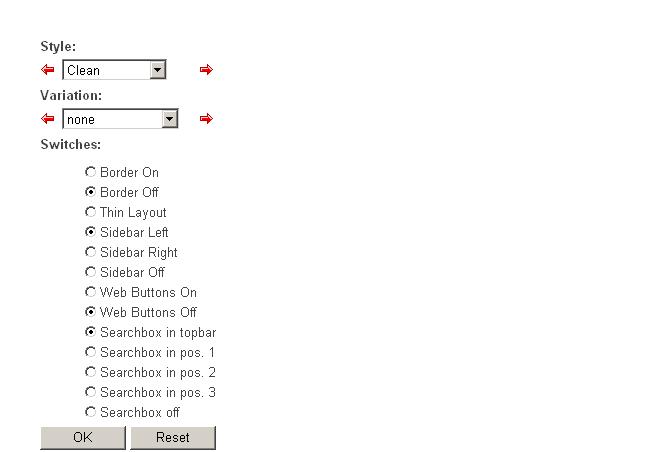
That's how it should look like (on IE). Please have a look at all sections of this topic marked
blue and read again.
-- MichaelDaum - 16 Mar 2006
Hi Michael,
The statement has been added to TWIKI web to which the NAT skin has been applied and the TWIKI web when accessed has the NATSkin Style page display.
The problem is that the URL .../twiki/bin/view.cgi/TWiki/NatSkinStyleBrowser is for the TWIKI site rather than the TWIKI web
My TWIKI web URL is something like ..../twiki/bin/view.cgi/RajeevGWeb/WebHome
So Can I set the NatSkinStyleBrowser up for just my web rather than applying it to the entire site as other webs are using the Dragon Skin. The Twiki web is using the dragon skin, so the NatSkinStyleBrowser is not working.
Also What is the easiest way to change the header text and sidebar text for the Twiki web that uses the Nat skin?
The TWIKI header text is something like "GROUP TWIKI Home Page".
I want it changed to be displayed as "Rajeev G TWIKI Home Page" on the TWIKI web RajeevGWeb.
Thanks,
Rajeev
-- RajeevG - 16 Mar 2006
-- RajeevG - 15 Mar 2006
That's how it should look like (on IE). Please have a look at all sections of this topic marked
blue and read again.
-- MichaelDaum - 16 Mar 2006
Hi Michael,
The statement has been added to TWIKI web to which the NAT skin has been applied and the TWIKI web when accessed has the NATSkin Style page display.
The problem is that the URL .../twiki/bin/view.cgi/TWiki/NatSkinStyleBrowser is for the TWIKI site rather than the TWIKI web
My TWIKI web URL is something like ..../twiki/bin/view.cgi/RajeevGWeb/WebHome
So Can I set the NatSkinStyleBrowser up for just my web rather than applying it to the entire site as other webs are using the Dragon Skin. The Twiki web is using the dragon skin, so the NatSkinStyleBrowser is not working.
Also What is the easiest way to change the header text and sidebar text for the Twiki web that uses the Nat skin?
The TWIKI header text is something like "GROUP TWIKI Home Page".
I want it changed to be displayed as "Rajeev G TWIKI Home Page" on the TWIKI web RajeevGWeb.
Thanks,
Rajeev
-- RajeevG - 16 Mar 2006


| I | Attachment | History | Action | Size | Date | Who | Comment |
|---|---|---|---|---|---|---|---|
 jpg jpg |
NATSKINISSUE.JPG | r1 | manage | 66.1 K | 2006-03-15 - 18:23 | UnknownUser | NatSkinStyleBrowser setting page issues. |
| jpg |
NatSkinURLappend.JPG | r1 | manage | 21.5 K | 2006-03-15 - 21:01 | UnknownUser | Main Page with ?skin=Nat appended |


 Site map
 Blog web

 Search
 Changes
 RSS Feed
 Notifications
 Statistics
 Preferences
 Register new user
 Support Forum
  Ask a question
 Open questions
  My recent questions
 Get quick help in #twiki IRC channel





 Ideas, requests, problems regarding TWiki? Send feedback. Ask community in the support forum.
Copyright © 1999-2026 by the contributing authors. All material on this collaboration platform is the property of the contributing authors.