Question
Hello guys, I'm using the AttachmentListPlugin to display the list of files which is attached to a page. Is it possible to get the list based on a specific user? - There is no"user=" or equivalent term available. Hence, I tried using the SpreadSheetPlugin to compare the current WIKIUSERNAME with the one in the associated with the attachment.
It was used like the following. But it is not giving the desired results.
%ATTACHMENTLIST{topic="SampleAtt" web="Sandbox2" format=" %CALC{$IF($EXACT($fileUser, %MAINWEB%.UserSample), $fileUser, <nop>)}% "}%
On the other hand, if it is used like this, it compares "a" and "a" correctly.
%ATTACHMENTLIST{topic="SampleAtt" web="Sandbox2" format=" %CALC{$IF($EXACT(a, a), $fileUser, <nop>)}% "}%
How can the format of the $fileUser be found out so that it can be compared with the current WIKIUSERNAME?
Environment
Answer
 If you answer a question - or someone answered one of your questions - please remember to edit the page and set the status to answered. The status selector is below the edit box.
 user filter (and excludeuser) is a sensible enhancement. Tracked in Bugs:Item5195 .
-- ArthurClemens - 03 Jan 2008
Arthur, thanks for filing the enhancement. Is it possible to get this done with SpreadSheetPlugin? The
.
-- ArthurClemens - 03 Jan 2008
Arthur, thanks for filing the enhancement. Is it possible to get this done with SpreadSheetPlugin? The % operators, even after they are escaped, are not working in the formula given above. Any suggestions?
-- TWikiGuest - 03 Jan 2008
Or use DBCachePlugin. An %ATTACHMENTS{}% feature, including any kind of filtering has been added to it April last year.
-- MichaelDaum - 03 Jan 2008
If you want to use CALC you might need to fix the plugin execution order (in TWikiPreferences), e.g. execute ATTACHMENTLIST before CALC.
-- PeterThoeny - 04 Jan 2008
Peter - I could not find any setting in TWikiPreferences that specified the plugin execution order. Hence, the given order was changed in configure. But it didn't work.
Michael - The %ATTACHMENTS% of the DBCachePlugin are working great. Here is the final query. If the "view=all" is defined in the query string, then all attachments are listed, otherwise, only the attachments uploaded by the current user are displayed.
%ATTACHMENTS{"SampleAtt" user="%CALC{$IF($EXACT(%URLPARAM{view}%, all), \"\", %WIKIUSERNAME%)}%"}%
Thanks a lot for the response guys. U rock!
-- TWikiGuest - 04 Jan 2008
I have added the new filters to AttachmentListPlugin.
-- ArthurClemens - 04 Jan 2008
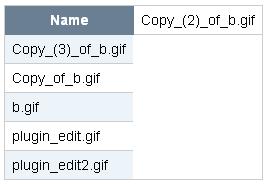
Guys, there's one more slight problem in the %ATTACHMENTS% of the DBCachePlugin. I gave the statement below,
%ATTACHMENTS{"SampleAtt" user="%CALC{$IF($EXACT(%URLPARAM{view}%, all), \"\", %WIKIUSERNAME%)}%" format="|$name|" header="|*Name*|"}%
There are 5 rows returned. But the first row gets itself attached to the header no matter what. How can that be prevented? If the ="header=" is not used, then the table is shown correctly (without the header ofcourse).
Screenshot is attached for reference. Filename is "screenshot.jpg".
-- TWikiGuest - 04 Jan 2008
Arthur, that's awesome :). I will download the latest version of AttachmentListPlugin and try.
-- TWikiGuest - 04 Jan 2008
Arthur, the user filter is not working properly :-(. The page containing attachments has files attached by two kinds of users. One is an admin and other is a normal user. When the user filter is given as user="NormalUser", all the files get listed (including the files uploaded by admin). When the user filter is given as user="AdminUser", none of the files get listed. I went through the source code of AttachmentListPlugin.pm. There could be some problem around line 205, though I'm not sure because I have 0.0001% knowledge of perl. Please help. Thanks a lot for the suggestions provided so far.
-- TWikiGuest - 04 Jan 2008
Try user="TWikiAdminUser".
-- ArthurClemens - 04 Jan 2008
It doesn't work.
-- TWikiGuest - 04 Jan 2008
Add a final $n to the header format string.
%ATTACHMENTS{
   "SampleAtt"
   header="|*Name*|$n"
   format="|$name|"
   user="%CALC{$IF($EXACT(%URLPARAM{view}%, all), \"\", %WIKIUSERNAME%)}%"
}%
-- MichaelDaum - 04 Jan 2008
I also found the problem on my 4.1.2 installation. Version 1.1.2 of AttachmentListPlugin should work.
-- ArthurClemens - 05 Jan 2008
Michael - Thanks for the $n. It works now. Btw, I'm very much missing the limit filter in %ATTACHMENTS%.
Arthur - The user filter works properly but I'm unable to specify any conditions with the limit parameter. They are not working even after escaping them. Here's how they were specified.
%ATTACHMENTLIST{
   topic="SampleAtt"
   web="Sandbox2"
   format="$fileName"
   header="| *Name* |"
   user="%URLPARAM{user}%"
   limit="%URLPARAM{limit default=\"5\"}%"
}%
Am I missing anything?
-- TWikiGuest - 08 Jan 2008
Put limit in quotes: limit="%URLPARAM{"limit" default="5"}%".
-- ArthurClemens - 08 Jan 2008
OMG!! such a simple thing. Anyways, I got the whole thing working atlast  This function below looks for a parameter named
 "user". If the parameter equals "all", then attachments uploaded by all users are listed, sorted by date in descending order. If the "user" parameter is blank/doesn't exist, attachments of the user currently logged in is displayed. If the "user" parameter consists of some other %WIKINAME% then, attachments by that user are shown.
%ATTACHMENTLIST{
   topic="SampleAtt"
   web="Sandbox2"
   format="$fileName"
   sort="$fileDate" sortorder="descending"
   header="| *Name* |"
   user="%CALC{$IF($EXACT(%URLPARAM{user}%, all), \"\", $IF($EXACT(%URLPARAM{user}%, %WIKINAME%), %WIKINAME%, $IF($EXACT(%URLPARAM{user}%,),%WIKINAME%,%URLPARAM{user}%)))}%"
}%
Nested if-else statements are a nightmare using the SpreadSheetPlugin :-). Nevertheless, it's been an awesome learning experience. Thanks a lot for the support guys.
-- TWikiGuest - 08 Jan 2008
Slightly better way of writing the "user" filter.
user="%CALC{$IF($EXACT(%URLPARAM{user}%, all), \"\", $IF( $OR($EXACT(%URLPARAM{user}%,),$EXACT(%URLPARAM{user}%, %WIKINAME%)), %WIKINAME%, %URLPARAM{user}%))}%"
-- TWikiGuest - 08 Jan 2008


| I | Attachment | History | Action | Size | Date | Who | Comment |
|---|---|---|---|---|---|---|---|
 jpg jpg |
screenshot.jpg | r1 | manage | 9.3 K | 2008-01-04 - 09:36 | TWikiGuest | Screenshot of the ATTACHMENTS operator. |

Topic revision: r16 - 2008-01-08 - TWikiGuest


 Site map
 Blog web

 Search
 Changes
 RSS Feed
 Notifications
 Statistics
 Preferences
 Register new user
 Support Forum
  Ask a question
 Open questions
  My recent questions
 Get quick help in #twiki IRC channel




 Ideas, requests, problems regarding TWiki? Send feedback. Ask community in the support forum.
Copyright © 1999-2026 by the contributing authors. All material on this collaboration platform is the property of the contributing authors.