Question
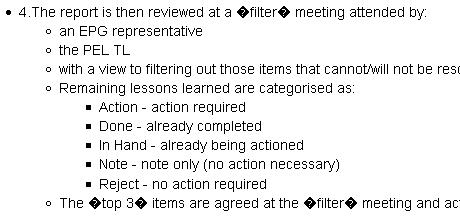
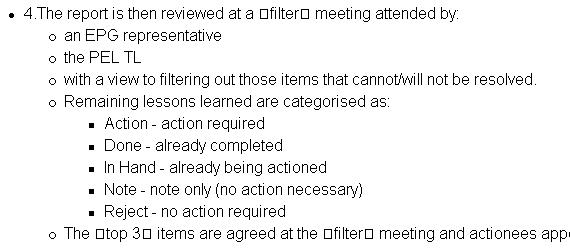
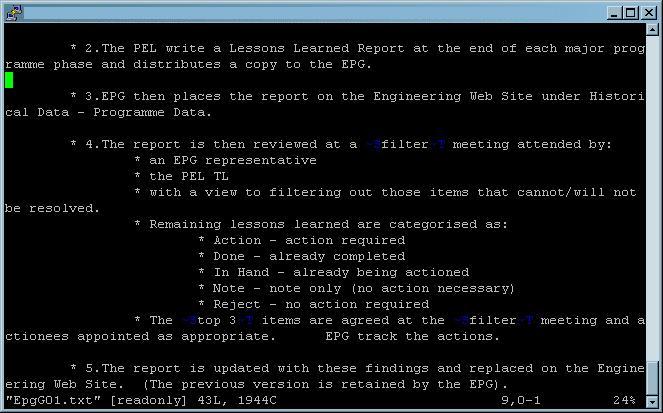
I have just upgraded my TWiki to version Tue, 04 Jul 2006 build 10807, Plugin API version 1.1 (from Release 02-Sep-2004) And now when I view some of the pages they seem to have acquired some strange symbols when viewed in some browsers. Where there used to be speech/quote marks (in the old version) there are now � (black diamonds with white question marks in) when viewed in FireFox but ”they appear as ” (white squares with thin black outlines) when viewed in IE. However when I view the page in Konqueror they look exactly as I'd expect. When I look directly in the pages' text files on the server I see these characters as ~S or ~T. So my question is: Is there some configuration item that I can change to make these characters appear as they used to for all browsers, or do I just have to go through and change every case of them? Thanks in advance for any help or advice you can give me. Emma Extra Background information: I have run configure and get no errors or warnings. I'm using the default Pattern skin. The non-default Plugins I'm using are at their latest version.Environment
Answer
 If you answer a question - or someone answered one of your questions - please remember to edit the page and set the status to answered. The status selector is below the edit box.
  for info about this (
demoroniser is a handy tool to turn smart quotes into ISO standard charcters, with some useful background docs). The fact that Konqueror on Linux works suggests this is what's happening.
However, it's really impossible to say what's happening exactly here without some more accurate information on which characters are failing to be displayed. See the Internationalisation setup and troubleshooting part of the TWiki docs for a few more hints.
It would help if you also attached the output of configure (HTML is best) as per SupportGuidelines.
-- RichardDonkin - 30 Oct 2006
Thanks very much for your reply to my question. I've uploaded a few files which will I hope make the issue clearer. There is the html output of the configure for my TWiki (but I've taken out my actual server name.) Also there is the text file of the page I'm using as an example of these symbols along with the relevant sections of screen grabs of this page viewed in FireFox and Internet explorer. I've also put here a screen grab of how it looks when I view the text file in VI (I've added this because it shows the symbols are not as standard as they appear if you just view the text file from the attachment.) And thanks for your pointer to demoroniser. It would make sense to me if Microsoft 'smart quotes' were the route of the problem. However I would have expected FireFox on linux to behave like Konqueror if this was the case (but this could be me assuming too much.) -- EmmaForrester - 31 Oct 2006 I've used the deomoroniser to "fix" these cases but are they likely to reappear as people use specifically windows based products to add and change content? -- EmmaForrester - 08 Nov 2006 RichardDonkin answered my question because the symbols were caused by "non-standard" characters and the demoroniser script got rid of them. -- EmmaForrester - 21 Nov 2006


| I | Attachment | History | Action | Size | Date | Who | Comment |
|---|---|---|---|---|---|---|---|
 txt txt |
EpgG01.txt | r1 | manage | 1.9 K | 2006-10-31 - 14:58 | UnknownUser | An example of a txt file behind a page that has these symbols |
 jpg jpg |
FF_2_symbols.jpg | r1 | manage | 26.3 K | 2006-10-31 - 15:01 | UnknownUser | A screen grab of the symbols from FireFox v2.0 under windows |
| jpg |
IE_6_symbols.jpg | r1 | manage | 31.5 K | 2006-10-31 - 15:10 | UnknownUser | A screen grab of the symbols from IE v6.0 |
 htm htm |
configure.htm | r1 | manage | 140.9 K | 2006-10-31 - 14:57 | UnknownUser | My configure output. Note that I've removed my server name. |
| jpg |
vi_symbols.jpg | r1 | manage | 65.9 K | 2006-10-31 - 15:24 | UnknownUser | The text file viewed in VI |

Topic revision: r7 - 2006-11-22 - PeterThoeny


 Site map
 Blog web

 Search
 Changes
 RSS Feed
 Notifications
 Statistics
 Preferences
 Register new user
 Support Forum
  Ask a question
 Open questions
  My recent questions
 Get quick help in #twiki IRC channel






 Ideas, requests, problems regarding TWiki? Send feedback. Ask community in the support forum.
Copyright © 1999-2026 by the contributing authors. All material on this collaboration platform is the property of the contributing authors.